<?xml version="1.0" encoding="utf-8"?><feed xmlns="http://www.w3.org/2005/Atom" ><generator uri="https://jekyllrb.com/" version="3.10.0">Jekyll</generator><link href="https://danielfh1.github.io/blog/feed.xml" rel="self" type="application/atom+xml" /><link href="https://danielfh1.github.io/blog/" rel="alternate" type="text/html" /><updated>2026-08-22T00:00:15+00:00</updated><id>https://danielfh1.github.io/blog/feed.xml</id><title type="html">This is Seungwoo Lim’s Blog</title><subtitle>For what I&apos;ve learned today and for daily log</subtitle><author><name>Seungwoo Lim</name><email>daniel73919@gmail.com</email></author><entry><title type="html">[Project-Android app] Shelfie (1)</title><link href="https://danielfh1.github.io/blog/projects/Shelfie/" rel="alternate" type="text/html" title="[Project-Android app] Shelfie (1)" /><published>2026-03-28T00:00:00+00:00</published><updated>2026-03-28T00:00:00+00:00</updated><id>https://danielfh1.github.io/blog/projects/Shelfie</id><content type="html" xml:base="https://danielfh1.github.io/blog/projects/Shelfie/"><![CDATA[<h2 id="why-i-built-this">Why I Built This</h2>

<p><a href="https://play.google.com/store/apps/details?id=com.shelfie.shelfie_app"><img src="/blog/assets/images/app_icon.png" alt="Shelfie" /></a></p>

<blockquote>
  <p>Click the logo!</p>
</blockquote>

<p>Even when you know a book’s call number, you still end up scanning every spine by eye.
I wanted the camera to do that for you — type in a title, point at the shelf, and let the app tell you exactly where it is.</p>

<h2 id="how-it-works">How It Works</h2>

<ol>
  <li>Enter the book title on the home screen.</li>
  <li>Tap <strong>Scan</strong> to open the camera.</li>
  <li>Pan slowly across the shelf. OCR runs on each frame and extracts any visible text.</li>
  <li>When extracted text matches the query above a similarity threshold, the app draws a bounding box around the spine and triggers a haptic buzz.</li>
</ol>

<h2 id="tech-stack">Tech Stack</h2>

<table>
  <thead>
    <tr>
      <th>Area</th>
      <th>Technology</th>
    </tr>
  </thead>
  <tbody>
    <tr>
      <td>Framework</td>
      <td>Flutter (Dart)</td>
    </tr>
    <tr>
      <td>OCR</td>
      <td>Google ML Kit Text Recognition v2</td>
    </tr>
    <tr>
      <td>State management</td>
      <td>Riverpod (<code class="language-plaintext highlighter-rouge">StateNotifier</code>)</td>
    </tr>
    <tr>
      <td>Camera</td>
      <td><code class="language-plaintext highlighter-rouge">camera</code> package, YUV_420_888 → NV21 conversion</td>
    </tr>
    <tr>
      <td>Languages</td>
      <td>English, Korean, Chinese, Japanese</td>
    </tr>
  </tbody>
</table>

<h2 id="real-time-ocr-pipeline">Real-Time OCR Pipeline</h2>

<p>Running OCR on every frame kills performance. The fix is straightforward: skip frames, and drop any frame that arrives while the previous one is still being processed.</p>

<div class="language-dart highlighter-rouge"><div class="highlight"><pre class="highlight"><code><span class="kd">static</span> <span class="kd">const</span> <span class="kt">int</span> <span class="n">_frameSkipInterval</span> <span class="o">=</span> <span class="mi">2</span><span class="p">;</span>

<span class="kt">void</span> <span class="nf">_processFrame</span><span class="p">(</span><span class="n">CameraImage</span> <span class="n">image</span><span class="p">)</span> <span class="kd">async</span> <span class="p">{</span>
  <span class="n">_frameSkipCounter</span><span class="o">++</span><span class="p">;</span>
  <span class="k">if</span> <span class="p">(</span><span class="n">_frameSkipCounter</span> <span class="o">%</span> <span class="n">_frameSkipInterval</span> <span class="o">!=</span> <span class="mi">0</span><span class="p">)</span> <span class="k">return</span><span class="p">;</span>
  <span class="k">if</span> <span class="p">(</span><span class="n">state</span><span class="o">.</span><span class="na">isProcessing</span><span class="p">)</span> <span class="k">return</span><span class="p">;</span>
  <span class="c1">// ...</span>
<span class="p">}</span>
</code></pre></div></div>

<h3 id="yuv--nv21-conversion">YUV → NV21 Conversion</h3>

<p>Android delivers camera frames in <code class="language-plaintext highlighter-rouge">YUV_420_888</code>. ML Kit wants <code class="language-plaintext highlighter-rouge">NV21</code>. The conversion merges three separate Y/U/V planes into a single interleaved byte array, with two code paths depending on <code class="language-plaintext highlighter-rouge">pixelStride</code>:</p>

<div class="language-dart highlighter-rouge"><div class="highlight"><pre class="highlight"><code><span class="k">if</span> <span class="p">(</span><span class="n">uvPixelStride</span> <span class="o">==</span> <span class="mi">2</span><span class="p">)</span> <span class="p">{</span>
  <span class="c1">// V plane is already interleaved — copy rows directly</span>
  <span class="k">for</span> <span class="p">(</span><span class="kt">int</span> <span class="n">row</span> <span class="o">=</span> <span class="mi">0</span><span class="p">;</span> <span class="n">row</span> <span class="p">&lt;</span> <span class="n">uvHeight</span><span class="p">;</span> <span class="n">row</span><span class="o">++</span><span class="p">)</span> <span class="p">{</span>
    <span class="kd">final</span> <span class="n">srcOffset</span> <span class="o">=</span> <span class="n">row</span> <span class="o">*</span> <span class="n">vPlane</span><span class="o">.</span><span class="na">bytesPerRow</span><span class="p">;</span>
    <span class="n">nv21</span><span class="o">.</span><span class="na">setRange</span><span class="p">(</span><span class="n">destIndex</span><span class="p">,</span> <span class="n">destIndex</span> <span class="o">+</span> <span class="n">uvWidth</span> <span class="o">*</span> <span class="mi">2</span><span class="p">,</span>
        <span class="n">vPlane</span><span class="o">.</span><span class="na">bytes</span><span class="o">.</span><span class="na">buffer</span><span class="o">.</span><span class="na">asUint8List</span><span class="p">(...));</span>
    <span class="n">destIndex</span> <span class="o">+=</span> <span class="n">uvWidth</span> <span class="o">*</span> <span class="mi">2</span><span class="p">;</span>
  <span class="p">}</span>
<span class="p">}</span> <span class="k">else</span> <span class="p">{</span>
  <span class="c1">// Manually interleave V and U bytes</span>
  <span class="k">for</span> <span class="p">(</span><span class="kt">int</span> <span class="n">row</span> <span class="o">=</span> <span class="mi">0</span><span class="p">;</span> <span class="n">row</span> <span class="p">&lt;</span> <span class="n">uvHeight</span><span class="p">;</span> <span class="n">row</span><span class="o">++</span><span class="p">)</span> <span class="p">{</span>
    <span class="k">for</span> <span class="p">(</span><span class="kt">int</span> <span class="n">col</span> <span class="o">=</span> <span class="mi">0</span><span class="p">;</span> <span class="n">col</span> <span class="p">&lt;</span> <span class="n">uvWidth</span><span class="p">;</span> <span class="n">col</span><span class="o">++</span><span class="p">)</span> <span class="p">{</span>
      <span class="n">nv21</span><span class="p">[</span><span class="n">destIndex</span><span class="o">++</span><span class="p">]</span> <span class="o">=</span> <span class="n">vPlane</span><span class="o">.</span><span class="na">bytes</span><span class="p">[</span><span class="n">vIndex</span><span class="p">];</span>
      <span class="n">nv21</span><span class="p">[</span><span class="n">destIndex</span><span class="o">++</span><span class="p">]</span> <span class="o">=</span> <span class="n">uPlane</span><span class="o">.</span><span class="na">bytes</span><span class="p">[</span><span class="n">uIndex</span><span class="p">];</span>
    <span class="p">}</span>
  <span class="p">}</span>
<span class="p">}</span>
</code></pre></div></div>

<h2 id="text-matching">Text Matching</h2>

<p>OCR output is noisy — lighting, typefaces, and camera angle all introduce errors. Fuzzy matching handles this in three stages:</p>

<ol>
  <li><strong>Exact containment</strong> — if the recognized text directly contains the query, score <code class="language-plaintext highlighter-rouge">0.8–1.0</code>.</li>
  <li><strong>Word-level matching</strong> — for multi-word queries, check whether each word appears individually in the result.</li>
  <li><strong>Levenshtein distance</strong> — if neither above rule fires, fall back to edit-distance similarity.</li>
</ol>

<p>The minimum threshold is <code class="language-plaintext highlighter-rouge">0.55</code>; anything below that is silently ignored.</p>

<h2 id="haptic-feedback">Haptic Feedback</h2>

<p>A match triggers a vibration, but vibrating on every frame while the camera is held still would be annoying. The logic is:</p>

<div class="language-plaintext highlighter-rouge"><div class="highlight"><pre class="highlight"><code>Match found → already buzzed? → No  → vibrate + set flag
                              → Yes → skip

Match gone for 5 consecutive frames → reset flag
</code></pre></div></div>

<p>Vibration intensity also scales with confidence:</p>

<table>
  <thead>
    <tr>
      <th>Similarity</th>
      <th>Duration</th>
      <th>Amplitude</th>
    </tr>
  </thead>
  <tbody>
    <tr>
      <td>≥ 95% (exact)</td>
      <td>300 ms</td>
      <td>max</td>
    </tr>
    <tr>
      <td>≥ 75% (strong)</td>
      <td>200 ms</td>
      <td>medium</td>
    </tr>
    <tr>
      <td>&lt; 75%</td>
      <td>100 ms</td>
      <td>light</td>
    </tr>
  </tbody>
</table>

<h2 id="project-structure">Project Structure</h2>

<div class="language-plaintext highlighter-rouge"><div class="highlight"><pre class="highlight"><code>lib/
├── main.dart
├── app.dart                      # theme, routing
├── models/
│   ├── search_query.dart         # query + mode (library / store)
│   └── match_result.dart         # match result + bounding box
├── features/
│   ├── search/
│   │   └── search_screen.dart
│   ├── scanner/
│   │   ├── scanner_screen.dart
│   │   ├── scanner_provider.dart         # state + frame handling
│   │   ├── text_recognizer_service.dart  # ML Kit wrapper
│   │   ├── text_matcher_service.dart     # fuzzy matching
│   │   └── overlay_painter.dart          # bounding box overlay
│   └── update/
│       └── ...
└── services/
    └── update_service.dart
</code></pre></div></div>

<p>Each feature directory holds its UI, business logic, and service layer side by side — no global <code class="language-plaintext highlighter-rouge">utils/</code> dumping ground.</p>

<h2 id="whats-next">What’s Next</h2>

<p>It’s MVP quality but genuinely useful in a real library. Things I want to add:</p>

<ul>
  <li><strong>Multi-query</strong> — search for several books in one scan</li>
  <li><strong>Search history</strong></li>
  <li><strong>Barcode scanning</strong> as a fallback</li>
</ul>

<p>Source is on <a href="https://github.com/DanielFH1/Multimodal-project-2026">GitHub</a>.</p>]]></content><author><name>Seungwoo Lim</name><email>daniel73919@gmail.com</email></author><category term="projects" /><summary type="html"><![CDATA[Why I Built This]]></summary></entry><entry><title type="html">[Quant] Alpha#101</title><link href="https://danielfh1.github.io/blog/quant/Alpha-101/" rel="alternate" type="text/html" title="[Quant] Alpha#101" /><published>2026-02-16T00:00:00+00:00</published><updated>2026-02-16T00:00:00+00:00</updated><id>https://danielfh1.github.io/blog/quant/Alpha#101</id><content type="html" xml:base="https://danielfh1.github.io/blog/quant/Alpha-101/"><![CDATA[<blockquote>
  <p>Wilmott Magazine 2016(84) (2016) 72-80 [<a href="https://arxiv.org/abs/1601.00991">Paper</a>]<br />
Zura Kakushadze</p>
</blockquote>

<p>In this post, we examine <strong>Alpha #101</strong> from the paper’s collection of 101 formulaic alphas.</p>

<hr />

<h1 id="formula">Formula</h1>

\[\frac{\text{close} - \text{open}}{(\text{high} - \text{low}) + 0.01}\]

<ul>
  <li><strong>close − open</strong> : How much did the price rise (or fall) during the day?</li>
  <li><strong>high − low</strong> : How much did the price fluctuate during the day?</li>
  <li><strong>+ 0.01</strong> : A small constant to prevent division by zero.</li>
</ul>

<p>In essence, this alpha measures the <strong>efficiency of the move relative to volatility</strong>.</p>

<p><strong>High alpha value →</strong></p>
<ul>
  <li>The price rose quietly, with little fluctuation.</li>
  <li>A steady, confident upward move — possibly conviction-driven buying.</li>
</ul>

<p><strong>Low alpha value →</strong></p>
<ul>
  <li>High intraday volatility relative to the net move.</li>
  <li>An unstable, noisy price action.</li>
</ul>

<p>This alpha can serve as a useful signal for <strong>short-term trading</strong> or <strong>momentum screening</strong>.</p>

<h2 id="limitations">Limitations</h2>

<ul>
  <li>The signal only looks at a <strong>single day’s</strong> OHLC data.</li>
  <li>It ignores all other information (volume, news, macro, etc.) and should be combined with other indicators.</li>
  <li>In a regime of <strong>high market-wide volatility</strong>, the interpretation may change significantly.</li>
</ul>

<hr />

<h1 id="experiment">Experiment</h1>

<h2 id="setup">Setup</h2>

<table>
  <thead>
    <tr>
      <th>Parameter</th>
      <th>Value</th>
    </tr>
  </thead>
  <tbody>
    <tr>
      <td>Universe</td>
      <td>Top 30 stocks from the S&amp;P 500</td>
    </tr>
    <tr>
      <td>Starting Capital</td>
      <td>$1</td>
    </tr>
    <tr>
      <td>Period</td>
      <td>499 trading days (~2 years)</td>
    </tr>
  </tbody>
</table>

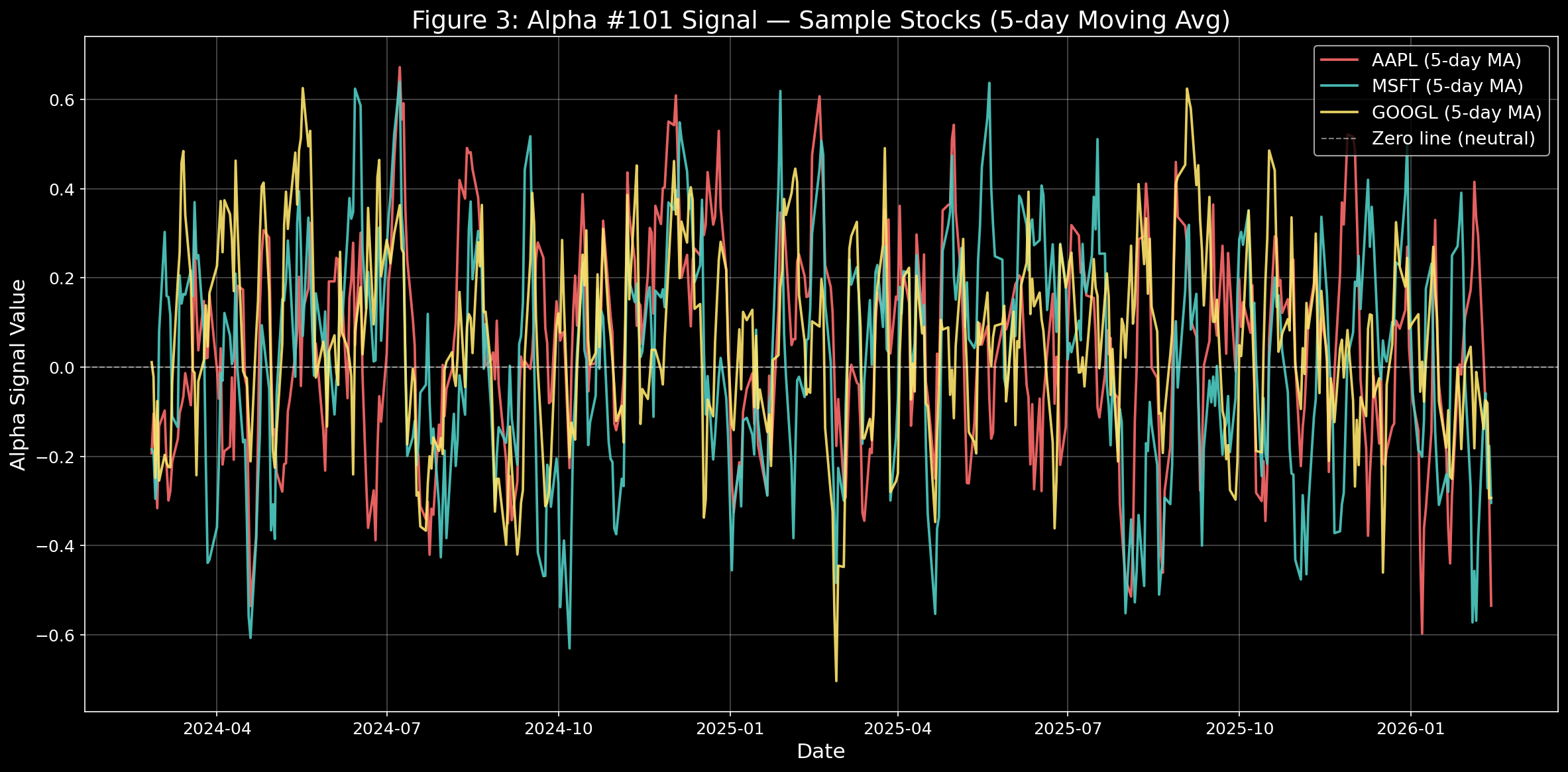
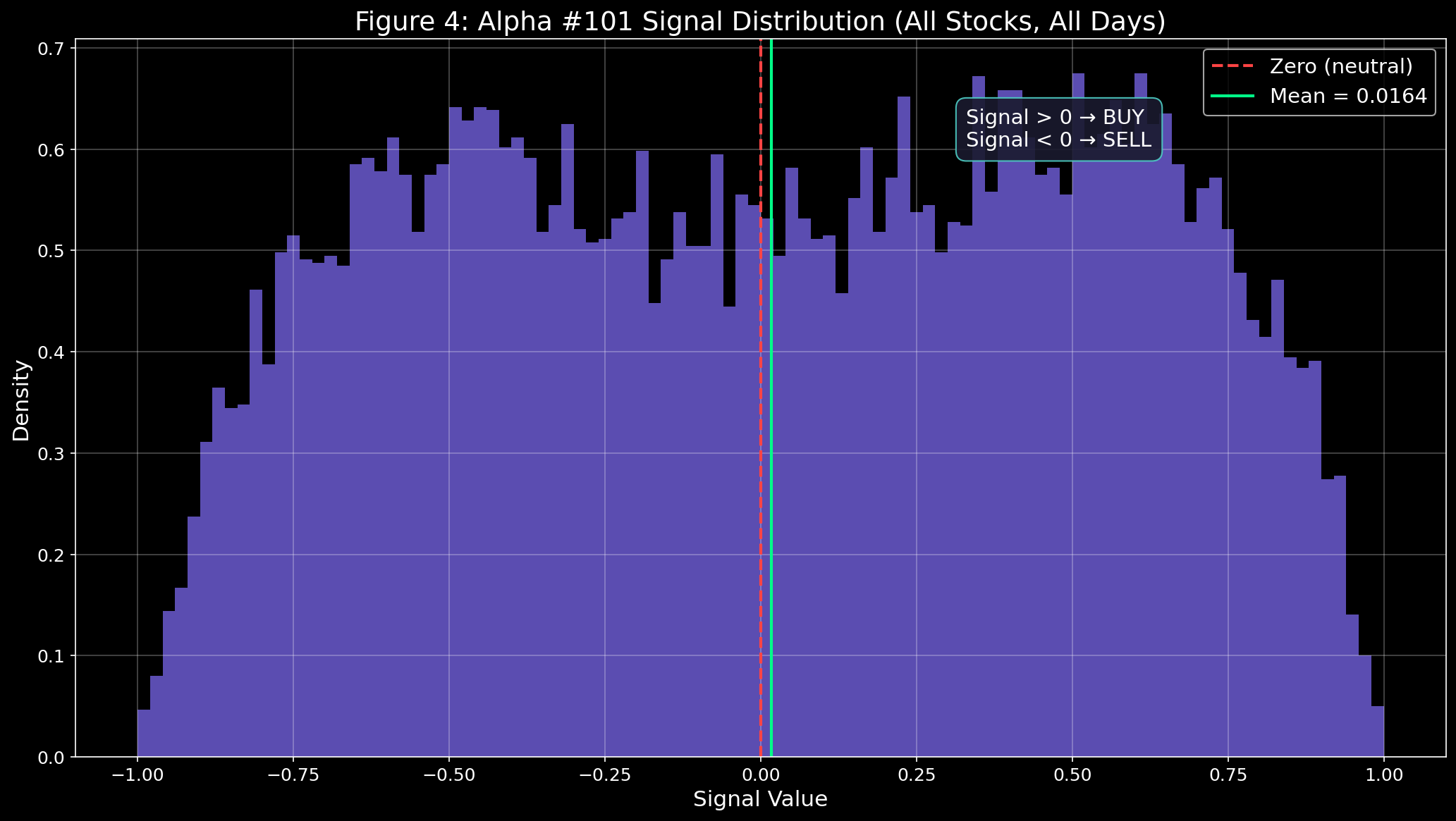
<p>Applying the signal to 30 stocks over ~500 days produces a total of <strong>15,000 alpha signals</strong>.</p>

<h2 id="procedure">Procedure</h2>

<ol>
  <li>Compute the alpha signal for each stock and <strong>rank</strong> them cross-sectionally.</li>
  <li>Since close, high, and low prices are only available after market close, the ranking is applied <strong>with a one-day lag</strong>.</li>
  <li>Go <strong>long</strong> the top 50% and <strong>short</strong> the bottom 50% by rank.</li>
  <li>Calculate the daily portfolio return across all stocks.</li>
  <li>Compound the daily returns to get the <strong>cumulative PnL</strong>.</li>
</ol>

<h2 id="results">Results</h2>

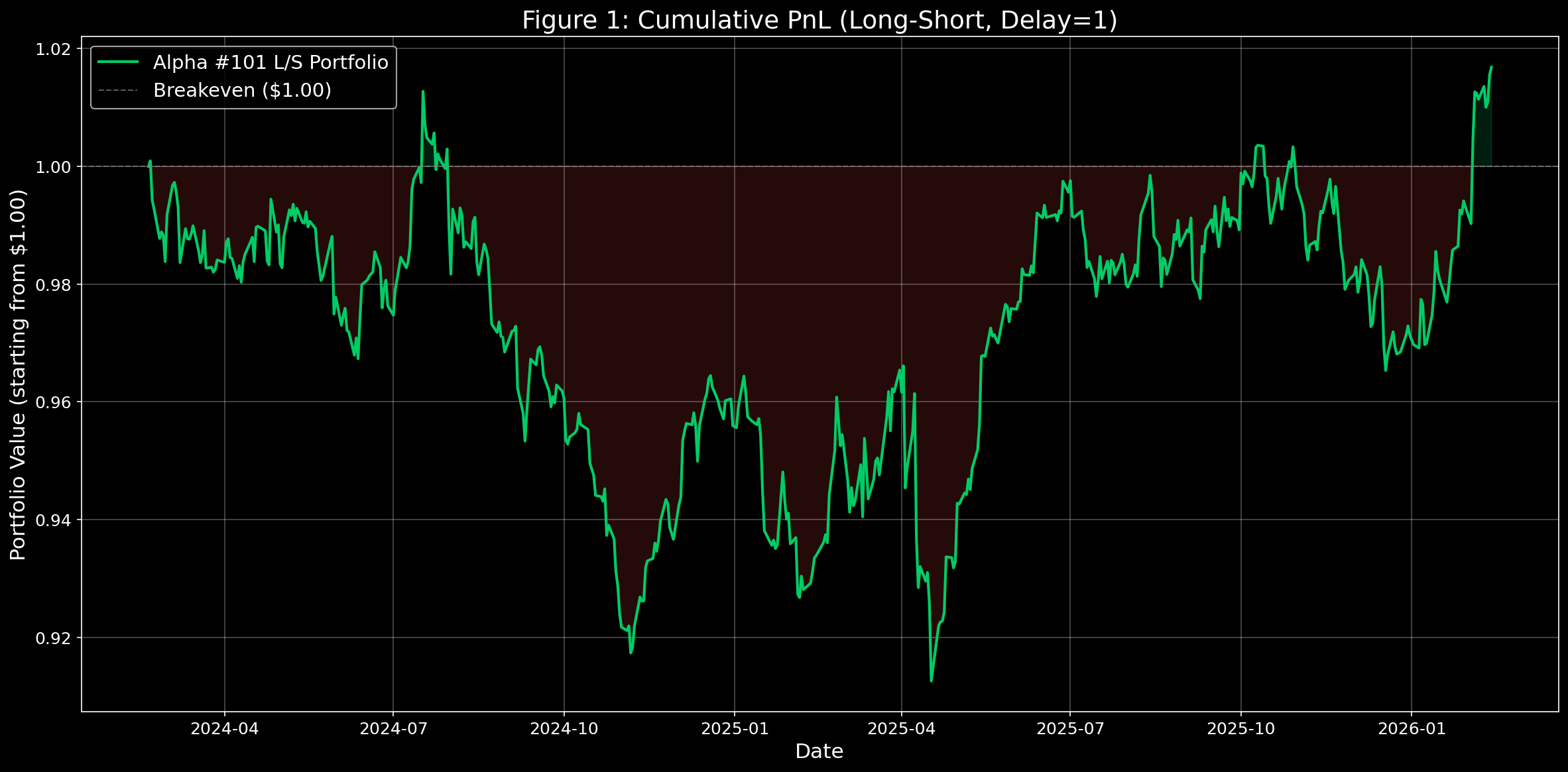
<p><img src="../../assets/images/2026-02-16-16-58-15.png" alt="Cumulative PnL Curve" /></p>

<ul>
  <li>The starting point of $1 is the <strong>break-even</strong> line.</li>
  <li><strong>PnL</strong> = Profit and Loss</li>
</ul>

<p><img src="../../assets/images/2026-02-16-16-58-26.png" alt="Performance Summary" /></p>

<h3 id="key-metrics">Key Metrics</h3>

<ul>
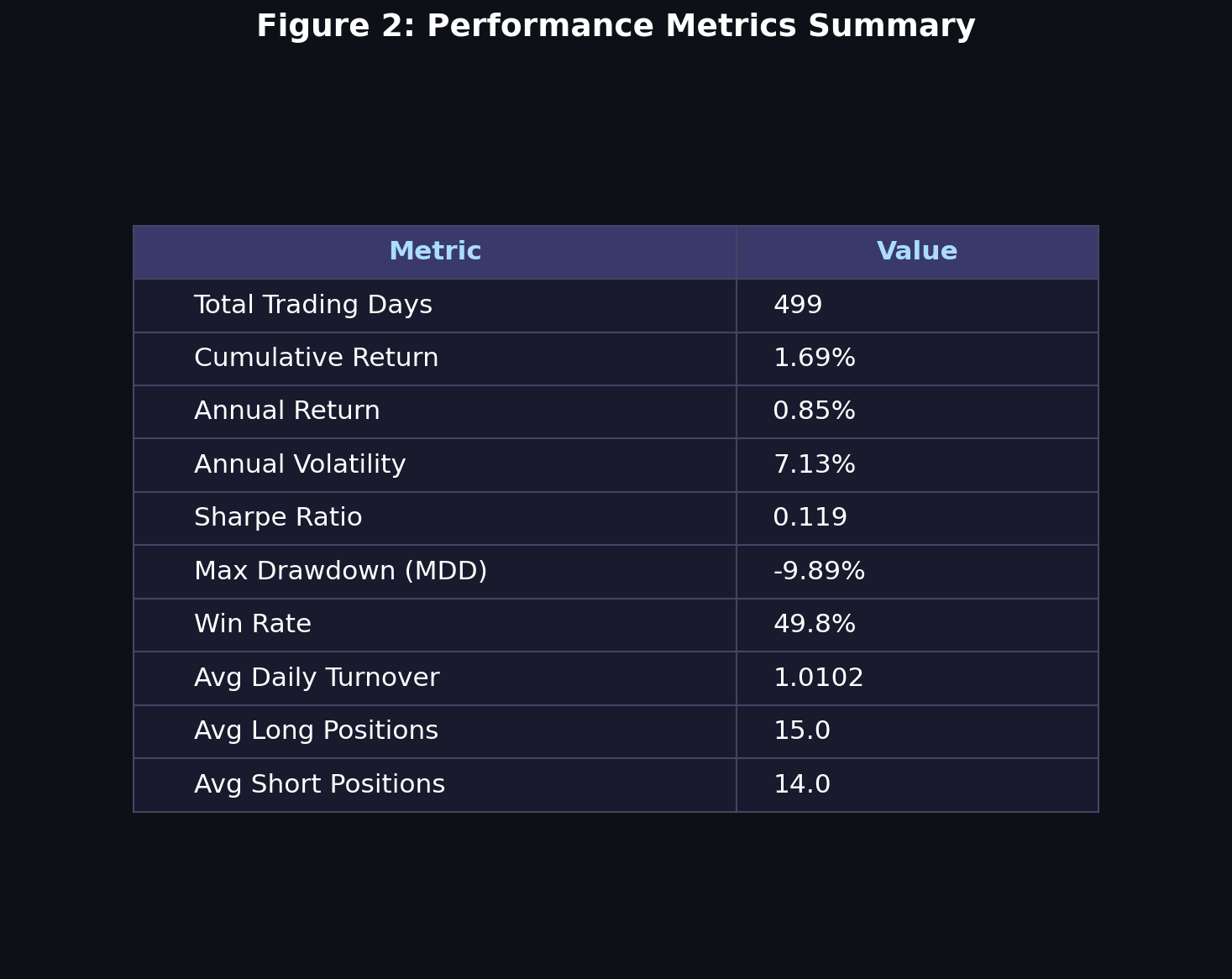
  <li><strong>Total Return: 1.69%</strong> — Quite low, considering bank deposit rates sit around 2–3% annually.</li>
  <li><strong>Annual Volatility</strong> — How much the portfolio value fluctuated over the year.</li>
</ul>

<h3 id="why-do-we-multiply-by-n">Why Do We Multiply by √N?</h3>

<p>This is a fundamental rule in statistics:</p>

\[\sigma_{N\text{-day}} = \sigma_{1\text{-day}} \times \sqrt{N}\]

<p><strong>Why not just multiply by N?</strong></p>

<div class="language-plaintext highlighter-rouge"><div class="highlight"><pre class="highlight"><code>Daily volatility: 1%

If we simply multiplied:
→ 252-day volatility = 1% × 252 = 252%  (absurd!)

With the square root:
→ 252-day volatility = 1% × √252 = 1% × 15.87 = 15.87%  (realistic)
</code></pre></div></div>

<p><strong>The underlying principle:</strong></p>

<p>Daily returns are assumed to be <strong>independent</strong>. Today’s +1% doesn’t dictate tomorrow’s direction — gains and losses can <strong>cancel out</strong> over time.</p>

<p>Mathematically:</p>

\[\text{Var}_{N} = N \cdot \sigma^2 \quad \Rightarrow \quad \text{Std}_{N} = \sqrt{N} \cdot \sigma\]

<p>Variance scales linearly with $N$; standard deviation scales with $\sqrt{N}$.</p>

<h3 id="annual-volatility-benchmarks">Annual Volatility Benchmarks</h3>

<table>
  <thead>
    <tr>
      <th>Asset</th>
      <th>Annual Volatility</th>
      <th>Note</th>
    </tr>
  </thead>
  <tbody>
    <tr>
      <td><strong>S&amp;P 500</strong></td>
      <td><strong>15–18%</strong></td>
      <td>U.S. large-cap 500</td>
    </tr>
    <tr>
      <td><strong>NASDAQ</strong></td>
      <td><strong>20–25%</strong></td>
      <td>Tech-heavy, higher swings</td>
    </tr>
    <tr>
      <td><strong>KOSPI</strong></td>
      <td><strong>18–22%</strong></td>
      <td>Korean equity market</td>
    </tr>
    <tr>
      <td><strong>Bitcoin</strong></td>
      <td><strong>80–120%</strong></td>
      <td>Extreme volatility</td>
    </tr>
    <tr>
      <td><strong>U.S. Treasuries</strong></td>
      <td><strong>3–5%</strong></td>
      <td>Very stable</td>
    </tr>
    <tr>
      <td><strong>Our Strategy</strong></td>
      <td><strong>7.13%</strong></td>
      <td>Remarkably low volatility</td>
    </tr>
  </tbody>
</table>

<h3 id="other-metrics">Other Metrics</h3>

<ul>
  <li><strong>Sharpe Ratio</strong> — Risk-adjusted return:</li>
</ul>

\[\text{Sharpe} = \frac{\text{Annualized Return}}{\text{Annualized Volatility}}\]

<p>A Sharpe above <strong>1.0</strong> is considered good; above <strong>2.0</strong> is excellent. Our result of <strong>0.119</strong> is very poor.</p>

<ul>
  <li><strong>Max Drawdown</strong> — The largest peak-to-trough decline in portfolio value.</li>
  <li><strong>Win Rate</strong> — Percentage of trading days with a positive return.</li>
  <li><strong>Avg Daily Turnover</strong> — How much of the portfolio is reshuffled each day.
    <ul>
      <li>A value of <strong>1.01</strong> means we traded ~101% of the portfolio’s value daily. Higher turnover = higher transaction costs.</li>
    </ul>
  </li>
  <li><strong>Avg Long / Short Positions</strong> — The average number of stocks held long vs. sold short on any given day.</li>
</ul>

<p><img src="../../assets/images/2026-02-16-16-58-36.png" alt="Daily Returns Distribution" /></p>

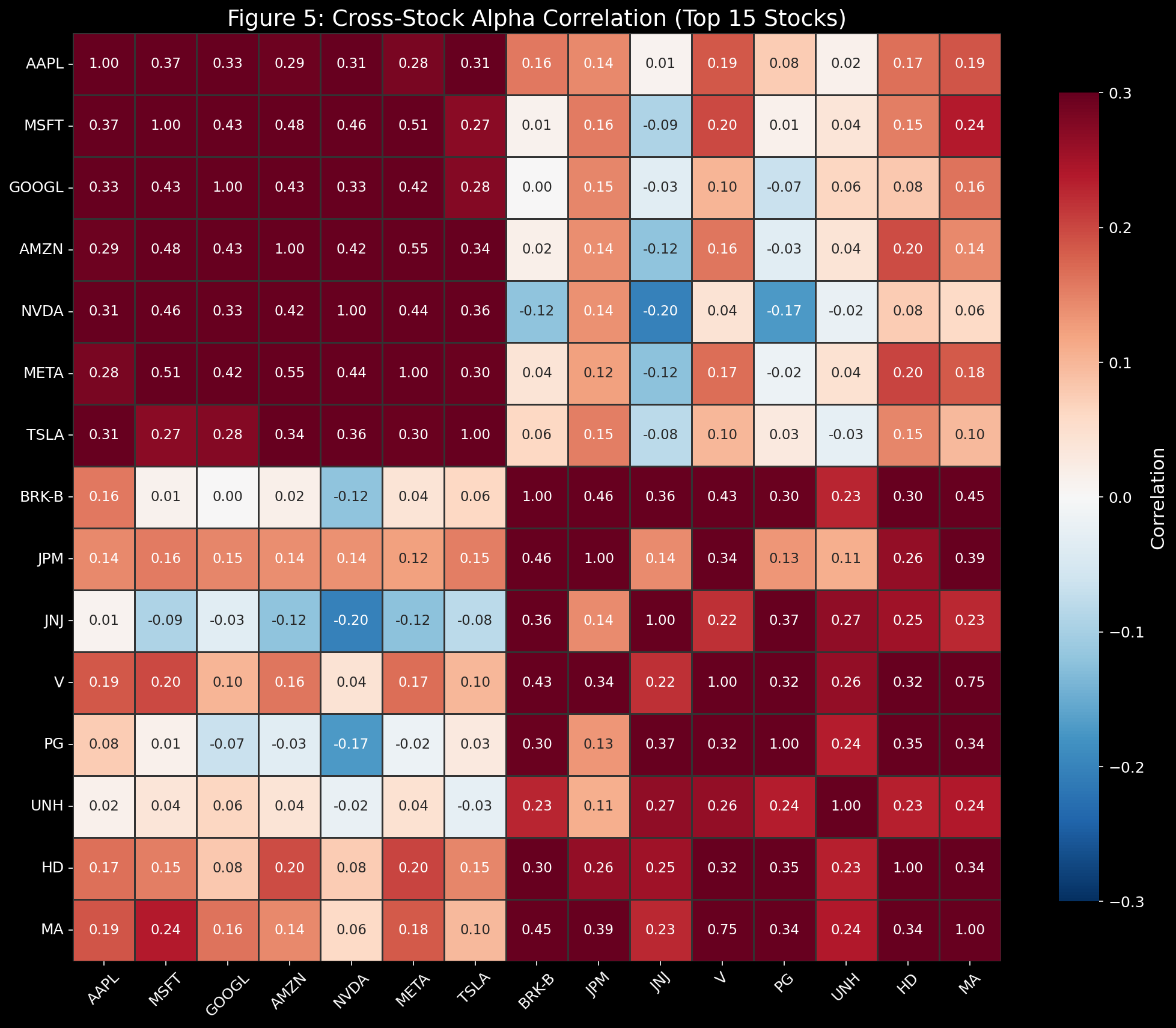
<p><img src="../../assets/images/2026-02-16-16-58-45.png" alt="Alpha Signal Heatmap" /></p>

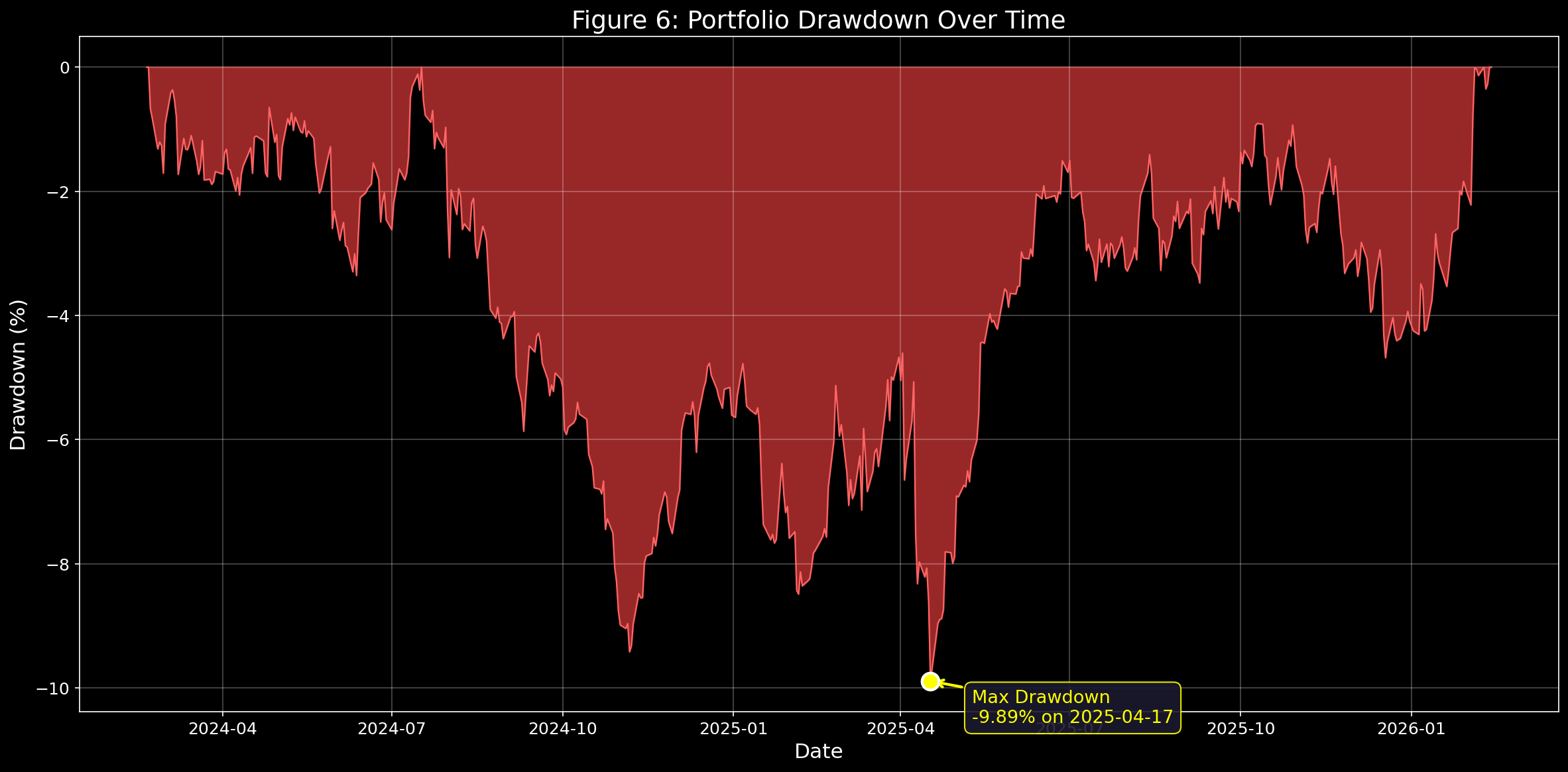
<p><img src="../../assets/images/2026-02-16-16-58-57.png" alt="Drawdown Over Time" /></p>

<p><img src="../../assets/images/2026-02-16-16-59-07.png" alt="Turnover Analysis" /></p>

<hr />

<blockquote>
  <p><strong>Disclaimer:</strong> This post is purely a study note. All investment decisions should be made based on your own research and judgment.</p>
</blockquote>]]></content><author><name>Seungwoo Lim</name><email>daniel73919@gmail.com</email></author><category term="quant" /><summary type="html"><![CDATA[Wilmott Magazine 2016(84) (2016) 72-80 [Paper] Zura Kakushadze]]></summary></entry><entry><title type="html">[Paper review and Reproduction] Mapping News Narrative Using LLMs and Narrative-Structured Text Embeddings</title><link href="https://danielfh1.github.io/blog/multimodal/MappingNewsNarrative/" rel="alternate" type="text/html" title="[Paper review and Reproduction] Mapping News Narrative Using LLMs and Narrative-Structured Text Embeddings" /><published>2026-02-11T00:00:00+00:00</published><updated>2026-02-11T00:00:00+00:00</updated><id>https://danielfh1.github.io/blog/multimodal/MappingNewsNarrative</id><content type="html" xml:base="https://danielfh1.github.io/blog/multimodal/MappingNewsNarrative/"><![CDATA[<blockquote>
  <p>ACM 2025 [<a href="https://arxiv.org/html/2409.06540v1">Paper</a>] [<a href="https://github.com/jelfes/llam">GitHub</a>]<br />
Jan Elfes<br />
University College Dublin<br />
10 Sep 2024</p>
</blockquote>

<h1 id="motivation-w-short-solution">Motivation w short solution</h1>
<h2 id="limitations-of-keyword-based-semantic-similarity">Limitations of keyword-based semantic similarity</h2>

<p>The paper uses Israel–Gaza war articles as an example, so I’ll use the same setting here.</p>

<ul>
  <li>“The Israeli army killed terrorists in Gaza.”</li>
  <li>“The Israeli army massacred civilians in Gaza.”</li>
</ul>

<p>As you can see, the phrasing carries subtle cues about the writer’s stance (narrative). However, with keyword-based similarity, the overlap in terms like <code class="language-plaintext highlighter-rouge">Israeli army</code>, <code class="language-plaintext highlighter-rouge">Gaza</code>, and <code class="language-plaintext highlighter-rouge">killed/massacred</code> makes the two sentences look highly similar.</p>

<p>In other words, it has been hard to precisely model and quantify the nuance in <em>who</em> did <em>what</em> to <em>whom</em>.</p>

<p>To address this, the paper adopts the Actantial Model (Greimas, 1996) and structures narratives into roles, enabling narrative-aware classification.</p>

<h2 id="contribution-to-quantitative-analysis">Contribution to quantitative analysis</h2>

<p>There wasn’t a scalable, automated way to analyze thousands of articles quantitatively. This paper proposes a pipeline that uses an LLM (Llama) to extract six actant roles based on Greimas’ framework, then performs semantic analysis while preserving meaning as much as possible.</p>

<h1 id="methodology">Methodology</h1>

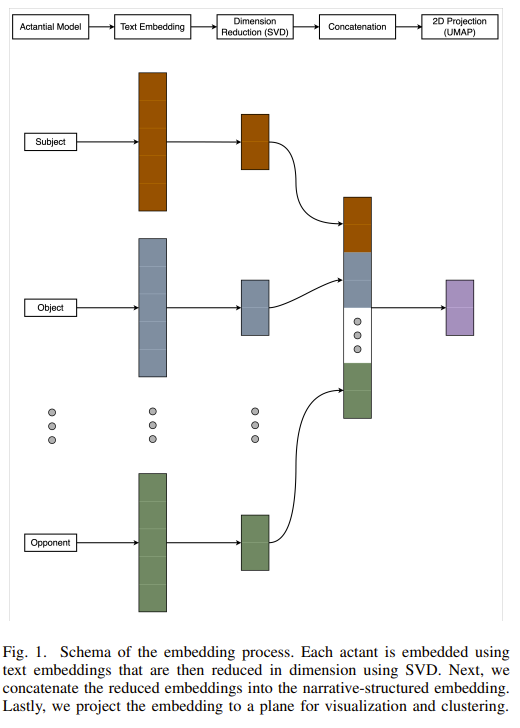
<p><img src="../../assets/images/2026-02-11-17-29-26.png" alt="architecture" /></p>

<p>Let’s walk through the architecture.</p>

<h2 id="1-actantial-model">1. Actantial model</h2>
<ul>
  <li>Feed crawled articles into an LLM (Llama-3-8B-Instruct) and extract six actant roles.</li>
</ul>

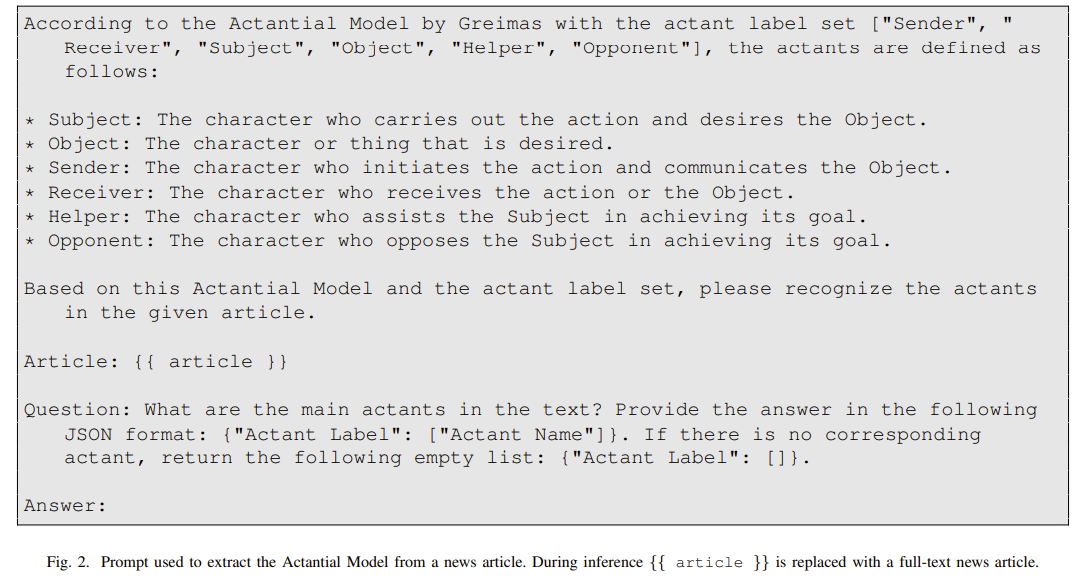
<p>The prompt is as follows.
<img src="../../assets/images/2026-02-11-17-32-17.png" alt="prompt" /></p>

<h2 id="reproduction">Reproduction</h2>
<p><img src="../../assets/images/2026-02-11-17-47-39.png" alt="" /></p>

<p>The output looks like this.</p>
<ul>
  <li>Crawling The Washington Post kept getting blocked, so I used CNN instead.</li>
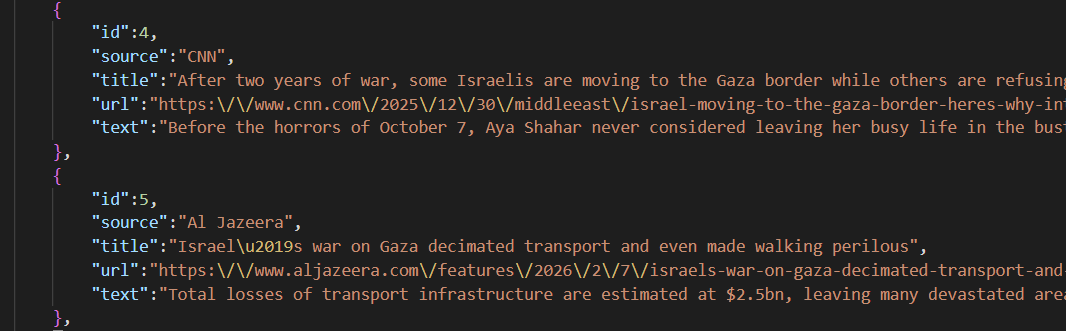
  <li>Due to broken links and crawling blocks, I manually collected five relevant articles each from CNN and Al Jazeera.</li>
</ul>

<div class="language-json highlighter-rouge"><div class="highlight"><pre class="highlight"><code><span class="p">{</span><span class="w">
    </span><span class="nl">"id"</span><span class="p">:</span><span class="w"> </span><span class="mi">0</span><span class="p">,</span><span class="w">
    </span><span class="nl">"source"</span><span class="p">:</span><span class="w"> </span><span class="s2">"CNN"</span><span class="p">,</span><span class="w">
    </span><span class="nl">"actants"</span><span class="p">:</span><span class="w"> </span><span class="p">{</span><span class="w">
        </span><span class="nl">"Sender"</span><span class="p">:</span><span class="w"> </span><span class="p">[</span><span class="w">
            </span><span class="s2">"Eyal Eshel"</span><span class="p">,</span><span class="w">
            </span><span class="s2">"Rafi Ben Shitrit"</span><span class="w">
        </span><span class="p">],</span><span class="w">
        </span><span class="nl">"Receiver"</span><span class="p">:</span><span class="w"> </span><span class="p">[</span><span class="w">
            </span><span class="s2">"Prime Minister Benjamin Netanyahu"</span><span class="p">,</span><span class="w">
            </span><span class="s2">"The government"</span><span class="p">,</span><span class="w">
            </span><span class="s2">"The public"</span><span class="w">
        </span><span class="p">],</span><span class="w">
        </span><span class="nl">"Subject"</span><span class="p">:</span><span class="w"> </span><span class="p">[</span><span class="w">
            </span><span class="s2">"Eyal Eshel"</span><span class="p">,</span><span class="w">
            </span><span class="s2">"Rafi Ben Shitrit"</span><span class="p">,</span><span class="w">
            </span><span class="s2">"The October Council"</span><span class="w">
        </span><span class="p">],</span><span class="w">
        </span><span class="nl">"Object"</span><span class="p">:</span><span class="w"> </span><span class="p">[</span><span class="w">
            </span><span class="s2">"Truth"</span><span class="p">,</span><span class="w">
            </span><span class="s2">"Accountability"</span><span class="p">,</span><span class="w">
            </span><span class="s2">"Investigation"</span><span class="w">
        </span><span class="p">],</span><span class="w">
        </span><span class="nl">"Helper"</span><span class="p">:</span><span class="w"> </span><span class="p">[</span><span class="w">
            </span><span class="s2">"The October Council"</span><span class="p">,</span><span class="w">
            </span><span class="s2">"Bereaved families"</span><span class="p">,</span><span class="w">
            </span><span class="s2">"Survivors"</span><span class="w">
        </span><span class="p">],</span><span class="w">
        </span><span class="nl">"Opponent"</span><span class="p">:</span><span class="w"> </span><span class="p">[</span><span class="w">
            </span><span class="s2">"Prime Minister Benjamin Netanyahu"</span><span class="p">,</span><span class="w">
            </span><span class="s2">"The government"</span><span class="w">
        </span><span class="p">]</span><span class="w">
    </span><span class="p">}</span><span class="w">
</span><span class="p">}</span><span class="w">
</span></code></pre></div></div>
<p>This is one example JSON output, where a single article is split into six actant roles.</p>

<h2 id="2-embedding">2. Embedding</h2>

<ul>
  <li>Embed the extracted actants into 1024-dimensional vectors.
    <ul>
      <li>I use <strong>e5-large</strong>, a BERT-family model. GPT-style models are strong at generation, but BERT-style models are typically more cost-effective for embeddings.</li>
    </ul>
  </li>
</ul>

<h2 id="3-svd">3. SVD</h2>

<ul>
  <li>Apply SVD separately for each of the six roles, preserving order and role identity.
    <ul>
      <li>SVD (Singular Value Decomposition) compresses the 1024-d space to its most informative core signal.</li>
    </ul>
  </li>
</ul>

<h2 id="4-concatenation">4. Concatenation</h2>

<ul>
  <li>After dimensionality reduction, concatenate the six role vectors into one long vector.</li>
  <li>I avoid mean pooling because summation destroys order information. (“Israel (Subject) attacks Gaza (Object)” vs. “Gaza (Subject) attacks Israel (Object)” become identical if you simply add vectors.)</li>
</ul>

<h2 id="5-2d-projection-umap">5. 2D projection (UMAP)</h2>
<ul>
  <li>Final vector size = reduced SVD dimension (34 in the paper) × 6
    <ul>
      <li>That is, 204 dimensions per article</li>
    </ul>
  </li>
  <li><strong>UMAP</strong> is a non-linear projection that flexibly preserves distances.
    <ul>
      <li><strong>SVD</strong> is a linear projection that captures directions explaining the largest variance.</li>
      <li>Since UMAP can become unreliable in very high dimensions, SVD is applied first as an intermediate step.</li>
    </ul>
  </li>
</ul>

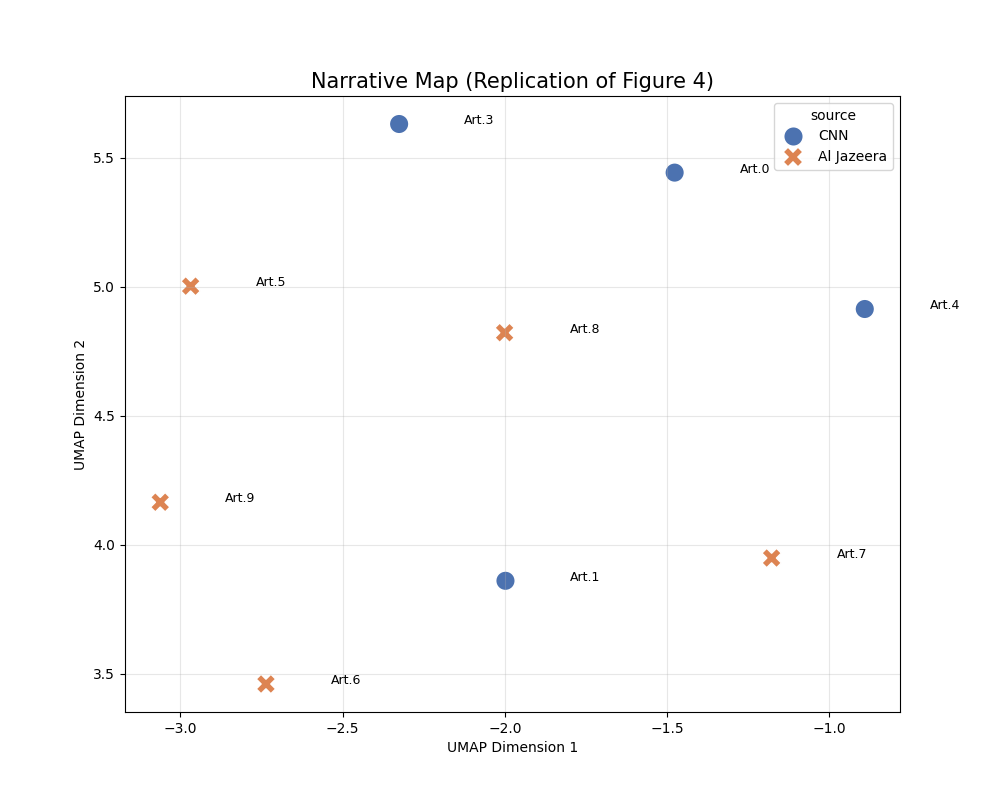
<p><img src="../../assets/images/2026-02-11-17-54-47.png" alt="" /></p>

<p>I only used 10 articles, so the plot is much smaller than the paper’s figure, but the clustering still works reasonably well.</p>

<h1 id="experiments--results">Experiments &amp; Results</h1>
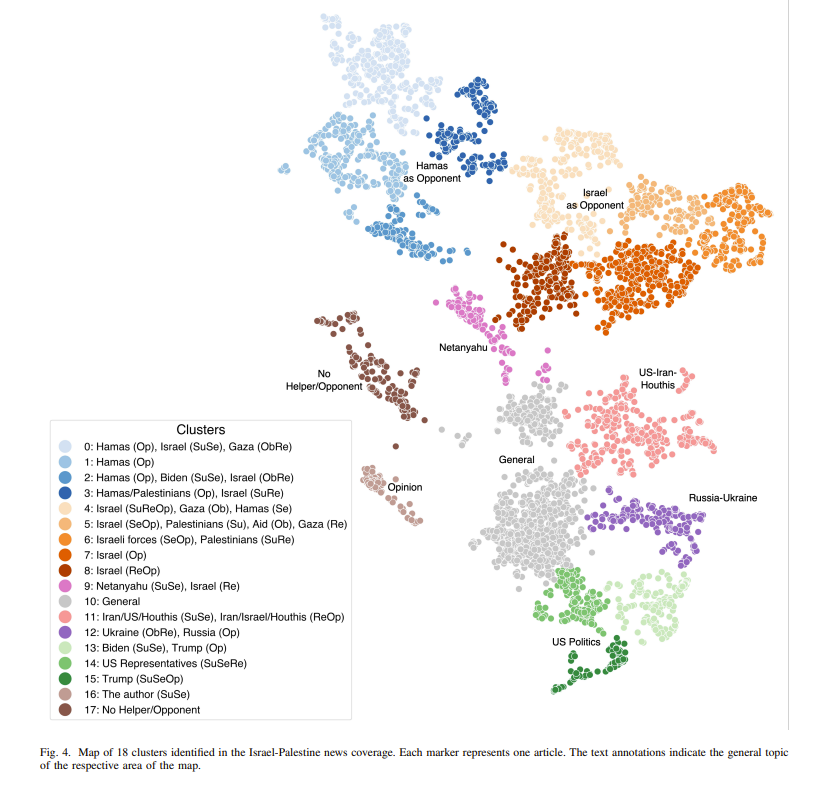
<p><img src="../../assets/images/2026-02-11-17-43-02.png" alt="results" /></p>

<p>The paper collected 5,342 news articles and split them into 18 classes.</p>
<blockquote>
  <p>5342 news articles on the Israel-Palestine conflict, sourced from Al Jazeera
and The Washington Post</p>
</blockquote>

<p>As the figure shows, semantic distances separate cleanly with minimal overlap.</p>

<h1 id="additional-study">Additional study</h1>
<p>To gain insight for my own research, I ran additional experiments.</p>

<h2 id="motivation">Motivation</h2>

<p><strong>To use the paper’s idea as a justification and baseline for my research, I designed an additional experiment:</strong></p>

<p>I applied the method to long-context novels. The key question was:</p>

<ul>
  <li>Can the approach still compare narratives effectively for long text, not just short news articles?</li>
</ul>

<p>To test generalization, I ran experiments on three popular English novels:</p>

<ul>
  <li><em>Harry Potter 1</em></li>
  <li><em>LOTR 1</em></li>
  <li><em>DUNE 1</em></li>
</ul>

<p>For narrative labels, I used three coarse themes—<strong>Battle</strong>, <strong>Daily</strong>, and <strong>Travel</strong>—and included the definitions in the prompt.</p>

<div class="language-python highlighter-rouge"><div class="highlight"><pre class="highlight"><code><span class="n">prompt_template</span> <span class="o">=</span> <span class="s">"""
    Classify the following novel excerpt into one of these categories:
    1. "Battle": Fighting, danger, war, tension, sandworm attack.
    2. "Daily": Dialogue, politics, philosophy, rest.
    3. "Travel": Moving, desert crossing, ornithopter flight.
    
    Excerpt: "{text}"
    
    Question: Is this 'Battle', 'Daily', or 'Travel'? Answer with one word.
    Answer:"""</span>
</code></pre></div></div>

<ul>
  <li>Chunk length = 1,500 characters (~200–300 words)
    <ul>
      <li>A typical novel page is about 1,500 characters</li>
      <li>e5-large has an input token limit (roughly 350–450)</li>
      <li>I used a 200-character overlap to reduce context loss
        <ul>
          <li>e.g., 0–1500, then 1300–2800, etc.</li>
        </ul>
      </li>
      <li>Chunks shorter than 1,500 characters were discarded</li>
    </ul>
  </li>
</ul>

<p>All other experiment settings (architecture, reduced dimension size, etc.) matched the paper.</p>

<p>The results are below.</p>

<ul>
  <li>
    <p>Results</p>

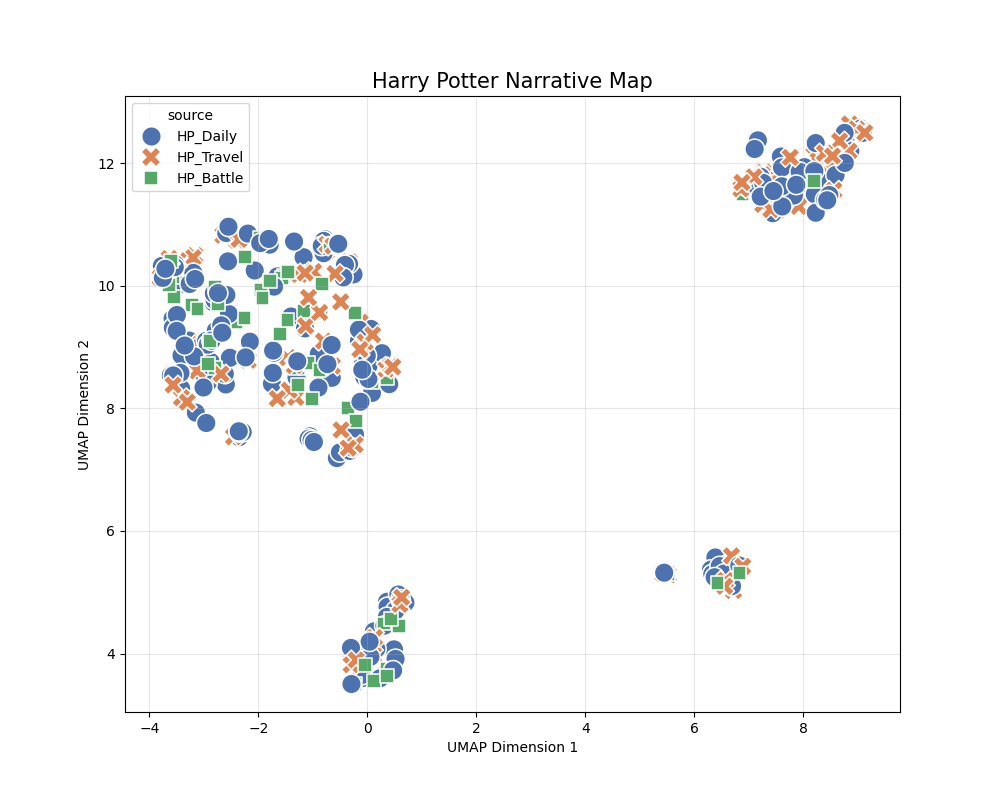
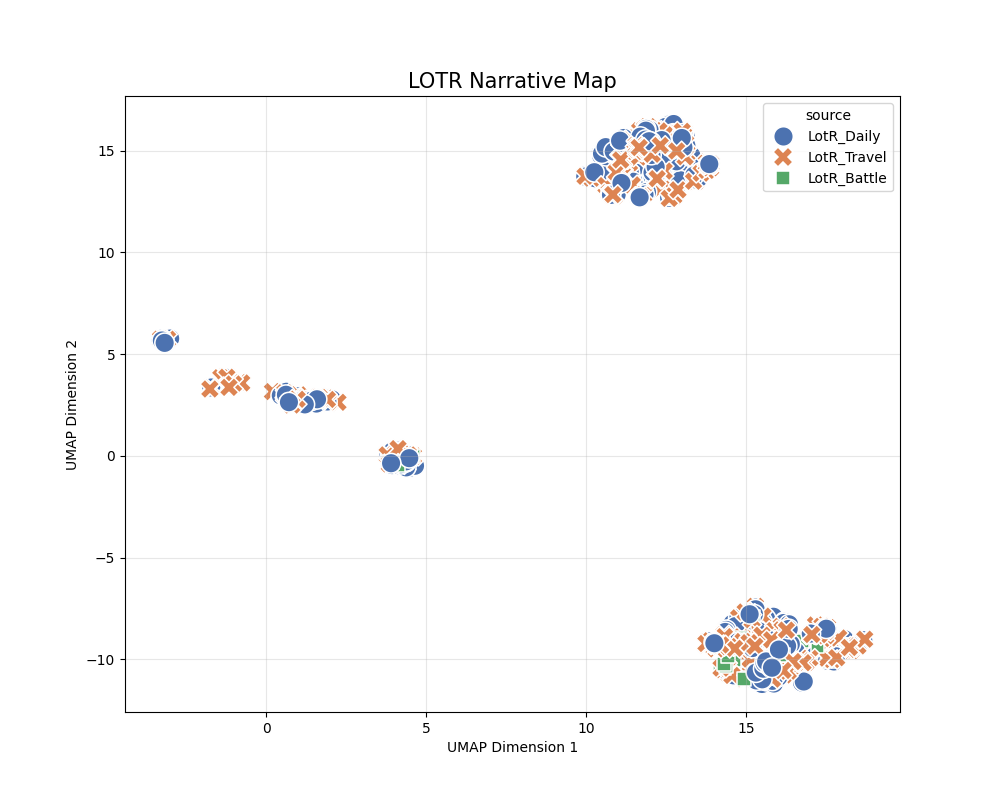
    <p><img src="../../assets/images/2026-02-12-15-09-25.png" alt="HarryPotter" /></p>

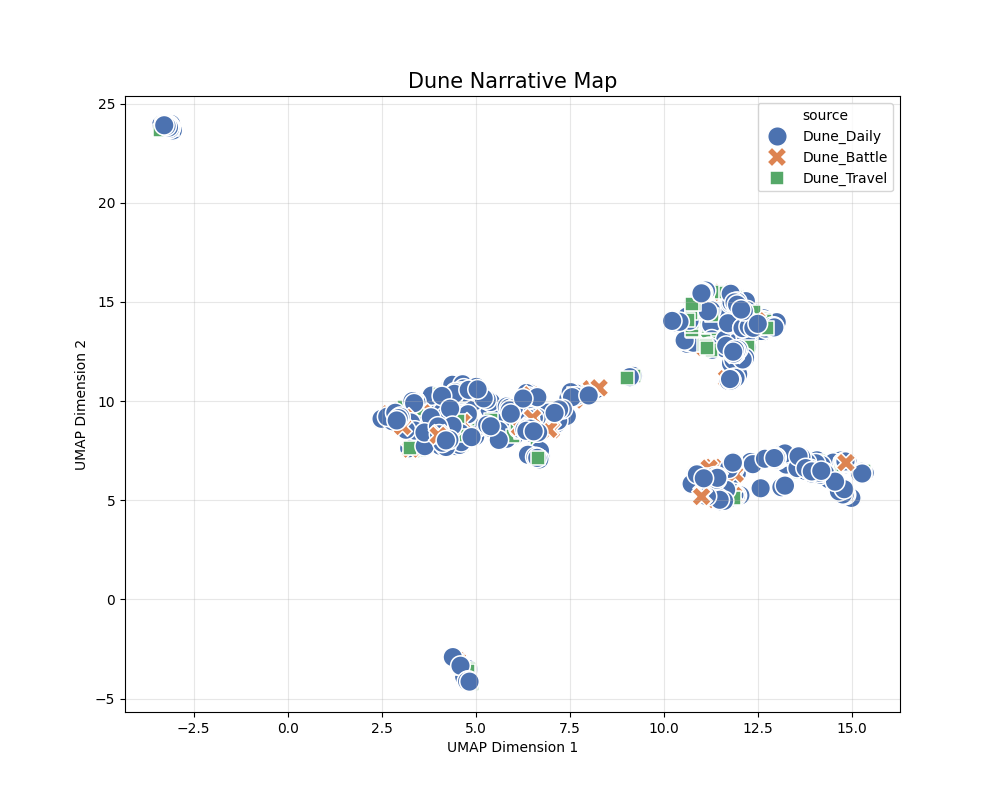
    <p><img src="../../assets/images/2026-02-12-15-09-51.png" alt="DUNE" /></p>

    <p><img src="../../assets/images/2026-02-12-15-10-10.png" alt="LOTR" /></p>
  </li>
</ul>

<p>As shown, the clusters do <strong>not</strong> split cleanly into three groups as intended.</p>

<p>Possible causes include the following.</p>

<ul>
  <li>Sparse vectors
    <ul>
      <li>In the novel experiments, it was rare for all six actant roles to be filled for each of the three clusters.</li>
      <li>Examples:
        <ul>
          <li>Travel: <code class="language-plaintext highlighter-rouge">Subject</code> exists, but <code class="language-plaintext highlighter-rouge">Opponent</code> or <code class="language-plaintext highlighter-rouge">Receiver</code> are often empty.</li>
          <li>Daily: <code class="language-plaintext highlighter-rouge">Subject</code> and <code class="language-plaintext highlighter-rouge">Receiver</code> exist, but <code class="language-plaintext highlighter-rouge">Object</code> or <code class="language-plaintext highlighter-rouge">Opponent</code> are often empty.</li>
        </ul>
      </li>
      <li>This creates many near-empty <strong>null actants</strong>, which add noise during embedding.</li>
    </ul>
  </li>
  <li>Limitations of embeddings themselves
    <ul>
      <li>Ideal case: (Harry vs. Malfoy) and (Harry vs. Voldemort) should both map to <strong>Battle</strong> because they share the same action structure.</li>
      <li>In practice, the embeddings for “Malfoy” and “Voldemort” are far apart, so the scenes appear distant despite being the same narrative type.</li>
    </ul>
  </li>
</ul>

<p>To analyze this further (using <strong>Harry Potter</strong> as the reference), I ran two focused checks:</p>

<ul>
  <li><strong>Class A:</strong> Why are some samples <em>close</em> despite being in the same cluster?</li>
  <li><strong>Class B:</strong> Why are some samples <em>far</em> despite being in the same cluster?</li>
</ul>

<p>I computed similarity in the concatenated vector space <strong>before</strong> UMAP. Compressing to 2D can destroy information, so it is not a reliable similarity measure.</p>

<ul>
  <li>34 dimensions (SVD) × 6 roles = 204-dimensional similarity check</li>
  <li>Euclidean distance (L2)</li>
  <li>Only the <strong>Battle</strong> cluster</li>
  <li>Selected 2 samples from Class A and 2 from Class B, then prompted <strong>Meta-Llama-3.1-8B-Instruct</strong>.
    <ul>
      <li>
        <p>Full prompt</p>

        <div class="language-python highlighter-rouge"><div class="highlight"><pre class="highlight"><code>  <span class="n">prompt_content</span> <span class="o">=</span> <span class="sa">f</span><span class="s">"""
      Analyze why these two '</span><span class="si">{</span><span class="n">TARGET_CATEGORY</span><span class="si">}</span><span class="s">' scenes are </span><span class="si">{</span><span class="n">label</span><span class="p">.</span><span class="n">upper</span><span class="p">()</span><span class="si">}</span><span class="s"> in vector space.
            
      [Scene A] (ID: </span><span class="si">{</span><span class="n">id1</span><span class="si">}</span><span class="s">)
      - Actants: </span><span class="si">{</span><span class="n">json</span><span class="p">.</span><span class="n">dumps</span><span class="p">(</span><span class="n">act1</span><span class="p">,</span> <span class="n">indent</span><span class="o">=</span><span class="mi">2</span><span class="p">)</span><span class="si">}</span><span class="s">
      - Text: "</span><span class="si">{</span><span class="n">art1</span><span class="p">[</span><span class="s">'text'</span><span class="p">][</span><span class="si">:</span><span class="mi">300</span><span class="p">]</span><span class="si">}</span><span class="s">..."
            
      [Scene B] (ID: </span><span class="si">{</span><span class="n">id2</span><span class="si">}</span><span class="s">)
      - Actants: </span><span class="si">{</span><span class="n">json</span><span class="p">.</span><span class="n">dumps</span><span class="p">(</span><span class="n">act2</span><span class="p">,</span> <span class="n">indent</span><span class="o">=</span><span class="mi">2</span><span class="p">)</span><span class="si">}</span><span class="s">
      - Text: "</span><span class="si">{</span><span class="n">art2</span><span class="p">[</span><span class="s">'text'</span><span class="p">][</span><span class="si">:</span><span class="mi">300</span><span class="p">]</span><span class="si">}</span><span class="s">..."
            
      [Task]
      Explain the distance (</span><span class="si">{</span><span class="n">dist</span><span class="si">:</span><span class="p">.</span><span class="mi">2</span><span class="n">f</span><span class="si">}</span><span class="s">) based on:
      1. Entity Overlap (Do they share same character names?)
      2. Structural Patterns (Are the same roles filled/empty?)
            
      Answer:
      """</span>
</code></pre></div>        </div>
      </li>
    </ul>
  </li>
</ul>

<p><strong>Result analysis</strong></p>

<ul>
  <li>Class A: Why are some samples close?
    <ul>
      <li>DISTANCE: 0.0000
        <ul>
          <li>One scene is essentially a paraphrase of another, producing near-identical actants (distance ≈ 0).</li>
        </ul>
      </li>
      <li>DISTANCE: 0.4148
        <ul>
          <li>
            <p><strong>Scene A Actants:</strong> {“Subject”: [“Harry”, “Hagrid”], “Object”: [“the truth about Harry’s parents”, “Uncle Vernon”], “Sender”: [“Hagrid”], “Receiver”: [“Harry”, “Uncle Vernon”], “Helper”: [“Hagrid”], “Opponent”: [“Uncle Vernon”]}</p>
          </li>
          <li><strong>Scene B Actants:</strong> {“Subject”: [“Hagrid”, “Harry”], “Object”: [“Uncle Vernon”, “You-Know-Who”, “Harry”], “Sender”: [“Hagrid”], “Receiver”: [“Uncle Vernon”, “Harry”], “Helper”: [“Hagrid”], “Opponent”: [“Uncle Vernon”, “You-Know-Who”]}</li>
          <li>High actant overlap:
            <ul>
              <li><strong>Sender</strong>: ‘Hagrid’ in both scenes.</li>
              <li><strong>Receiver</strong>: ‘Harry’ and ‘Uncle Vernon’ in both scenes.</li>
              <li><strong>Helper</strong>: ‘Hagrid’ in both scenes.</li>
            </ul>
          </li>
        </ul>
      </li>
    </ul>
  </li>
  <li>Class B: Why are some samples far?
    <ul>
      <li>
        <p><strong>Scene A Actants:</strong> {“Subject”: [“Hermione”], “Object”: [“the door”], “Sender”: [“Hermione”], “Receiver”: [“the door”], “Helper”: [“Harry”], “Opponent”: [“Filch”, “Peeves”]}</p>
      </li>
      <li>
        <p><strong>Scene B Actants:</strong> {“Subject”: [“Harry”], “Object”: [], “Sender”: [], “Receiver”: [], “Helper”: [], “Opponent”: []}</p>
      </li>
    </ul>

    <ol>
      <li><strong>Diverse character involvement</strong>: Scene A involves multiple characters (Hermione, Harry, Filch, Peeves), while Scene B focuses mostly on Harry.</li>
      <li><strong>Different structural roles</strong>: Scene A has a richer actant structure; Scene B has many missing roles.</li>
      <li><strong>Lack of shared context</strong>: The scenes come from different chapters with distinct settings and plot developments (e.g., Chapter 9 vs. Chapter 12).</li>
    </ol>
  </li>
</ul>

<p>In short, the <strong>key requirement is that all six actants align</strong>. Because many novel chunks lack full actant sets (especially <code class="language-plaintext highlighter-rouge">Opponent</code> in Daily/Travel), clean 3-way clustering is hard.</p>

<p>Therefore, a new approach is likely needed for long-context narratives such as novels.</p>]]></content><author><name>Seungwoo Lim</name><email>daniel73919@gmail.com</email></author><category term="multimodal" /><summary type="html"><![CDATA[ACM 2025 [Paper] [GitHub] Jan Elfes University College Dublin 10 Sep 2024]]></summary></entry><entry><title type="html">[Paper review and Reproduction] Topotext</title><link href="https://danielfh1.github.io/blog/multimodal/topotext/" rel="alternate" type="text/html" title="[Paper review and Reproduction] Topotext" /><published>2026-02-10T00:00:00+00:00</published><updated>2026-02-10T00:00:00+00:00</updated><id>https://danielfh1.github.io/blog/multimodal/topotext</id><content type="html" xml:base="https://danielfh1.github.io/blog/multimodal/topotext/"><![CDATA[<blockquote>
  <p>COLING 2016. [<a href="https://aclanthology.org/C16-2040.pdf">Paper</a>] [<a href="https://github.com/rkhatib/topotext">GitHub</a>]<br />
Ramy Khatib, Julia Makhalova, Shady Elbassuoni<br />
American University of Beirut<br />
13 Dec 2016</p>
</blockquote>

<h1 id="motivation">Motivation</h1>
<p>This study aimed to overcome the limitations of existing literary map mapping, which primarily consists of simple location display (static plotting), making it difficult to determine the importance (frequency) of a location within the text or the context in which it was used.</p>

<h1 id="methodology">Methodology</h1>
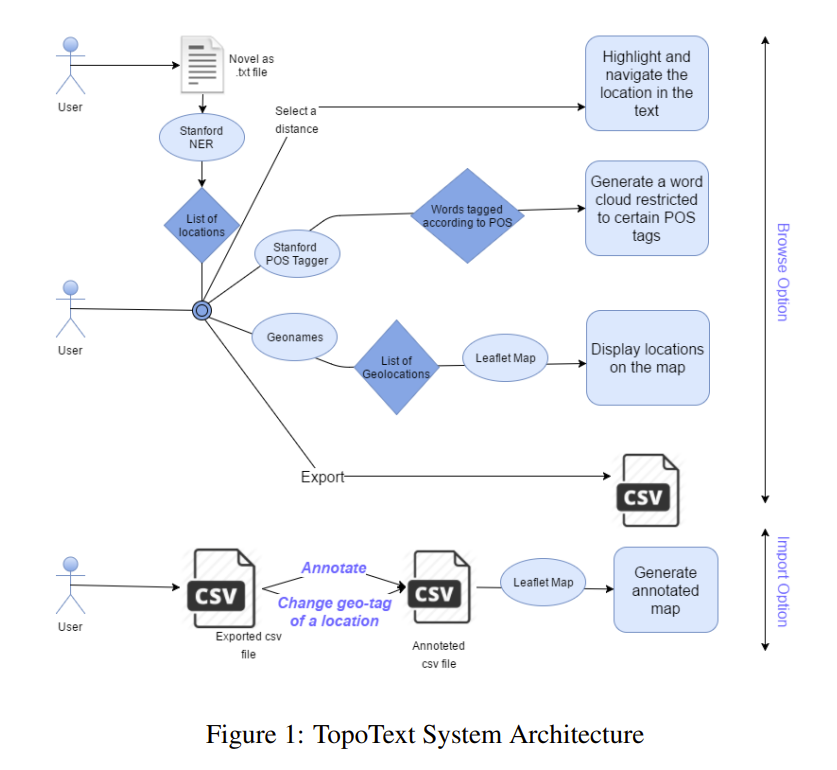
<p><img src="../../assets/images/2026-02-10-00-49-07.png" alt="Architecture" /></p>

<ol>
  <li>txt -&gt; extract locations with CoreNLP -&gt; count frequencies -&gt; save as JSON</li>
</ol>

<div class="language-plaintext highlighter-rouge"><div class="highlight"><pre class="highlight"><code>{"Gardens": 1, "Saville": 14, "Row": 10, "Pall": 3, "Mall": 3, "Rothal": 2, "Great": 10, "Peninsula": 2, "Railway": 3, "Yokohama": 40, "Fallentin": 1, "Sydenham": 1, "West": 2, "End": 1, "Europe": 13, "ROWAN": 1, "Peninsular": 2, "Canal": 1, "Cape": 1, "Red": 3, "Sea": 4, "Atlantic": 12, "Africa": 3, "Arabic": 1, "Gulf": 2, "Benares": 9, "Bab": 1, "-": 3, "el": 1}
</code></pre></div></div>
<p>The location output looks like this. 
But you can already see a few errors:</p>
<ul>
  <li>Non-locations: “el”, “-“, “Railway”, “Red”</li>
  <li>Parsing error: “Saville” and “Row” (the actual name is “Saville Row”)</li>
</ul>

<p>This happens because the engine is dated I’ll revisit it in the limitations section below.</p>

<p>In 2016, Stanford CoreNLP was still one of the strongest options available.
It relies on CRF (Conditional Random Fields), a statistical model, rather than modern deep learning approaches like BERT. As a result, non-locations can be extracted as locations. 
Also, it’s implemented in Java and runs on CPU/RAM only (no GPU), which makes it quite slow.</p>

<ol>
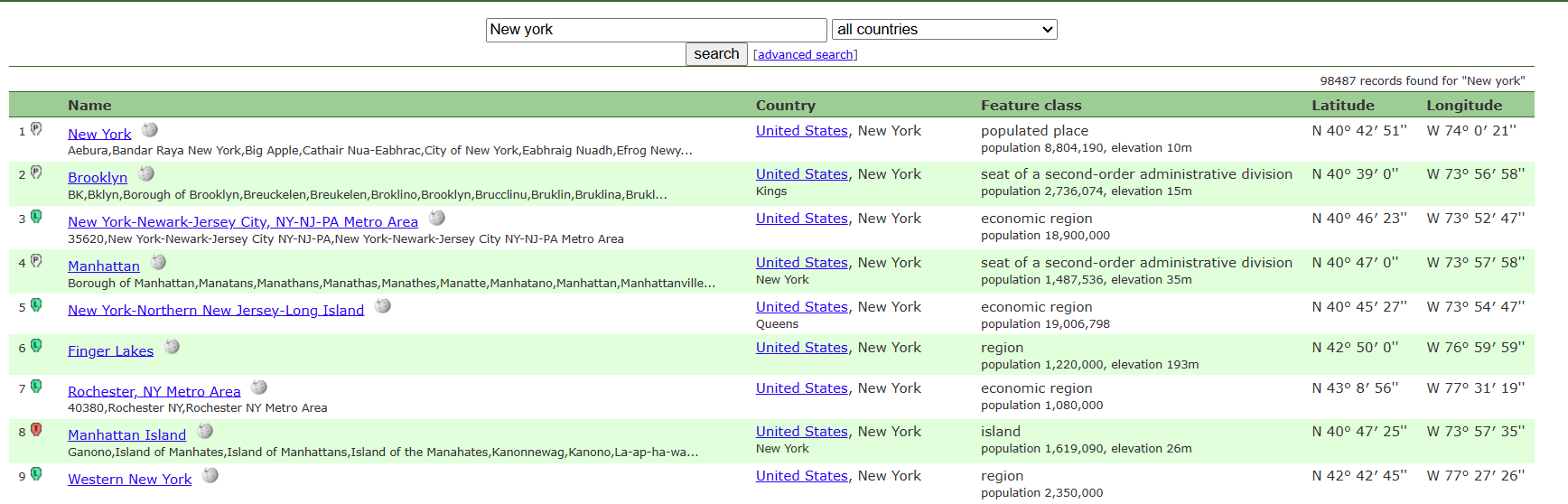
  <li>Take the JSON from step 1 and query <a href="https://www.geonames.org/">Geonames</a>. 
<img src="../../assets/images/2026-02-10-01-00-44.png" alt="Geonames example1" /></li>
</ol>

<p>As shown, each place returns latitude/longitude, which is used in the next step to map locations. 
You can also see basic metadata for each place.</p>

<p>We consolidate everything and store it as a CSV file.</p>

<div class="language-plaintext highlighter-rouge"><div class="highlight"><pre class="highlight"><code>Location,Resolved_Name,Country,Lat,Lng,Frequency,Annotation
Gardens,Singapore Botanic Gardens,Singapore,1.31028,103.81639,1,
Saville,Saville Lake,Canada,47.61848,-81.27189,14,
Row,Row Island,Antarctica,-66.51667,162.63333,10,
Pall,Lac Pall,Canada,47.09528,-78.28972,3,
Mall,Hougang Mall,,1.37249,103.89348,3,
Great,Great Lakes Region,United States,44.57143,-84.69022,10,
Peninsula,Balkan Peninsula,,44,23,2,
</code></pre></div></div>

<p>It ends up stored like this.</p>

<p>The <code class="language-plaintext highlighter-rouge">Annotation</code> column enables a human-in-the-loop step, allowing manual corrections on the location, metadata, and frequency.</p>

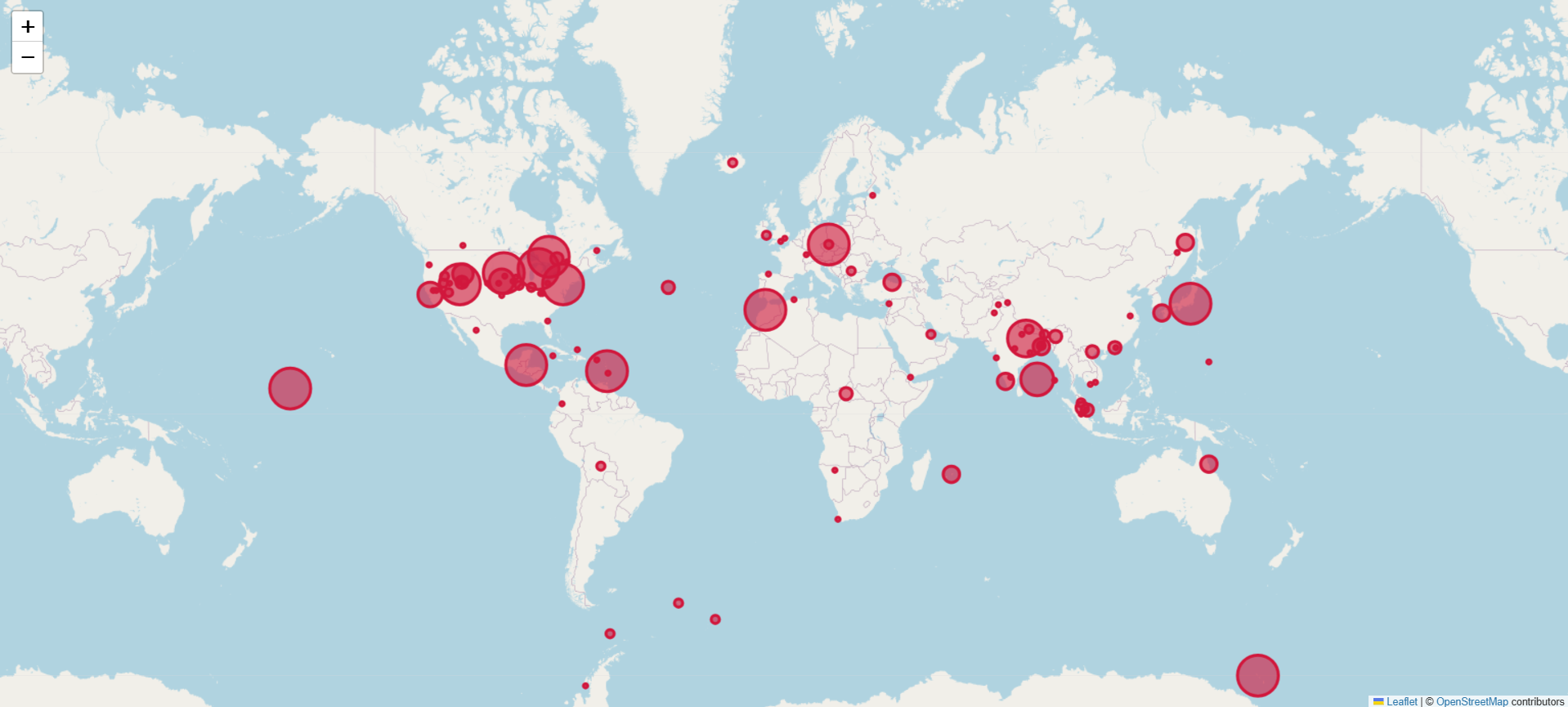
<ol>
  <li>With coordinates, place names, and frequencies, we can plot them on a map. 
They use Leaflet, a mobile-friendly open-source JavaScript library.</li>
</ol>

<p><img src="../../assets/images/2026-02-10-01-15-00.png" alt="" /></p>

<p>As you can see, the marker size varies based on frequency in the input text.</p>

<p>In short, given a full text, the system maps the most frequently mentioned places onto a static map.</p>

<h1 id="limitations">Limitations</h1>

<ul>
  <li>CoreNLP extracts locations from text, but Stanford NER uses CRF (not modern deep learning such as BERT), so non-locations can be incorrectly labeled as locations.</li>
  <li>CoreNLP is CPU/RAM-bound, so it becomes slow as the input grows.</li>
  <li>Disambiguation for identical place names is weak. 
<img src="../../assets/images/2026-02-10-01-19-31.png" alt="" /></li>
</ul>

<p>For example, “London” could be London (UK) or London (Connecticut, USA). The paper defaults to the first result, and correcting this requires manual labeling.</p>

<ul>
  <li>Naive extraction: if the input sentence is “I’m in London now, but I miss the bread I ate in Paris three years ago,” the system will plot Paris even though the focus is London.</li>
  <li>Fictional settings don’t work. Only real-world places on Earth are supported (a scalability issue). What about sci‑fi or fantasy?</li>
  <li>No time axis: there is no animation of movement over time. It simply maps frequency from the full text onto a static map.</li>
</ul>

<h1 id="conclusion">Conclusion</h1>
<p>This was my first paper research for my research, but it was so outdated that I couldn’t find any useful insights…</p>]]></content><author><name>Seungwoo Lim</name><email>daniel73919@gmail.com</email></author><category term="multimodal" /><summary type="html"><![CDATA[COLING 2016. [Paper] [GitHub] Ramy Khatib, Julia Makhalova, Shady Elbassuoni American University of Beirut 13 Dec 2016]]></summary></entry><entry><title type="html">A Practical Guide to Image Processing with PIL and OpenCV (2)</title><link href="https://danielfh1.github.io/blog/multimodal/pilopencv2/" rel="alternate" type="text/html" title="A Practical Guide to Image Processing with PIL and OpenCV (2)" /><published>2026-01-05T00:00:00+00:00</published><updated>2026-01-05T00:00:00+00:00</updated><id>https://danielfh1.github.io/blog/multimodal/pilopencv2</id><content type="html" xml:base="https://danielfh1.github.io/blog/multimodal/pilopencv2/"><![CDATA[<p>In the previous post, we covered the fundamentals of digital images and how to load them using PIL. Now, we’re going to step up our game. We will move beyond simple display and look into how computers actually store images in memory, how to manipulate them mathematically using matrix operations, and how to use <strong>OpenCV</strong>, the industry-standard library for computer vision.</p>

<h1 id="the-memory-trap-aliasing-vs-copying">The Memory Trap: Aliasing vs. Copying</h1>

<p>One of the most common bugs in image processing comes from misunderstanding how Python handles arrays in memory. Since images are essentially large arrays of numbers, assigning them to a new variable doesn’t create a new image—it just creates a new “label” for the same data.</p>

<h2 id="the-shallow-copy-problem">The “Shallow” Copy Problem</h2>

<div class="language-python highlighter-rouge"><div class="highlight"><pre class="highlight"><code><span class="kn">import</span> <span class="nn">numpy</span> <span class="k">as</span> <span class="n">np</span>
<span class="kn">from</span> <span class="nn">PIL</span> <span class="kn">import</span> <span class="n">Image</span>
<span class="kn">import</span> <span class="nn">matplotlib.pyplot</span> <span class="k">as</span> <span class="n">plt</span>

<span class="c1"># Load image and convert to array
</span><span class="n">img</span> <span class="o">=</span> <span class="n">Image</span><span class="p">.</span><span class="nb">open</span><span class="p">(</span><span class="s">'baboon.png'</span><span class="p">)</span>
<span class="n">img_array</span> <span class="o">=</span> <span class="n">np</span><span class="p">.</span><span class="n">array</span><span class="p">(</span><span class="n">img</span><span class="p">)</span>

<span class="c1"># Just assigning the variable (Reference)
</span><span class="n">A</span> <span class="o">=</span> <span class="n">img_array</span> 

<span class="c1"># If we modify A...
</span><span class="n">A</span><span class="p">[:,</span> <span class="p">:,</span> <span class="p">:]</span> <span class="o">=</span> <span class="mi">0</span>  <span class="c1"># Turn everything black
</span>
<span class="c1"># ...the original img_array is ALSO destroyed!
</span><span class="k">print</span><span class="p">(</span><span class="s">"Are they the same object?"</span><span class="p">,</span> <span class="nb">id</span><span class="p">(</span><span class="n">A</span><span class="p">)</span> <span class="o">==</span> <span class="nb">id</span><span class="p">(</span><span class="n">img_array</span><span class="p">))</span> <span class="c1"># True
</span></code></pre></div></div>

<h2 id="sol--deep-copy">Sol : Deep copy</h2>
<div class="language-python highlighter-rouge"><div class="highlight"><pre class="highlight"><code><span class="c1"># Proper Deep Copy
</span><span class="n">B</span> <span class="o">=</span> <span class="n">img_array</span><span class="p">.</span><span class="n">copy</span><span class="p">()</span>

<span class="c1"># Now B is safe from changes made to img_array
</span><span class="k">print</span><span class="p">(</span><span class="s">"Are they the same object?"</span><span class="p">,</span> <span class="nb">id</span><span class="p">(</span><span class="n">B</span><span class="p">)</span> <span class="o">==</span> <span class="nb">id</span><span class="p">(</span><span class="n">img_array</span><span class="p">))</span> <span class="c1"># False
</span></code></pre></div></div>

<h1 id="geometric-transformations">Geometric Transformations</h1>
<p>While libraries provide simple functions like .flip(), understanding the matrix logic behind them helps when you need to build custom filters.</p>

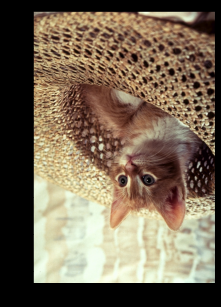
<p><img src="../../assets/images/2026-01-05-22-14-39.png" alt="" /></p>

<h2 id="manual-flipping-matrix-indexing">Manual Flipping (Matrix Indexing)</h2>
<p>Let’s flip an image vertically without using a built-in function. We map the first row of the original image to the last row of the new image.</p>
<div class="language-python highlighter-rouge"><div class="highlight"><pre class="highlight"><code><span class="n">height</span><span class="p">,</span> <span class="n">width</span><span class="p">,</span> <span class="n">channels</span> <span class="o">=</span> <span class="n">img_array</span><span class="p">.</span><span class="n">shape</span>
<span class="n">array_flip</span> <span class="o">=</span> <span class="n">np</span><span class="p">.</span><span class="n">zeros_like</span><span class="p">(</span><span class="n">img_array</span><span class="p">)</span>

<span class="k">for</span> <span class="n">i</span><span class="p">,</span> <span class="n">row</span> <span class="ow">in</span> <span class="nb">enumerate</span><span class="p">(</span><span class="n">img_array</span><span class="p">):</span>
    <span class="c1"># Map row i to row (height - 1 - i)
</span>    <span class="n">array_flip</span><span class="p">[</span><span class="n">height</span> <span class="o">-</span> <span class="mi">1</span> <span class="o">-</span> <span class="n">i</span><span class="p">,</span> <span class="p">:,</span> <span class="p">:]</span> <span class="o">=</span> <span class="n">row</span>

<span class="n">plt</span><span class="p">.</span><span class="n">imshow</span><span class="p">(</span><span class="n">array_flip</span><span class="p">)</span>
<span class="n">plt</span><span class="p">.</span><span class="n">show</span><span class="p">()</span>
</code></pre></div></div>

<h2 id="the-easy-way-transpose--flip">The Easy Way (Transpose &amp; Flip)</h2>
<p>Of course, libraries offer optimized ways to do this.</p>
<div class="language-python highlighter-rouge"><div class="highlight"><pre class="highlight"><code><span class="c1"># Pillow 
</span><span class="kn">from</span> <span class="nn">PIL</span> <span class="kn">import</span> <span class="n">ImageOps</span>

<span class="n">im_flip</span> <span class="o">=</span> <span class="n">img</span><span class="p">.</span><span class="n">transpose</span><span class="p">(</span><span class="n">Image</span><span class="p">.</span><span class="n">FLIP_TOP_BOTTOM</span><span class="p">)</span>
<span class="c1"># or
</span><span class="n">im_mirror</span> <span class="o">=</span> <span class="n">ImageOps</span><span class="p">.</span><span class="n">mirror</span><span class="p">(</span><span class="n">img</span><span class="p">)</span>
</code></pre></div></div>

<p>OpenCV uses a simple integer code for flipping:</p>
<ul>
  <li>0: Vertical flip</li>
  <li>1: Horizontal flip</li>
  <li>-1: Both</li>
</ul>

<div class="language-python highlighter-rouge"><div class="highlight"><pre class="highlight"><code><span class="kn">import</span> <span class="nn">cv2</span>
<span class="c1"># OpenCV flipping
</span><span class="n">flip_vertical</span> <span class="o">=</span> <span class="n">cv2</span><span class="p">.</span><span class="n">flip</span><span class="p">(</span><span class="n">img_array</span><span class="p">,</span> <span class="mi">0</span><span class="p">)</span>
</code></pre></div></div>

<h1 id="drawing-and-text-overlay">Drawing and Text Overlay</h1>
<p>Image processing isn’t just about analyzing pixel values; it’s often about annotating them. Using PIL’s ImageDraw, we can modify images directly.</p>

<h2 id="drawing-shapes-and-text">Drawing Shapes and Text</h2>
<p>A common issue with ImageDraw.text is that the default font is tiny. To fix this, we load a specific TrueType font.</p>

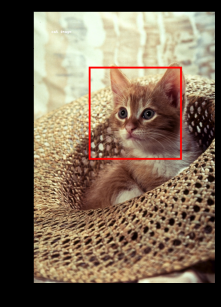
<p><img src="../../assets/images/2026-01-05-22-16-52.png" alt="" /></p>

<p><img src="../../assets/images/2026-01-05-22-17-04.png" alt="" /></p>

<div class="language-python highlighter-rouge"><div class="highlight"><pre class="highlight"><code><span class="kn">from</span> <span class="nn">PIL</span> <span class="kn">import</span> <span class="n">ImageDraw</span><span class="p">,</span> <span class="n">ImageFont</span>

<span class="c1"># Create a copy to draw on
</span><span class="n">image_draw</span> <span class="o">=</span> <span class="n">img</span><span class="p">.</span><span class="n">copy</span><span class="p">()</span>
<span class="n">draw</span> <span class="o">=</span> <span class="n">ImageDraw</span><span class="p">.</span><span class="n">Draw</span><span class="p">(</span><span class="n">image_draw</span><span class="p">)</span>

<span class="c1"># Load a font (You might need to download a .ttf file first)
# Here we set the size to 50 for visibility
</span><span class="k">try</span><span class="p">:</span>
    <span class="n">font</span> <span class="o">=</span> <span class="n">ImageFont</span><span class="p">.</span><span class="n">truetype</span><span class="p">(</span><span class="s">"RobotoSlab-Bold.ttf"</span><span class="p">,</span> <span class="n">size</span><span class="o">=</span><span class="mi">50</span><span class="p">)</span>
<span class="k">except</span><span class="p">:</span>
    <span class="n">font</span> <span class="o">=</span> <span class="n">ImageFont</span><span class="p">.</span><span class="n">load_default</span><span class="p">()</span>

<span class="c1"># Draw a red rectangle (outline only)
# Coords: [left, top, right, bottom]
</span><span class="n">box</span> <span class="o">=</span> <span class="p">[</span><span class="mi">150</span><span class="p">,</span> <span class="mi">150</span><span class="p">,</span> <span class="mi">400</span><span class="p">,</span> <span class="mi">400</span><span class="p">]</span> 
<span class="n">draw</span><span class="p">.</span><span class="n">rectangle</span><span class="p">(</span><span class="n">xy</span><span class="o">=</span><span class="n">box</span><span class="p">,</span> <span class="n">outline</span><span class="o">=</span><span class="s">"red"</span><span class="p">,</span> <span class="n">width</span><span class="o">=</span><span class="mi">5</span><span class="p">)</span>

<span class="c1"># Add Text
</span><span class="n">draw</span><span class="p">.</span><span class="n">text</span><span class="p">(</span><span class="n">xy</span><span class="o">=</span><span class="p">(</span><span class="mi">150</span><span class="p">,</span> <span class="mi">100</span><span class="p">),</span> <span class="n">text</span><span class="o">=</span><span class="s">"Target"</span><span class="p">,</span> <span class="n">fill</span><span class="o">=</span><span class="s">"black"</span><span class="p">,</span> <span class="n">font</span><span class="o">=</span><span class="n">font</span><span class="p">)</span>

<span class="n">plt</span><span class="p">.</span><span class="n">imshow</span><span class="p">(</span><span class="n">image_draw</span><span class="p">)</span>
<span class="n">plt</span><span class="p">.</span><span class="n">show</span><span class="p">()</span>
</code></pre></div></div>

<h1 id="opencv--channel-splitting-and-merge">Opencv : Channel splitting and merge</h1>
<p>OpenCV allows you to dismantle an image into its color components and reassemble them. This is how we can verify the BGR structure.</p>

<div class="language-python highlighter-rouge"><div class="highlight"><pre class="highlight"><code><span class="c1"># Split channels (Remember: B, G, R order)
</span><span class="n">blue</span><span class="p">,</span> <span class="n">green</span><span class="p">,</span> <span class="n">red</span> <span class="o">=</span> <span class="n">cv2</span><span class="p">.</span><span class="n">split</span><span class="p">(</span><span class="n">image_cv</span><span class="p">)</span>

<span class="c1"># If we merge them back in reverse order (R, G, B), 
# we create a valid RGB image manually without cvtColor
</span><span class="n">image_merged</span> <span class="o">=</span> <span class="n">cv2</span><span class="p">.</span><span class="n">merge</span><span class="p">([</span><span class="n">red</span><span class="p">,</span> <span class="n">green</span><span class="p">,</span> <span class="n">blue</span><span class="p">])</span>

<span class="n">plt</span><span class="p">.</span><span class="n">imshow</span><span class="p">(</span><span class="n">image_merged</span><span class="p">)</span>
<span class="n">plt</span><span class="p">.</span><span class="n">show</span><span class="p">()</span>
</code></pre></div></div>]]></content><author><name>Seungwoo Lim</name><email>daniel73919@gmail.com</email></author><category term="multimodal" /><summary type="html"><![CDATA[In the previous post, we covered the fundamentals of digital images and how to load them using PIL. Now, we’re going to step up our game. We will move beyond simple display and look into how computers actually store images in memory, how to manipulate them mathematically using matrix operations, and how to use OpenCV, the industry-standard library for computer vision.]]></summary></entry><entry><title type="html">A Practical Guide to Image Processing with PIL and OpenCV</title><link href="https://danielfh1.github.io/blog/multimodal/PILopencv/" rel="alternate" type="text/html" title="A Practical Guide to Image Processing with PIL and OpenCV" /><published>2026-01-01T00:00:00+00:00</published><updated>2026-01-01T00:00:00+00:00</updated><id>https://danielfh1.github.io/blog/multimodal/PILopencv</id><content type="html" xml:base="https://danielfh1.github.io/blog/multimodal/PILopencv/"><![CDATA[<p>Digital images are fundamental to computer vision and image processing. In this guide, we’ll explore what digital images are, how they’re represented in memory, and how to manipulate them using two popular Python libraries: PIL (Pillow) and OpenCV.</p>

<h2 id="what-is-a-digital-image">What is a Digital Image?</h2>

<p>A digital image can be interpreted as a rectangular array of numbers. When we zoom into any image, we see it’s comprised of a rectangular grid of blocks called <strong>pixels</strong> (picture elements). Each pixel is represented by numerical values called <strong>intensity values</strong>.</p>

<h3 id="grayscale-images">Grayscale Images</h3>

<p>For grayscale images, pixels are represented by a single intensity value ranging from 0 to 255:</p>
<ul>
  <li><strong>0</strong> represents black</li>
  <li><strong>255</strong> represents white</li>
  <li>Values in between represent different shades of gray</li>
</ul>

<p>The <strong>contrast</strong> of an image is determined by the difference between these intensity values. Interestingly, 256 different intensity levels are sufficient to represent images that appear smooth to the human eye.</p>

<p>When we reduce the number of intensity levels, image quality degrades:</p>
<ul>
  <li>256 levels: Full quality image</li>
  <li>32 levels: Still looks similar</li>
  <li>16 levels: Noticeable differences in low-contrast regions</li>
  <li>8 levels: Image looks degraded</li>
  <li>2 levels: Image appears cartoon-like</li>
</ul>

<h3 id="image-structure">Image Structure</h3>

<p>A digital image has:</p>
<ul>
  <li><strong>Height</strong>: Number of rows</li>
  <li><strong>Width</strong>: Number of columns</li>
  <li><strong>Indexing</strong>: Each pixel has row and column coordinates
    <ul>
      <li>Rows start at the top and increase downward</li>
      <li>Columns start at the left and increase rightward</li>
    </ul>
  </li>
</ul>

<h3 id="color-images-rgb">Color Images (RGB)</h3>

<p>Color images are represented as a combination of three channels:</p>
<ul>
  <li><strong>Red channel</strong> (index 0)</li>
  <li><strong>Green channel</strong> (index 1)</li>
  <li><strong>Blue channel</strong> (index 2)</li>
</ul>

<p>If a grayscale image is like a square array, a color image is like a cube with three layers (channels). Each channel has its own set of intensity values from 0 to 255.</p>

<h3 id="image-file-formats">Image File Formats</h3>

<p>Common image formats include:</p>
<ul>
  <li><strong>JPEG</strong> (Joint Photographic Expert Group): Lossy compression, smaller file sizes</li>
  <li><strong>PNG</strong> (Portable Network Graphics): Lossless compression, supports transparency</li>
</ul>

<h2 id="working-with-pil-pillow">Working with PIL (Pillow)</h2>

<p>PIL (Python Imaging Library), now maintained as Pillow, is a popular library for basic image operations in Python.</p>

<h3 id="installation-and-setup">Installation and Setup</h3>

<div class="language-python highlighter-rouge"><div class="highlight"><pre class="highlight"><code><span class="c1"># Install required libraries
</span><span class="err">!</span><span class="n">pip</span> <span class="n">install</span> <span class="n">Pillow</span>
<span class="err">!</span><span class="n">pip</span> <span class="n">install</span> <span class="n">matplotlib</span>

<span class="c1"># Import necessary modules
</span><span class="kn">from</span> <span class="nn">PIL</span> <span class="kn">import</span> <span class="n">Image</span><span class="p">,</span> <span class="n">ImageOps</span>
<span class="kn">import</span> <span class="nn">matplotlib.pyplot</span> <span class="k">as</span> <span class="n">plt</span>
<span class="kn">import</span> <span class="nn">os</span>
<span class="kn">import</span> <span class="nn">numpy</span> <span class="k">as</span> <span class="n">np</span>
</code></pre></div></div>

<h3 id="loading-images">Loading Images</h3>

<div class="language-python highlighter-rouge"><div class="highlight"><pre class="highlight"><code><span class="c1"># Define image path
</span><span class="n">my_image</span> <span class="o">=</span> <span class="s">"lenna.png"</span>
<span class="n">cwd</span> <span class="o">=</span> <span class="n">os</span><span class="p">.</span><span class="n">getcwd</span><span class="p">()</span>
<span class="k">print</span><span class="p">(</span><span class="s">"Current directory: "</span><span class="p">,</span> <span class="n">cwd</span><span class="p">)</span>

<span class="c1"># Use os.path.join() for cross-platform compatibility
# Windows uses backslash (\), Linux uses forward slash (/)
</span><span class="n">image_path</span> <span class="o">=</span> <span class="n">os</span><span class="p">.</span><span class="n">path</span><span class="p">.</span><span class="n">join</span><span class="p">(</span><span class="n">cwd</span><span class="p">,</span> <span class="n">my_image</span><span class="p">)</span>
<span class="k">print</span><span class="p">(</span><span class="s">"Image whole path: "</span><span class="p">,</span> <span class="n">image_path</span><span class="p">)</span>

<span class="c1"># Load the image
</span><span class="n">image</span> <span class="o">=</span> <span class="n">Image</span><span class="p">.</span><span class="nb">open</span><span class="p">(</span><span class="n">image_path</span><span class="p">)</span>
<span class="k">print</span><span class="p">(</span><span class="nb">type</span><span class="p">(</span><span class="n">image</span><span class="p">))</span>  <span class="c1"># &lt;class 'PIL.PngImagePlugin.PngImageFile'&gt;
</span></code></pre></div></div>

<h3 id="displaying-images">Displaying Images</h3>

<div class="language-python highlighter-rouge"><div class="highlight"><pre class="highlight"><code><span class="c1"># Display image using matplotlib
</span><span class="n">plt</span><span class="p">.</span><span class="n">figure</span><span class="p">(</span><span class="n">figsize</span><span class="o">=</span><span class="p">(</span><span class="mi">10</span><span class="p">,</span><span class="mi">10</span><span class="p">))</span>
<span class="n">plt</span><span class="p">.</span><span class="n">imshow</span><span class="p">(</span><span class="n">image</span><span class="p">)</span>
<span class="n">plt</span><span class="p">.</span><span class="n">show</span><span class="p">()</span>
</code></pre></div></div>

<h3 id="image-attributes">Image Attributes</h3>

<div class="language-python highlighter-rouge"><div class="highlight"><pre class="highlight"><code><span class="c1"># Check image properties
</span><span class="k">print</span><span class="p">(</span><span class="s">"Format:"</span><span class="p">,</span> <span class="n">image</span><span class="p">.</span><span class="nb">format</span><span class="p">)</span>    <span class="c1"># File format (e.g., 'PNG')
</span><span class="k">print</span><span class="p">(</span><span class="s">"Size:"</span><span class="p">,</span> <span class="n">image</span><span class="p">.</span><span class="n">size</span><span class="p">)</span>        <span class="c1"># (width, height) in pixels
</span><span class="k">print</span><span class="p">(</span><span class="s">"Mode:"</span><span class="p">,</span> <span class="n">image</span><span class="p">.</span><span class="n">mode</span><span class="p">)</span>        <span class="c1"># Color space (e.g., 'RGB')
</span></code></pre></div></div>

<h3 id="grayscale-conversion">Grayscale Conversion</h3>

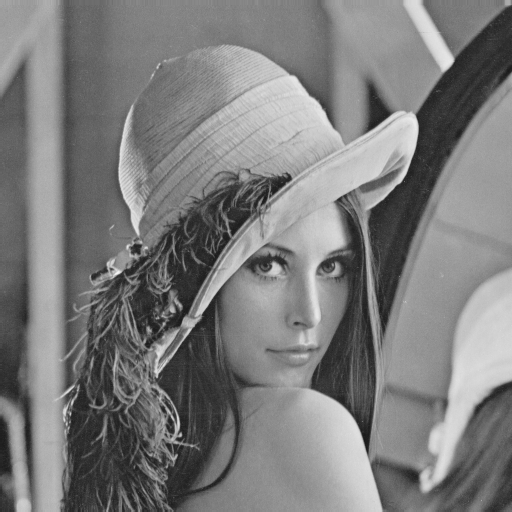
<p><img src="../../assets/images/2026-01-02-00-11-40.png" alt="" /></p>

<div class="language-python highlighter-rouge"><div class="highlight"><pre class="highlight"><code><span class="c1"># Convert to grayscale to reduce file size
</span><span class="n">image_gray</span> <span class="o">=</span> <span class="n">ImageOps</span><span class="p">.</span><span class="n">grayscale</span><span class="p">(</span><span class="n">image</span><span class="p">)</span>
<span class="k">print</span><span class="p">(</span><span class="s">"Grayscale mode:"</span><span class="p">,</span> <span class="n">image_gray</span><span class="p">.</span><span class="n">mode</span><span class="p">)</span>  <span class="c1"># 'L' for luminance
</span>
<span class="c1"># Display grayscale image
</span><span class="n">plt</span><span class="p">.</span><span class="n">figure</span><span class="p">(</span><span class="n">figsize</span><span class="o">=</span><span class="p">(</span><span class="mi">10</span><span class="p">,</span><span class="mi">10</span><span class="p">))</span>
<span class="n">plt</span><span class="p">.</span><span class="n">imshow</span><span class="p">(</span><span class="n">image_gray</span><span class="p">,</span> <span class="n">cmap</span><span class="o">=</span><span class="s">'gray'</span><span class="p">)</span>
<span class="n">plt</span><span class="p">.</span><span class="n">show</span><span class="p">()</span>
</code></pre></div></div>

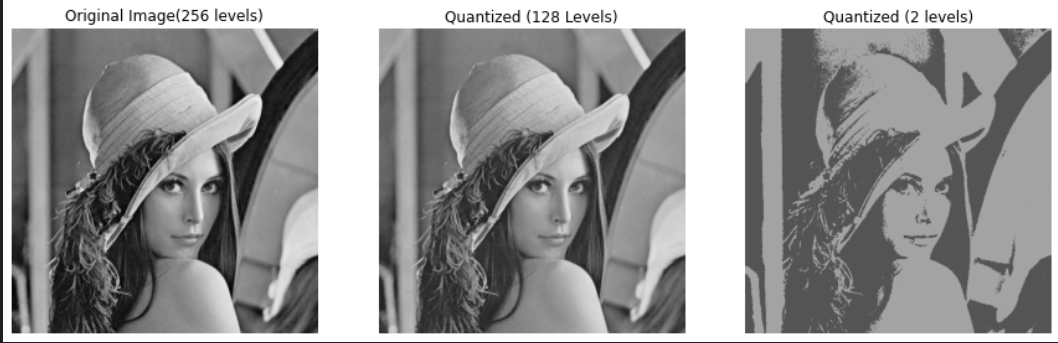
<h3 id="quantization">Quantization</h3>

<p><img src="../../assets/images/2026-01-02-00-20-21.png" alt="" /></p>

<p>Quantization reduces the number of intensity levels, which can significantly reduce file size:</p>

<div class="language-python highlighter-rouge"><div class="highlight"><pre class="highlight"><code><span class="c1"># Reduce intensity levels
</span><span class="n">quantized_drastic</span> <span class="o">=</span> <span class="n">image_gray</span><span class="p">.</span><span class="n">quantize</span><span class="p">(</span><span class="mi">2</span><span class="p">)</span>      <span class="c1"># Only 2 levels (black/white)
</span><span class="n">quantized_image</span> <span class="o">=</span> <span class="n">image_gray</span><span class="p">.</span><span class="n">quantize</span><span class="p">(</span><span class="mi">256</span><span class="o">//</span><span class="mi">2</span><span class="p">)</span>   <span class="c1"># 128 levels
</span>
<span class="c1"># Compare different quantization levels
</span><span class="n">fig</span><span class="p">,</span> <span class="n">axes</span> <span class="o">=</span> <span class="n">plt</span><span class="p">.</span><span class="n">subplots</span><span class="p">(</span><span class="mi">1</span><span class="p">,</span> <span class="mi">3</span><span class="p">,</span> <span class="n">figsize</span><span class="o">=</span><span class="p">(</span><span class="mi">15</span><span class="p">,</span><span class="mi">5</span><span class="p">))</span>

<span class="n">axes</span><span class="p">[</span><span class="mi">0</span><span class="p">].</span><span class="n">imshow</span><span class="p">(</span><span class="n">image_gray</span><span class="p">,</span> <span class="n">cmap</span><span class="o">=</span><span class="s">'gray'</span><span class="p">)</span>
<span class="n">axes</span><span class="p">[</span><span class="mi">0</span><span class="p">].</span><span class="n">set_title</span><span class="p">(</span><span class="s">"Original Image (256 levels)"</span><span class="p">)</span>
<span class="n">axes</span><span class="p">[</span><span class="mi">0</span><span class="p">].</span><span class="n">axis</span><span class="p">(</span><span class="s">'off'</span><span class="p">)</span>

<span class="n">axes</span><span class="p">[</span><span class="mi">1</span><span class="p">].</span><span class="n">imshow</span><span class="p">(</span><span class="n">quantized_image</span><span class="p">.</span><span class="n">convert</span><span class="p">(</span><span class="s">'RGB'</span><span class="p">))</span>
<span class="n">axes</span><span class="p">[</span><span class="mi">1</span><span class="p">].</span><span class="n">set_title</span><span class="p">(</span><span class="s">"Quantized (128 Levels)"</span><span class="p">)</span>
<span class="n">axes</span><span class="p">[</span><span class="mi">1</span><span class="p">].</span><span class="n">axis</span><span class="p">(</span><span class="s">'off'</span><span class="p">)</span>

<span class="n">axes</span><span class="p">[</span><span class="mi">2</span><span class="p">].</span><span class="n">imshow</span><span class="p">(</span><span class="n">quantized_drastic</span><span class="p">.</span><span class="n">convert</span><span class="p">(</span><span class="s">'RGB'</span><span class="p">))</span>
<span class="n">axes</span><span class="p">[</span><span class="mi">2</span><span class="p">].</span><span class="n">set_title</span><span class="p">(</span><span class="s">"Quantized (2 levels)"</span><span class="p">)</span>
<span class="n">axes</span><span class="p">[</span><span class="mi">2</span><span class="p">].</span><span class="n">axis</span><span class="p">(</span><span class="s">'off'</span><span class="p">)</span>

<span class="n">plt</span><span class="p">.</span><span class="n">show</span><span class="p">()</span>
</code></pre></div></div>

<p>The <code class="language-plaintext highlighter-rouge">convert('RGB')</code> method converts the quantized image back to RGB mode for display purposes.</p>

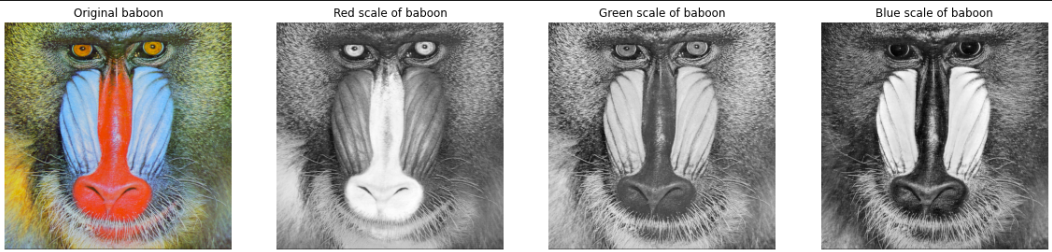
<h3 id="working-with-color-channels">Working with Color Channels</h3>

<p><img src="../../assets/images/2026-01-02-00-21-20.png" alt="" /></p>

<div class="language-python highlighter-rouge"><div class="highlight"><pre class="highlight"><code><span class="c1"># Load a color image
</span><span class="n">baboon</span> <span class="o">=</span> <span class="n">Image</span><span class="p">.</span><span class="nb">open</span><span class="p">(</span><span class="s">'baboon.png'</span><span class="p">)</span>

<span class="c1"># Split into separate R, G, B channels
</span><span class="n">red</span><span class="p">,</span> <span class="n">green</span><span class="p">,</span> <span class="n">blue</span> <span class="o">=</span> <span class="n">baboon</span><span class="p">.</span><span class="n">split</span><span class="p">()</span>

<span class="c1"># Visualize each channel
</span><span class="n">fig</span><span class="p">,</span> <span class="n">axes</span> <span class="o">=</span> <span class="n">plt</span><span class="p">.</span><span class="n">subplots</span><span class="p">(</span><span class="mi">1</span><span class="p">,</span> <span class="mi">4</span><span class="p">,</span> <span class="n">figsize</span><span class="o">=</span><span class="p">(</span><span class="mi">20</span><span class="p">,</span><span class="mi">5</span><span class="p">))</span>

<span class="n">axes</span><span class="p">[</span><span class="mi">0</span><span class="p">].</span><span class="n">imshow</span><span class="p">(</span><span class="n">baboon</span><span class="p">)</span>
<span class="n">axes</span><span class="p">[</span><span class="mi">0</span><span class="p">].</span><span class="n">set_title</span><span class="p">(</span><span class="s">"Original baboon"</span><span class="p">)</span>
<span class="n">axes</span><span class="p">[</span><span class="mi">0</span><span class="p">].</span><span class="n">axis</span><span class="p">(</span><span class="s">'off'</span><span class="p">)</span>

<span class="n">axes</span><span class="p">[</span><span class="mi">1</span><span class="p">].</span><span class="n">imshow</span><span class="p">(</span><span class="n">red</span><span class="p">,</span> <span class="n">cmap</span><span class="o">=</span><span class="s">'gray'</span><span class="p">)</span>
<span class="n">axes</span><span class="p">[</span><span class="mi">1</span><span class="p">].</span><span class="n">set_title</span><span class="p">(</span><span class="s">"Red channel"</span><span class="p">)</span>
<span class="n">axes</span><span class="p">[</span><span class="mi">1</span><span class="p">].</span><span class="n">axis</span><span class="p">(</span><span class="s">'off'</span><span class="p">)</span>

<span class="n">axes</span><span class="p">[</span><span class="mi">2</span><span class="p">].</span><span class="n">imshow</span><span class="p">(</span><span class="n">green</span><span class="p">,</span> <span class="n">cmap</span><span class="o">=</span><span class="s">'gray'</span><span class="p">)</span>
<span class="n">axes</span><span class="p">[</span><span class="mi">2</span><span class="p">].</span><span class="n">set_title</span><span class="p">(</span><span class="s">"Green channel"</span><span class="p">)</span>
<span class="n">axes</span><span class="p">[</span><span class="mi">2</span><span class="p">].</span><span class="n">axis</span><span class="p">(</span><span class="s">'off'</span><span class="p">)</span>

<span class="n">axes</span><span class="p">[</span><span class="mi">3</span><span class="p">].</span><span class="n">imshow</span><span class="p">(</span><span class="n">blue</span><span class="p">,</span> <span class="n">cmap</span><span class="o">=</span><span class="s">'gray'</span><span class="p">)</span>
<span class="n">axes</span><span class="p">[</span><span class="mi">3</span><span class="p">].</span><span class="n">set_title</span><span class="p">(</span><span class="s">"Blue channel"</span><span class="p">)</span>
<span class="n">axes</span><span class="p">[</span><span class="mi">3</span><span class="p">].</span><span class="n">axis</span><span class="p">(</span><span class="s">'off'</span><span class="p">)</span>

<span class="n">plt</span><span class="p">.</span><span class="n">show</span><span class="p">()</span>
</code></pre></div></div>

<p>Note: In grayscale channel visualizations, brighter regions indicate higher intensity in that particular color channel.</p>

<h3 id="converting-pil-images-to-numpy-arrays">Converting PIL Images to NumPy Arrays</h3>

<div class="language-python highlighter-rouge"><div class="highlight"><pre class="highlight"><code><span class="c1"># Convert PIL image to NumPy array
</span><span class="n">image_array</span> <span class="o">=</span> <span class="n">np</span><span class="p">.</span><span class="n">array</span><span class="p">(</span><span class="n">image</span><span class="p">)</span>
<span class="k">print</span><span class="p">(</span><span class="s">"Type:"</span><span class="p">,</span> <span class="nb">type</span><span class="p">(</span><span class="n">image_array</span><span class="p">))</span>  <span class="c1"># &lt;class 'numpy.ndarray'&gt;
</span><span class="k">print</span><span class="p">(</span><span class="s">"Shape:"</span><span class="p">,</span> <span class="n">image_array</span><span class="p">.</span><span class="n">shape</span><span class="p">)</span>  <span class="c1"># (height, width, channels)
</span><span class="k">print</span><span class="p">(</span><span class="s">"Min value:"</span><span class="p">,</span> <span class="n">image_array</span><span class="p">.</span><span class="nb">min</span><span class="p">())</span>
<span class="k">print</span><span class="p">(</span><span class="s">"Max value:"</span><span class="p">,</span> <span class="n">image_array</span><span class="p">.</span><span class="nb">max</span><span class="p">())</span>
</code></pre></div></div>

<p>NumPy arrays provide more flexibility for mathematical operations and are compatible with many computer vision libraries.</p>

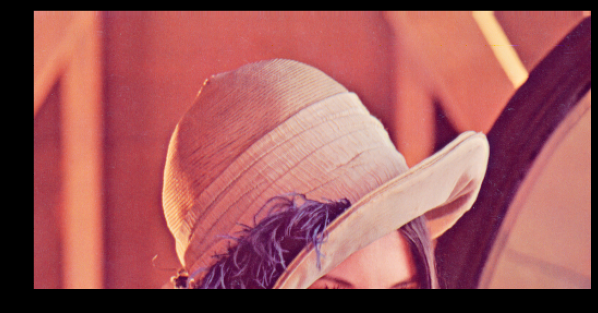
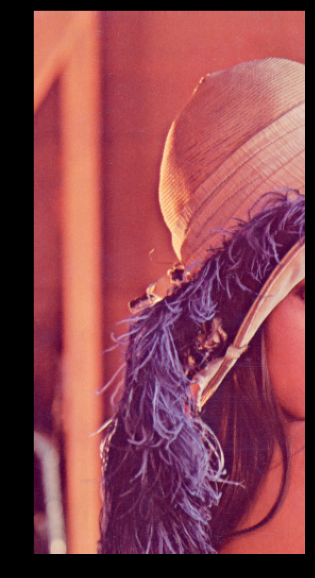
<h3 id="image-slicing-and-cropping">Image Slicing and Cropping</h3>

<p><img src="../../assets/images/2026-01-02-00-13-35.png" alt="" /></p>

<div class="language-python highlighter-rouge"><div class="highlight"><pre class="highlight"><code><span class="c1"># Crop vertically (keep top 256 rows)
</span><span class="n">rows</span> <span class="o">=</span> <span class="mi">256</span>
<span class="n">plt</span><span class="p">.</span><span class="n">figure</span><span class="p">(</span><span class="n">figsize</span><span class="o">=</span><span class="p">(</span><span class="mi">10</span><span class="p">,</span><span class="mi">10</span><span class="p">))</span>
<span class="n">plt</span><span class="p">.</span><span class="n">imshow</span><span class="p">(</span><span class="n">image_array</span><span class="p">[</span><span class="mi">0</span><span class="p">:</span><span class="n">rows</span><span class="p">,</span> <span class="p">:,</span> <span class="p">:])</span>
<span class="n">plt</span><span class="p">.</span><span class="n">show</span><span class="p">()</span>
</code></pre></div></div>

<p><img src="../../assets/images/2026-01-02-00-14-04.png" alt="" /></p>
<div class="language-python highlighter-rouge"><div class="highlight"><pre class="highlight"><code><span class="c1"># Crop horizontally (keep left 256 columns)
</span><span class="n">columns</span> <span class="o">=</span> <span class="mi">256</span>
<span class="n">plt</span><span class="p">.</span><span class="n">figure</span><span class="p">(</span><span class="n">figsize</span><span class="o">=</span><span class="p">(</span><span class="mi">10</span><span class="p">,</span><span class="mi">10</span><span class="p">))</span>
<span class="n">plt</span><span class="p">.</span><span class="n">imshow</span><span class="p">(</span><span class="n">image_array</span><span class="p">[:,</span> <span class="mi">0</span><span class="p">:</span><span class="n">columns</span><span class="p">,</span> <span class="p">:])</span>
<span class="n">plt</span><span class="p">.</span><span class="n">show</span><span class="p">()</span>
</code></pre></div></div>

<p>The slicing notation <code class="language-plaintext highlighter-rouge">[row_start:row_end, col_start:col_end, :]</code> allows you to extract specific regions:</p>
<ul>
  <li>First dimension: row indices (vertical)</li>
  <li>Second dimension: column indices (horizontal)</li>
  <li>Third dimension: color channels (use <code class="language-plaintext highlighter-rouge">:</code> to keep all channels)</li>
</ul>

<h3 id="the-importance-of-copying">The Importance of Copying</h3>

<p>When working with arrays, understanding the difference between reference and copy is crucial:</p>

<div class="language-python highlighter-rouge"><div class="highlight"><pre class="highlight"><code><span class="c1"># Create a proper copy
</span><span class="n">A</span> <span class="o">=</span> <span class="n">image_array</span><span class="p">.</span><span class="n">copy</span><span class="p">()</span>

<span class="c1"># This creates a reference, NOT a copy
</span><span class="n">B</span> <span class="o">=</span> <span class="n">A</span>

<span class="c1"># Modifying A will also modify B (they point to the same memory)
</span><span class="n">A</span><span class="p">[:,</span> <span class="p">:,</span> <span class="p">:]</span> <span class="o">=</span> <span class="mi">0</span>

<span class="n">plt</span><span class="p">.</span><span class="n">figure</span><span class="p">(</span><span class="n">figsize</span><span class="o">=</span><span class="p">(</span><span class="mi">10</span><span class="p">,</span><span class="mi">10</span><span class="p">))</span>
<span class="n">plt</span><span class="p">.</span><span class="n">imshow</span><span class="p">(</span><span class="n">B</span><span class="p">)</span>  <span class="c1"># B is also all black now!
</span><span class="n">plt</span><span class="p">.</span><span class="n">show</span><span class="p">()</span>
</code></pre></div></div>

<p>Always use <code class="language-plaintext highlighter-rouge">.copy()</code> when you want to preserve the original image while making modifications.</p>

<h3 id="channel-manipulation">Channel Manipulation</h3>

<div class="language-python highlighter-rouge"><div class="highlight"><pre class="highlight"><code><span class="c1"># Keep only the red channel
</span><span class="n">baboon_array</span> <span class="o">=</span> <span class="n">np</span><span class="p">.</span><span class="n">array</span><span class="p">(</span><span class="n">baboon</span><span class="p">)</span>
<span class="n">baboon_red</span> <span class="o">=</span> <span class="n">baboon_array</span><span class="p">.</span><span class="n">copy</span><span class="p">()</span>

<span class="n">baboon_red</span><span class="p">[:,</span> <span class="p">:,</span> <span class="mi">1</span><span class="p">]</span> <span class="o">=</span> <span class="mi">0</span>  <span class="c1"># Remove green channel
</span><span class="n">baboon_red</span><span class="p">[:,</span> <span class="p">:,</span> <span class="mi">2</span><span class="p">]</span> <span class="o">=</span> <span class="mi">0</span>  <span class="c1"># Remove blue channel
</span>
<span class="n">fig</span><span class="p">,</span> <span class="n">axes</span> <span class="o">=</span> <span class="n">plt</span><span class="p">.</span><span class="n">subplots</span><span class="p">(</span><span class="mi">1</span><span class="p">,</span> <span class="mi">2</span><span class="p">,</span> <span class="n">figsize</span><span class="o">=</span><span class="p">(</span><span class="mi">10</span><span class="p">,</span><span class="mi">5</span><span class="p">))</span>

<span class="n">axes</span><span class="p">[</span><span class="mi">0</span><span class="p">].</span><span class="n">imshow</span><span class="p">(</span><span class="n">baboon</span><span class="p">)</span>
<span class="n">axes</span><span class="p">[</span><span class="mi">0</span><span class="p">].</span><span class="n">set_title</span><span class="p">(</span><span class="s">"Original baboon"</span><span class="p">)</span>
<span class="n">axes</span><span class="p">[</span><span class="mi">0</span><span class="p">].</span><span class="n">axis</span><span class="p">(</span><span class="s">'off'</span><span class="p">)</span>

<span class="n">axes</span><span class="p">[</span><span class="mi">1</span><span class="p">].</span><span class="n">imshow</span><span class="p">(</span><span class="n">baboon_red</span><span class="p">)</span>
<span class="n">axes</span><span class="p">[</span><span class="mi">1</span><span class="p">].</span><span class="n">set_title</span><span class="p">(</span><span class="s">"Red channel only"</span><span class="p">)</span>
<span class="n">axes</span><span class="p">[</span><span class="mi">1</span><span class="p">].</span><span class="n">axis</span><span class="p">(</span><span class="s">'off'</span><span class="p">)</span>

<span class="n">plt</span><span class="p">.</span><span class="n">show</span><span class="p">()</span>
</code></pre></div></div>

<h2 id="working-with-opencv">Working with OpenCV</h2>

<p>OpenCV (Open Source Computer Vision Library) is a more powerful library for computer vision tasks, offering extensive functionality beyond basic image manipulation.</p>

<h3 id="installation-and-setup-1">Installation and Setup</h3>

<div class="language-python highlighter-rouge"><div class="highlight"><pre class="highlight"><code><span class="c1"># Install OpenCV
</span><span class="err">!</span><span class="n">pip</span> <span class="n">install</span> <span class="n">opencv</span><span class="o">-</span><span class="n">python</span><span class="o">-</span><span class="n">headless</span>
<span class="err">!</span><span class="n">pip</span> <span class="n">install</span> <span class="n">matplotlib</span>

<span class="c1"># Import OpenCV
</span><span class="kn">import</span> <span class="nn">cv2</span>
<span class="kn">import</span> <span class="nn">matplotlib.pyplot</span> <span class="k">as</span> <span class="n">plt</span>
</code></pre></div></div>

<h3 id="loading-images-with-opencv">Loading Images with OpenCV</h3>

<div class="language-python highlighter-rouge"><div class="highlight"><pre class="highlight"><code><span class="c1"># Load image (returns NumPy array directly)
</span><span class="n">image</span> <span class="o">=</span> <span class="n">cv2</span><span class="p">.</span><span class="n">imread</span><span class="p">(</span><span class="s">"lenna.png"</span><span class="p">)</span>
<span class="k">print</span><span class="p">(</span><span class="nb">type</span><span class="p">(</span><span class="n">image</span><span class="p">))</span>  <span class="c1"># &lt;class 'numpy.ndarray'&gt;
</span><span class="k">print</span><span class="p">(</span><span class="s">"Shape:"</span><span class="p">,</span> <span class="n">image</span><span class="p">.</span><span class="n">shape</span><span class="p">)</span>  <span class="c1"># (height, width, channels)
</span></code></pre></div></div>

<h3 id="critical-difference-bgr-vs-rgb">Critical Difference: BGR vs RGB</h3>

<p>OpenCV uses BGR (Blue-Green-Red) color order instead of RGB:</p>

<div class="language-python highlighter-rouge"><div class="highlight"><pre class="highlight"><code><span class="c1"># Display without conversion shows wrong colors
</span><span class="n">plt</span><span class="p">.</span><span class="n">figure</span><span class="p">(</span><span class="n">figsize</span><span class="o">=</span><span class="p">(</span><span class="mi">10</span><span class="p">,</span><span class="mi">10</span><span class="p">))</span>
<span class="n">plt</span><span class="p">.</span><span class="n">imshow</span><span class="p">(</span><span class="n">image</span><span class="p">)</span>  <span class="c1"># Colors look wrong!
</span><span class="n">plt</span><span class="p">.</span><span class="n">show</span><span class="p">()</span>

<span class="c1"># Convert BGR to RGB for proper display
</span><span class="n">new_image</span> <span class="o">=</span> <span class="n">cv2</span><span class="p">.</span><span class="n">cvtColor</span><span class="p">(</span><span class="n">image</span><span class="p">,</span> <span class="n">cv2</span><span class="p">.</span><span class="n">COLOR_BGR2RGB</span><span class="p">)</span>

<span class="n">plt</span><span class="p">.</span><span class="n">figure</span><span class="p">(</span><span class="n">figsize</span><span class="o">=</span><span class="p">(</span><span class="mi">10</span><span class="p">,</span><span class="mi">10</span><span class="p">))</span>
<span class="n">plt</span><span class="p">.</span><span class="n">imshow</span><span class="p">(</span><span class="n">new_image</span><span class="p">)</span>  <span class="c1"># Now colors are correct
</span><span class="n">plt</span><span class="p">.</span><span class="n">show</span><span class="p">()</span>
</code></pre></div></div>

<p>This is the main difference between PIL and OpenCV:</p>
<ul>
  <li><strong>PIL</strong>: Uses RGB order</li>
  <li><strong>OpenCV</strong>: Uses BGR order</li>
  <li><strong>Matplotlib</strong>: Expects RGB order for display</li>
</ul>

<p>Always convert OpenCV images to RGB before displaying with matplotlib.</p>

<h3 id="grayscale-conversion-in-opencv">Grayscale Conversion in OpenCV</h3>

<div class="language-python highlighter-rouge"><div class="highlight"><pre class="highlight"><code><span class="c1"># Convert to grayscale
</span><span class="n">image_gray</span> <span class="o">=</span> <span class="n">cv2</span><span class="p">.</span><span class="n">cvtColor</span><span class="p">(</span><span class="n">image</span><span class="p">,</span> <span class="n">cv2</span><span class="p">.</span><span class="n">COLOR_BGR2GRAY</span><span class="p">)</span>
<span class="k">print</span><span class="p">(</span><span class="s">"Grayscale shape:"</span><span class="p">,</span> <span class="n">image_gray</span><span class="p">.</span><span class="n">shape</span><span class="p">)</span>  <span class="c1"># (height, width) - only 2D
</span>
<span class="n">plt</span><span class="p">.</span><span class="n">figure</span><span class="p">(</span><span class="n">figsize</span><span class="o">=</span><span class="p">(</span><span class="mi">10</span><span class="p">,</span><span class="mi">10</span><span class="p">))</span>
<span class="n">plt</span><span class="p">.</span><span class="n">imshow</span><span class="p">(</span><span class="n">image_gray</span><span class="p">,</span> <span class="n">cmap</span><span class="o">=</span><span class="s">'gray'</span><span class="p">)</span>
<span class="n">plt</span><span class="p">.</span><span class="n">show</span><span class="p">()</span>
</code></pre></div></div>

<p>You can also load images as grayscale directly:</p>

<div class="language-python highlighter-rouge"><div class="highlight"><pre class="highlight"><code><span class="c1"># Load as grayscale from the start
</span><span class="n">im_gray</span> <span class="o">=</span> <span class="n">cv2</span><span class="p">.</span><span class="n">imread</span><span class="p">(</span><span class="s">'barbara.png'</span><span class="p">,</span> <span class="n">cv2</span><span class="p">.</span><span class="n">IMREAD_GRAYSCALE</span><span class="p">)</span>

<span class="n">plt</span><span class="p">.</span><span class="n">figure</span><span class="p">(</span><span class="n">figsize</span><span class="o">=</span><span class="p">(</span><span class="mi">10</span><span class="p">,</span><span class="mi">10</span><span class="p">))</span>
<span class="n">plt</span><span class="p">.</span><span class="n">imshow</span><span class="p">(</span><span class="n">im_gray</span><span class="p">,</span> <span class="n">cmap</span><span class="o">=</span><span class="s">'gray'</span><span class="p">)</span>  <span class="c1"># Must specify cmap='gray' for grayscale
</span><span class="n">plt</span><span class="p">.</span><span class="n">show</span><span class="p">()</span>
</code></pre></div></div>

<p>Note: Without <code class="language-plaintext highlighter-rouge">cmap='gray'</code>, matplotlib will apply a random colormap to 2D arrays.</p>

<h3 id="channel-slicing-in-opencv">Channel Slicing in OpenCV</h3>

<p>Remember that OpenCV uses BGR order:</p>

<div class="language-python highlighter-rouge"><div class="highlight"><pre class="highlight"><code><span class="c1"># Load image
</span><span class="n">baboon</span> <span class="o">=</span> <span class="n">cv2</span><span class="p">.</span><span class="n">imread</span><span class="p">(</span><span class="s">'baboon.png'</span><span class="p">)</span>

<span class="c1"># Extract individual channels (BGR order!)
</span><span class="n">blue</span> <span class="o">=</span> <span class="n">baboon</span><span class="p">[:,</span> <span class="p">:,</span> <span class="mi">0</span><span class="p">]</span>   <span class="c1"># Blue channel
</span><span class="n">green</span> <span class="o">=</span> <span class="n">baboon</span><span class="p">[:,</span> <span class="p">:,</span> <span class="mi">1</span><span class="p">]</span>  <span class="c1"># Green channel
</span><span class="n">red</span> <span class="o">=</span> <span class="n">baboon</span><span class="p">[:,</span> <span class="p">:,</span> <span class="mi">2</span><span class="p">]</span>    <span class="c1"># Red channel
</span>
<span class="c1"># Display all channels
</span><span class="n">fig</span><span class="p">,</span> <span class="n">axes</span> <span class="o">=</span> <span class="n">plt</span><span class="p">.</span><span class="n">subplots</span><span class="p">(</span><span class="mi">1</span><span class="p">,</span> <span class="mi">3</span><span class="p">,</span> <span class="n">figsize</span><span class="o">=</span><span class="p">(</span><span class="mi">15</span><span class="p">,</span><span class="mi">5</span><span class="p">))</span>

<span class="n">axes</span><span class="p">[</span><span class="mi">0</span><span class="p">].</span><span class="n">imshow</span><span class="p">(</span><span class="n">blue</span><span class="p">,</span> <span class="n">cmap</span><span class="o">=</span><span class="s">'gray'</span><span class="p">)</span>
<span class="n">axes</span><span class="p">[</span><span class="mi">0</span><span class="p">].</span><span class="n">set_title</span><span class="p">(</span><span class="s">"Blue channel"</span><span class="p">)</span>

<span class="n">axes</span><span class="p">[</span><span class="mi">1</span><span class="p">].</span><span class="n">imshow</span><span class="p">(</span><span class="n">green</span><span class="p">,</span> <span class="n">cmap</span><span class="o">=</span><span class="s">'gray'</span><span class="p">)</span>
<span class="n">axes</span><span class="p">[</span><span class="mi">1</span><span class="p">].</span><span class="n">set_title</span><span class="p">(</span><span class="s">"Green channel"</span><span class="p">)</span>

<span class="n">axes</span><span class="p">[</span><span class="mi">2</span><span class="p">].</span><span class="n">imshow</span><span class="p">(</span><span class="n">red</span><span class="p">,</span> <span class="n">cmap</span><span class="o">=</span><span class="s">'gray'</span><span class="p">)</span>
<span class="n">axes</span><span class="p">[</span><span class="mi">2</span><span class="p">].</span><span class="n">set_title</span><span class="p">(</span><span class="s">"Red channel"</span><span class="p">)</span>

<span class="n">plt</span><span class="p">.</span><span class="n">show</span><span class="p">()</span>
</code></pre></div></div>

<h3 id="isolating-color-channels">Isolating Color Channels</h3>

<p>Method 1: Working directly with BGR (then convert for display):</p>

<div class="language-python highlighter-rouge"><div class="highlight"><pre class="highlight"><code><span class="n">baboon_red</span> <span class="o">=</span> <span class="n">baboon</span><span class="p">.</span><span class="n">copy</span><span class="p">()</span>
<span class="n">baboon_red</span><span class="p">[:,</span> <span class="p">:,</span> <span class="mi">0</span><span class="p">]</span> <span class="o">=</span> <span class="mi">0</span>  <span class="c1"># Remove blue
</span><span class="n">baboon_red</span><span class="p">[:,</span> <span class="p">:,</span> <span class="mi">1</span><span class="p">]</span> <span class="o">=</span> <span class="mi">0</span>  <span class="c1"># Remove green
</span>
<span class="n">plt</span><span class="p">.</span><span class="n">figure</span><span class="p">(</span><span class="n">figsize</span><span class="o">=</span><span class="p">(</span><span class="mi">10</span><span class="p">,</span><span class="mi">10</span><span class="p">))</span>
<span class="n">plt</span><span class="p">.</span><span class="n">imshow</span><span class="p">(</span><span class="n">cv2</span><span class="p">.</span><span class="n">cvtColor</span><span class="p">(</span><span class="n">baboon_red</span><span class="p">,</span> <span class="n">cv2</span><span class="p">.</span><span class="n">COLOR_BGR2RGB</span><span class="p">))</span>
<span class="n">plt</span><span class="p">.</span><span class="n">show</span><span class="p">()</span>
</code></pre></div></div>

<p>Method 2: Convert to RGB first, then manipulate:</p>

<div class="language-python highlighter-rouge"><div class="highlight"><pre class="highlight"><code><span class="n">baboon</span> <span class="o">=</span> <span class="n">cv2</span><span class="p">.</span><span class="n">imread</span><span class="p">(</span><span class="s">'baboon.png'</span><span class="p">)</span>
<span class="n">baboon_rgb</span> <span class="o">=</span> <span class="n">cv2</span><span class="p">.</span><span class="n">cvtColor</span><span class="p">(</span><span class="n">baboon</span><span class="p">,</span> <span class="n">cv2</span><span class="p">.</span><span class="n">COLOR_BGR2RGB</span><span class="p">)</span>

<span class="n">baboon_blue</span> <span class="o">=</span> <span class="n">baboon_rgb</span><span class="p">.</span><span class="n">copy</span><span class="p">()</span>
<span class="n">baboon_blue</span><span class="p">[:,</span> <span class="p">:,</span> <span class="mi">0</span><span class="p">]</span> <span class="o">=</span> <span class="mi">0</span>  <span class="c1"># Remove red (now in RGB order)
</span><span class="n">baboon_blue</span><span class="p">[:,</span> <span class="p">:,</span> <span class="mi">1</span><span class="p">]</span> <span class="o">=</span> <span class="mi">0</span>  <span class="c1"># Remove green
</span>
<span class="n">plt</span><span class="p">.</span><span class="n">figure</span><span class="p">(</span><span class="n">figsize</span><span class="o">=</span><span class="p">(</span><span class="mi">10</span><span class="p">,</span><span class="mi">10</span><span class="p">))</span>
<span class="n">plt</span><span class="p">.</span><span class="n">imshow</span><span class="p">(</span><span class="n">baboon_blue</span><span class="p">)</span>
<span class="n">plt</span><span class="p">.</span><span class="n">show</span><span class="p">()</span>
</code></pre></div></div>

<h2 id="pil-vs-opencv">PIL vs OpenCV</h2>

<table>
  <thead>
    <tr>
      <th>Feature</th>
      <th>PIL/Pillow</th>
      <th>OpenCV</th>
    </tr>
  </thead>
  <tbody>
    <tr>
      <td><strong>Color Order</strong></td>
      <td>RGB</td>
      <td>BGR</td>
    </tr>
    <tr>
      <td><strong>Loading</strong></td>
      <td><code class="language-plaintext highlighter-rouge">Image.open()</code> returns PIL object</td>
      <td><code class="language-plaintext highlighter-rouge">cv2.imread()</code> returns NumPy array</td>
    </tr>
    <tr>
      <td><strong>Ease of Use</strong></td>
      <td>Simpler, more intuitive</td>
      <td>More complex but powerful</td>
    </tr>
    <tr>
      <td><strong>Functionality</strong></td>
      <td>Basic image operations</td>
      <td>Extensive CV algorithms</td>
    </tr>
    <tr>
      <td><strong>Array Type</strong></td>
      <td>Needs conversion to NumPy</td>
      <td>Native NumPy arrays</td>
    </tr>
    <tr>
      <td><strong>Best For</strong></td>
      <td>Simple tasks, quick prototypes</td>
      <td>Advanced CV, real-time processing</td>
    </tr>
  </tbody>
</table>]]></content><author><name>Seungwoo Lim</name><email>daniel73919@gmail.com</email></author><category term="multimodal" /><summary type="html"><![CDATA[Digital images are fundamental to computer vision and image processing. In this guide, we’ll explore what digital images are, how they’re represented in memory, and how to manipulate them using two popular Python libraries: PIL (Pillow) and OpenCV.]]></summary></entry><entry><title type="html">[Data Structure] Understanding ADT(Abstract Data Types)</title><link href="https://danielfh1.github.io/blog/algorithms/ADT/" rel="alternate" type="text/html" title="[Data Structure] Understanding ADT(Abstract Data Types)" /><published>2025-12-29T00:00:00+00:00</published><updated>2025-12-29T00:00:00+00:00</updated><id>https://danielfh1.github.io/blog/algorithms/ADT</id><content type="html" xml:base="https://danielfh1.github.io/blog/algorithms/ADT/"><![CDATA[<h2 id="what-are-data-structures">What Are Data Structures?</h2>

<p>A data structure is a way of organizing and storing data so we can work with it efficiently. Different types of data require different organizational strategies—think of how a dictionary organizes words alphabetically for quick lookup, or how a map uses geometric layouts to represent locations and routes.</p>

<p>When we study data structures, we typically approach them from two angles:</p>

<ol>
  <li><strong>Abstract Data Types (ADTs)</strong>: The mathematical and logical perspective</li>
  <li><strong>Implementation</strong>: How we actually build them in code</li>
</ol>

<h2 id="abstract-data-types-adts">Abstract Data Types (ADTs)</h2>

<p>An ADT defines <em>what</em> operations a data structure can perform without specifying <em>how</em> those operations work under the hood. It’s like knowing you can turn a TV on and off, change channels, and adjust volume—without needing to understand the internal circuitry.</p>

<h3 id="adt-vs-data-structure">ADT vs. Data Structure</h3>

<p>Let’s clarify the distinction with an example:</p>

<p><strong>List ADT</strong> (the “what”):</p>
<ul>
  <li>Store elements in sequential order</li>
  <li>Insert elements at any position</li>
  <li>Remove elements from any position</li>
  <li>Access and modify elements by position</li>
  <li>Track the number of stored elements</li>
</ul>

<p>This is abstract—we’re describing capabilities, not implementations.</p>

<p><strong>List Implementation</strong> (the “how”):</p>
<ul>
  <li>Array-based list</li>
  <li>Linked list</li>
  <li>Dynamic array</li>
  <li>And more…</li>
</ul>

<p>These are concrete implementations of the same ADT concept.</p>

<blockquote>
  <p><strong>Note</strong>: In C, there’s no built-in stack implementation. You have to build one yourself using arrays or linked lists—that’s the implementation part.</p>
</blockquote>

<h2 id="practical-example-implementing-a-list-with-arrays">Practical Example: Implementing a List with Arrays</h2>

<p>Let’s see what happens when we implement the List ADT using an array:</p>
<div class="language-plaintext highlighter-rouge"><div class="highlight"><pre class="highlight"><code>Initial state:
[2][4][3][7][ ][ ][ ]  end=3

Insert 5 at position 2:
[2][4][ ][3][7][ ][ ]  ← shift elements right
[2][4][5][3][7][ ][ ]  ← insert 5, end=4
</code></pre></div></div>

<h3 id="time-complexity-analysis">Time Complexity Analysis</h3>

<ul>
  <li><strong>Insertion</strong>: $O(N)$ in the worst case (when inserting at the beginning)
    <ul>
      <li>We have to shift all subsequent elements</li>
    </ul>
  </li>
  <li><strong>Access/Modification</strong>: $O(1)$
    <ul>
      <li>Direct indexing makes this fast</li>
    </ul>
  </li>
  <li><strong>Handling Full Arrays</strong>:
    <ul>
      <li>Create a new, larger array (typically double the size)</li>
      <li>Copy all elements to the new array</li>
      <li>This is expensive and wastes memory if we overestimate capacity</li>
    </ul>
  </li>
</ul>

<h3 id="the-problem">The Problem</h3>

<p>Array-based lists have limitations:</p>
<ul>
  <li>Costly insertions and deletions</li>
  <li>Inefficient memory usage</li>
  <li>Fixed maximum capacity (or expensive resizing)</li>
</ul>

<p>This is where <strong>linked lists</strong> come in, offering a different set of trade-offs that we’ll explore in future posts.</p>

<h2 id="why-this-matters">Why This Matters</h2>

<p>When solving problems, your first question should be: <strong>Which ADT fits this problem?</strong> 
Only after choosing the right abstraction should you worry about implementation details. This separation of concerns makes code more flexible and easier to reason about.</p>

<p>Think of ADTs as contracts—they guarantee certain operations will be available, regardless of how they’re implemented behind the scenes.</p>]]></content><author><name>Seungwoo Lim</name><email>daniel73919@gmail.com</email></author><category term="algorithms" /><summary type="html"><![CDATA[What Are Data Structures?]]></summary></entry><entry><title type="html">EECS 498-007: DL for CV Lecture 1,2</title><link href="https://danielfh1.github.io/blog/multimodal/cvumich1/" rel="alternate" type="text/html" title="EECS 498-007: DL for CV Lecture 1,2" /><published>2025-12-28T00:00:00+00:00</published><updated>2025-12-28T00:00:00+00:00</updated><id>https://danielfh1.github.io/blog/multimodal/cvumich1</id><content type="html" xml:base="https://danielfh1.github.io/blog/multimodal/cvumich1/"><![CDATA[<p>This post summarizes key insights from EECS 498-007: Deep Learning for Computer Vision, Lectures 1 and 2.</p>

<h1 id="lecture-1-a-brief-history-of-computer-vision">Lecture 1: A Brief History of Computer Vision</h1>

<!-- Courtesy of embedresponsively.com -->

<div class="responsive-video-container">
    <iframe src="https://www.youtube-nocookie.com/embed/QytpbYkGxKo" frameborder="0" webkitallowfullscreen="" mozallowfullscreen="" allowfullscreen=""></iframe>
  </div>

<hr />

<h2 id="the-building-blocks-how-vision-actually-works">The Building Blocks: How Vision Actually Works</h2>

<h3 id="the-groundbreaking-hubel--wiesel-experiment-1959">The Groundbreaking Hubel &amp; Wiesel Experiment (1959)</h3>

<p><img src="../../assets/images/2025-12-28-12-47-17.png" alt="" /></p>

<p>Back in 1959, two neuroscientists did something quite remarkable – they stuck electrodes into a cat’s visual cortex and watched what happened when they showed the cat different images. What they discovered fundamentally changed how we understand vision.</p>

<p>The brain doesn’t just “see” an image all at once. Instead, it processes visual information in a hierarchical way:</p>
<ul>
  <li><strong>Simple cells</strong> detect basic features like edges and lines</li>
  <li><strong>Complex cells</strong> combine these into shapes and patterns</li>
  <li>Higher-level processing eventually recognizes complete objects</li>
</ul>

<p>This was a huge deal because it revealed that vision isn’t a single step – it’s a cascade of increasingly complex pattern recognition. Sound familiar? That’s because modern neural networks follow this exact same principle.</p>

<h2 id="the-long-road-feature-engineering-era-1960s-2012">The Long Road: Feature Engineering Era (~1960s-2012)</h2>

<h3 id="the-ai-winter-arrives">The AI Winter Arrives</h3>

<p>In 1969, Marvin Minsky and Seymour Papert published “Perceptrons,” mathematically proving that single-layer perceptrons couldn’t solve the XOR problem. This seemingly technical limitation triggered what we now call the “AI Winter” – a period where funding dried up and many researchers abandoned neural networks entirely.</p>

<p>But research didn’t stop completely. Geoffrey Hinton kept the flame alive in the 1980s by developing the backpropagation algorithm, which finally made training multi-layer networks feasible. Then in 1998, Yann LeCun deployed LeNet to read handwritten zip codes on mail, proving that neural networks could work in the real world.</p>

<h3 id="when-humans-designed-the-features">When Humans Designed the Features</h3>

<p>Through the 2000s, the mainstream approach wasn’t neural networks – it was <strong>feature engineering</strong>. Researchers manually designed algorithms to extract meaningful patterns from images:</p>

<p><strong>SIFT (1999)</strong>: <img src="../../assets/images/2025-12-28-12-49-40.png" alt="SIFT" />
Found image features that stayed consistent even when you rotated, scaled, or changed the lighting of an image. This was huge for matching images or tracking objects.</p>

<p><strong>Viola-Jones (2001)</strong>: <img src="../../assets/images/2025-12-28-12-50-17.png" alt="ViolaJones" />
Used the simple observation that eyes are typically darker than the surrounding face region to create the first real-time face detector. This is what powered those face-detection rectangles in your old digital camera!</p>

<p><strong>HOG (2005)</strong>: Analyzed the direction of pixel intensity gradients to detect pedestrians. Instead of looking at raw pixels, it asked “which way are the edges pointing?” and turned that into a histogram.</p>

<p>These approaches worked, but they had a fundamental limitation: humans had to manually design features for every new problem. Want to detect cars instead of pedestrians? Start over. New lighting conditions? Tweak everything. It wasn’t scalable.</p>

<h2 id="the-revolution-when-everything-changed-2012">The Revolution: When Everything Changed (2012)</h2>

<p><img src="../../assets/images/2025-12-28-12-52-03.png" alt="Imagenet" /></p>

<p><img src="../../assets/images/2025-12-28-12-53-14.png" alt="AlexNet" /></p>

<p>In 2012, everything exploded at the ImageNet Challenge. A team led by Alex Krizhevsky submitted “AlexNet,” a deep convolutional neural network that crushed the competition – dropping the error rate from 26% to 16% overnight.</p>

<p>This wasn’t just an incremental improvement. It was a paradigm shift that happened because three crucial elements aligned:</p>

<ol>
  <li><strong>Data</strong>: ImageNet provided millions of labeled images – way more than anyone had worked with before</li>
  <li><strong>Algorithms</strong>: Convolutional Neural Networks (CNNs) proved they could learn features automatically, no human design needed</li>
  <li><strong>Hardware</strong>: GPUs turned out to be perfect for training neural networks, making what was once impossible suddenly feasible</li>
</ol>

<p>Researchers call this a “perfect storm” – the moment when everything came together.</p>

<h2 id="the-semantic-gap-what-we-still-cant-do">The Semantic Gap: What We Still Can’t Do</h2>

<p>Here’s a thought experiment: Look at a photo of two people standing on a bathroom scale. One person is in front, one behind. You immediately understand what’s happening – the person behind is sneakily putting their foot on the scale to make the front person think they weigh more. You might even laugh at the prank.</p>

<p>Now ask an AI what it sees: “person, scale, bathroom.”</p>

<p>That’s it. No understanding of the prank, the spatial relationships, or why someone might laugh. This gap between what computers can detect (pixels, objects) and what humans understand (context, intention, humor) is called the <strong>semantic gap</strong>.</p>

<p>We’ve made incredible progress, but bridging this gap remains one of computer vision’s greatest challenges.</p>

<hr />

<h1 id="lecture-2-image-classification-deep-dive">Lecture 2: Image Classification Deep Dive</h1>

<!-- Courtesy of embedresponsively.com -->

<div class="responsive-video-container">
    <iframe src="https://www.youtube-nocookie.com/embed/qr5rsiJuuRc" frameborder="0" webkitallowfullscreen="" mozallowfullscreen="" allowfullscreen=""></iframe>
  </div>

<hr />

<h2 id="what-is-image-classification">What Is Image Classification?</h2>

<p>At its core, image classification is deceptively simple: given an image, assign it a category label. Input an image of a cat, output “cat.” But this simplicity is misleading – it’s actually one of the hardest problems in computer vision.</p>

<p>Why does it matter? Because image classification is a building block for almost everything else:</p>
<ul>
  <li><strong>Object detection</strong>: Run a classifier on different parts of an image to find where objects are</li>
  <li><strong>Image captioning</strong>: Repeatedly classify to generate “a man riding a horse”</li>
  <li><strong>Game playing</strong>: Treat the board state as an image and classify next moves</li>
</ul>

<h2 id="the-core-challenge-same-image-different-pixels">The Core Challenge: Same Image, Different Pixels</h2>

<p>Here’s the brutal reality: to a computer, images are just grids of numbers. A 800×600 color image is 800×600×3 = 1,440,000 numbers between 0 and 255. That’s all the computer sees.</p>

<p>When you slightly rotate the camera angle, every single one of those numbers changes. But to you? It’s obviously still the same cat. This is the semantic gap in action.</p>

<p>The challenges multiply:</p>
<ul>
  <li><strong>Viewpoint</strong>: Same cat, different angle, completely different pixel values</li>
  <li><strong>Illumination</strong>: Turn on a light and every pixel changes, but it’s still the same scene</li>
  <li><strong>Occlusion</strong>: You see a tail sticking out from under a couch cushion and think “cat” – but why? It could be a raccoon. You’re using context and common sense, not just visual evidence</li>
  <li><strong>Intra-class variation</strong>: Different cats look radically different, yet they’re all “cats”</li>
  <li><strong>Fine-grained categories</strong>: A Persian cat vs. a Siamese cat – very similar visually, different categories</li>
</ul>

<h2 id="the-old-way-rule-based-programming">The Old Way: Rule-Based Programming</h2>

<p>You might think: “I’ll just write rules! Cats have pointy ears, whiskers, and…”</p>

<p>This doesn’t work. Consider:</p>
<ul>
  <li>Cats without visible ears?</li>
  <li>What exact angle defines “pointy”?</li>
  <li>How do you code “usually has whiskers”?</li>
  <li>Now do this for galaxies. And medical scans. And…</li>
</ul>

<p>You see the problem. It’s not scalable, it’s brittle, and you end up hardcoding your entire knowledge of the world, which is impossible.</p>

<h2 id="the-machine-learning-way">The Machine Learning Way</h2>

<p>Instead, we let data do the teaching:</p>

<div class="language-python highlighter-rouge"><div class="highlight"><pre class="highlight"><code><span class="k">def</span> <span class="nf">train</span><span class="p">(</span><span class="n">images</span><span class="p">,</span> <span class="n">labels</span><span class="p">):</span>
    <span class="c1"># Learn patterns from examples
</span>    <span class="k">return</span> <span class="n">model</span>

<span class="k">def</span> <span class="nf">predict</span><span class="p">(</span><span class="n">model</span><span class="p">,</span> <span class="n">test_image</span><span class="p">):</span>
    <span class="c1"># Apply learned patterns
</span>    <span class="k">return</span> <span class="n">prediction</span>
</code></pre></div></div>

<p>This is fundamentally different from traditional programming. We’re not telling the computer “how” to recognize cats – we’re showing it thousands of cat examples and letting it figure out the patterns.</p>

<h2 id="common-datasets">Common Datasets</h2>

<p>Before diving into algorithms, let’s talk about the data we use:</p>

<p><strong>MNIST</strong> (28×28 grayscale images, 10 digit classes)</p>
<ul>
  <li>Often called the “Drosophila of computer vision” (fruit fly of CV)</li>
  <li>Almost everything works on MNIST, so it’s more of a sanity check than a real benchmark</li>
  <li>Historical significance: used for reading checks in the 1990s</li>
</ul>

<p><strong>CIFAR-10</strong> (32×32 color images, 10 classes)</p>
<ul>
  <li>Small enough to train quickly, hard enough to be meaningful</li>
  <li>Categories: airplane, automobile, bird, cat, deer, dog, frog, horse, ship, truck</li>
  <li>The sweet spot for homework assignments</li>
</ul>

<p><strong>CIFAR-100</strong> (32×32 color images, 100 classes)</p>
<ul>
  <li>Same idea as CIFAR-10, but more challenging with 100 categories</li>
</ul>

<p><strong>ImageNet</strong> (variable size, usually resized to 224×224, 1000 classes)</p>
<ul>
  <li>~1.3 million training images</li>
  <li>The gold standard – if you publish a vision paper without ImageNet results, reviewers will complain</li>
  <li>So large it requires serious computational resources</li>
  <li>Uses “top-5 accuracy”: you get credit if the right answer is in your top 5 predictions (because 1000 categories is really hard!)</li>
</ul>

<p><strong>MIT Places</strong> (scene classification instead of objects)</p>
<ul>
  <li>Instead of “cat” or “dog,” it’s “bedroom” or “field” or “classroom”</li>
</ul>

<p><strong>Omniglot</strong> (few-shot learning)</p>
<ul>
  <li>1600+ character classes from 50 alphabets</li>
  <li>Only 20 examples per class</li>
  <li>Tests whether algorithms can learn from very few examples, like humans do</li>
</ul>

<h2 id="algorithm-1-nearest-neighbor">Algorithm #1: Nearest Neighbor</h2>

<p>Let’s start with the simplest possible machine learning algorithm. It’s so simple it barely deserves the name “learning.”</p>

<h3 id="how-it-works">How It Works</h3>

<p><strong>Training</strong>: Just memorize everything. That’s it. $O(1)$ time complexity – just store the data.</p>

<p><strong>Prediction</strong>:</p>
<ol>
  <li>Take your test image</li>
  <li>Compare it to every single training image</li>
  <li>Find the most similar one</li>
  <li>Return that image’s label</li>
</ol>

<p>That’s literally all there is to it. $O(N)$ time complexity - compare with every single datasets.</p>

<h3 id="measuring-similarity-distance-metrics">Measuring Similarity: Distance Metrics</h3>

<p>We need a way to measure “how similar” two images are. Two common choices:</p>

<p><strong>L1 Distance (Manhattan Distance)</strong>:
\(d_1(I_1, I_2) = \sum_p |I_1^p - I_2^p|\)</p>

<p>Just subtract the pixel values and sum up the absolute differences. Simple.</p>

<p><strong>L2 Distance (Euclidean Distance)</strong>:
\(d_2(I_1, I_2) = \sqrt{\sum_p (I_1^p - I_2^p)^2}\)</p>

<p>The familiar Euclidean distance from geometry class.</p>

<h3 id="the-problem-with-nearest-neighbor">The Problem With Nearest Neighbor</h3>

<p>Here’s the issue: this is backwards from what we want. Training is instant ($O(1)$), but testing is slow ($O(N)$ – we compare to every training image).</p>

<p>In real machine learning systems, we want the opposite:</p>
<ul>
  <li>Training can be slow – we do it once</li>
  <li>Testing must be fast – we do it millions of times</li>
</ul>

<p>This is a fatal flaw for production systems. Neural networks flip this: slow training, fast inference.</p>

<h3 id="k-nearest-neighbors-a-small-improvement">K-Nearest Neighbors: A Small Improvement</h3>

<p>Instead of using just the nearest neighbor, why not use the K nearest neighbors and take a majority vote?</p>

<p>This helps in several ways:</p>
<ul>
  <li><strong>Smoother decision boundaries</strong>: Less sensitive to individual outliers</li>
  <li><strong>More robust</strong>: A single mislabeled training image won’t dominate</li>
  <li><strong>Better generalization</strong>: Represents the local neighborhood, not just one point</li>
</ul>

<p>But we need to pick K carefully. K=1 overfits to training data. K too large and we lose precision. Finding the right K is a hyperparameter tuning problem.</p>

<h3 id="visualizing-decision-boundaries">Visualizing Decision Boundaries</h3>

<p>Imagine a toy problem: images with just 2 pixels, so we can visualize in 2D. Each training point gets a colored dot. The background color shows what a test point at that location would be classified as.</p>

<p><strong>K=1</strong>: Decision boundaries are jagged and chaotic. A single outlier creates its own little island of wrong predictions.</p>

<p><strong>K&gt;1</strong>: Boundaries smooth out. Outliers have less influence. The model generalizes better.</p>

<p><strong>L1 vs L2</strong>:</p>
<ul>
  <li>L1 creates decision boundaries aligned with axes (vertical, horizontal, 45° lines)</li>
  <li>L2 creates boundaries at any angle</li>
</ul>

<p>Neither is obviously “better” – it depends on your problem.</p>

<h2 id="the-data-splits-a-critical-concept">The Data Splits: A Critical Concept</h2>

<p>How do we choose hyperparameters like K? Here’s what NOT to do:</p>

<p><img src="../../assets/images/2025-12-28-12-58-42.png" alt="dataSplits" /></p>

<h3 id="terrible-idea-1-maximize-training-accuracy">Terrible Idea #1: Maximize Training Accuracy</h3>

<p>Never, ever do this. With K=1, nearest neighbor gets 100% training accuracy (every training point is its own nearest neighbor!). But this is meaningless for real-world performance.</p>

<h3 id="terrible-idea-2-traintest-split-only">Terrible Idea #2: Train/Test Split Only</h3>

<p>Split data 90% train, 10% test. Use test accuracy to pick K.</p>

<p>This seems logical but it’s wrong! Once you use test data to make decisions, it’s no longer “unseen data.” You’ve contaminated it with your knowledge. Your algorithm has effectively “seen” the test set through the hyperparameter tuning process.</p>

<h3 id="correct-approach-trainvalidationtest-split">Correct Approach: Train/Validation/Test Split</h3>

<p>Split data three ways:</p>
<ul>
  <li><strong>Training set</strong>: Train the algorithm</li>
  <li><strong>Validation set</strong>: Tune hyperparameters</li>
  <li><strong>Test set</strong>: Touch ONLY ONCE at the very end</li>
</ul>

<p>The workflow:</p>
<ol>
  <li>Train on training set</li>
  <li>Try different K values</li>
  <li>Evaluate each on validation set</li>
  <li>Pick best K based on validation performance</li>
  <li>Only after everything is finalized, evaluate once on test set</li>
  <li>Report that number</li>
</ol>

<p>This is terrifying in practice. Imagine working on a project for months, and the week before the deadline is when you FIRST check test performance. What if it’s bad? Well… then your algorithm was bad, and that’s important to know. This is the honest way to do science.</p>

<h3 id="even-better-cross-validation">Even Better: Cross-Validation</h3>

<p><img src="../../assets/images/2025-12-28-12-59-51.png" alt="" /></p>

<p>Split data into K “folds” (say, 5). Run 5 experiments:</p>
<ul>
  <li>Fold 1 as validation, folds 2-5 as training</li>
  <li>Fold 2 as validation, folds 1,3,4,5 as training</li>
  <li>… and so on</li>
</ul>

<p>Average the results across all folds. This gives a more robust estimate of performance but requires 5× the computation.
Worth it when it’s only a small datasets.</p>

<h2 id="universal-approximation-the-good-news">Universal Approximation: The Good News</h2>

<p>With enough data, K-nearest neighbors can approximate <strong>any function</strong>. This isn’t just theory – you can prove it mathematically (with some technical conditions).</p>

<p>As you add more training points, the KNN approximation gets arbitrarily close to any continuous function. This is called the Universal Approximation Theorem for KNN.</p>

<h2 id="the-curse-of-dimensionality-the-bad-news">The Curse of Dimensionality: The Bad News</h2>

<p>Here’s the catch. To densely cover a space, you need exponentially more data as dimensions increase:</p>

<p><strong>1D space</strong>: Want to cover a line with 10% spacing? Need 10 points.</p>

<p><strong>2D space</strong>: Want the same density? Need $10^2 = 100$ points.</p>

<p><strong>3D space</strong>: Need $10^3 = 1,000$ points.</p>

<p><strong>CIFAR-10 images</strong>: 32×32×3 = 3,072 dimensions. Need $10^{3072}$ points.</p>

<p>How big is $10^{3072}$? The observable universe contains about $10^{80}$ atoms. $10^{3072}$ is incomprehensibly larger. If you put an entire universe inside every atom of our universe, then put another universe in every atom of THOSE universes, you still wouldn’t be close.</p>

<p>This is the curse of dimensionality. High-dimensional spaces are so vast that no amount of data can densely cover them. KNN needs dense coverage to work well. Therefore, KNN on raw pixels is doomed.</p>

<h2 id="why-knn-on-raw-pixels-fails">Why KNN on Raw Pixels Fails</h2>

<p>Beyond the curse of dimensionality, there’s a semantic problem. Consider three images:</p>
<ol>
  <li>Original cat photo</li>
  <li>Same photo shifted 1 pixel right</li>
  <li>Same photo with slight tint</li>
</ol>

<p>All three have the same L2 distance from the original. But semantically:</p>
<ul>
  <li>Shifted image: basically identical to us</li>
  <li>Tinted image: different but recognizably the same</li>
  <li>They shouldn’t have the same distance!</li>
</ul>

<p>Pixel distance doesn’t capture semantic similarity. A white dog and a white cloud might have similar pixels. Two photos of the same cat from different angles have completely different pixels.</p>

<h2 id="when-knn-actually-works-feature-vectors">When KNN Actually Works: Feature Vectors</h2>

<p>Here’s the twist: KNN is terrible on raw pixels but excellent on learned features!</p>

<p>If you first pass images through a CNN, you get a “feature vector” – a compressed representation that captures semantic meaning. KNN on these feature vectors works remarkably well:</p>

<ul>
  <li>Different angles of the same train? Retrieved as neighbors</li>
  <li>Baby photos from different positions? Retrieved as neighbors</li>
  <li>Even rotated 90°? Still neighbors!</li>
</ul>

<p>This is why you sometimes see KNN used in modern systems – not on pixels, but on deep features.</p>

<p>Some applications:</p>
<ul>
  <li><strong>Google Lens</strong>: Uses KNN on neural network features for visual search</li>
  <li><strong>Image captioning</strong>: Retrieve nearest neighbor’s caption as your prediction (surprisingly effective!)</li>
  <li><strong>Document similarity</strong>: Use TF-IDF features with KNN to find related papers</li>
</ul>

<h2 id="summary-key-takeaways">Summary: Key Takeaways</h2>

<p><strong>Image Classification</strong> is fundamental to computer vision. It’s conceptually simple (assign labels to images) but practically challenging due to the semantic gap between pixels and meaning.</p>

<p><strong>K-Nearest Neighbors</strong> taught us important lessons:</p>
<ul>
  <li>Simplest possible learning algorithm</li>
  <li>Universal approximation property (theoretically can learn anything)</li>
  <li>Cursed by dimensionality (practically can’t learn from raw pixels)</li>
  <li>Slow at inference time (opposite of what we want)</li>
  <li>But works great with learned features!</li>
</ul>

<p><strong>Data Hygiene</strong> is crucial:</p>
<ul>
  <li>Never use test data for hyperparameter tuning</li>
  <li>Use train/validation/test splits</li>
  <li>Cross-validation when computationally feasible</li>
  <li>Touch test set only once at the very end</li>
</ul>

<p><strong>The Path Forward</strong>: We need algorithms that:</p>
<ol>
  <li>Learn features automatically (no manual feature engineering)</li>
  <li>Train slowly but infer quickly (opposite of KNN)</li>
  <li>Scale to high dimensions without exponential data requirements</li>
  <li>Capture semantic meaning, not just pixel similarity</li>
</ol>]]></content><author><name>Seungwoo Lim</name><email>daniel73919@gmail.com</email></author><category term="multimodal" /><summary type="html"><![CDATA[This post summarizes key insights from EECS 498-007: Deep Learning for Computer Vision, Lectures 1 and 2.]]></summary></entry><entry><title type="html">[Paper review] EgoVLA</title><link href="https://danielfh1.github.io/blog/robotics/EgoVLA_Paper/" rel="alternate" type="text/html" title="[Paper review] EgoVLA" /><published>2025-12-22T00:00:00+00:00</published><updated>2025-12-22T00:00:00+00:00</updated><id>https://danielfh1.github.io/blog/robotics/EgoVLA_Paper</id><content type="html" xml:base="https://danielfh1.github.io/blog/robotics/EgoVLA_Paper/"><![CDATA[<p><a href="https://arxiv.org/abs/2507.12440" target="_blank">EgoVLA Paper Link</a></p>

<p>How can we teach robots complex manipulation skills? Until now, the dominant approach has been to directly operate robots and collect data. However, this method is expensive, and more importantly, it has a fundamental limitation: <strong>you need to have a robot</strong> to collect data in the first place.</p>

<p>But if you think about it, there are already 8 billion “robots” in the world performing all kinds of manipulation tasks every day, in diverse environments. They are <strong>humans</strong>. EgoVLA starts from this idea. If we can learn robot policies from human egocentric videos, wouldn’t we be able to secure not only large-scale data, but also <strong>diversity in tasks and environments</strong>?</p>

<h2 id="core-idea">Core Idea</h2>

<h3 id="why-human-videos">Why Human Videos?</h3>

<p>The problems with robot data collection are clear:</p>
<ul>
  <li>Requires robots and expert operators</li>
  <li>Time-consuming and costly</li>
  <li>Impossible to collect data in environments robots cannot access</li>
  <li>Complex tasks are hard to capture even with teleoperation</li>
</ul>

<p>In contrast, human egocentric videos:</p>
<ul>
  <li>Already exist at large scale</li>
  <li>Cover diverse environments and tasks</li>
  <li>Capture fine-grained hand movements</li>
</ul>

<h3 id="key-insight">Key Insight</h3>

<p>The authors’ key observation is the following: <strong>the gap between human and robot action spaces is smaller than expected and can be approximated with a few geometric transformations</strong>.</p>

<p>Based on this, EgoVLA:</p>
<ol>
  <li>Trains a <strong>Human VLA</strong> using human egocentric videos</li>
  <li>Learns to predict wrist positions and hand joint angles</li>
  <li>Transforms them into the robot action space (inverse kinematics + retargeting)</li>
  <li>Fine-tunes with a small amount of robot demonstration data</li>
</ol>

<p>This enables learning manipulation policies without massive robot datasets.</p>

<h2 id="methodology">Methodology</h2>

<h3 id="overall-pipeline">Overall Pipeline</h3>

<p>The training pipeline of EgoVLA consists of three main stages:</p>

<div class="language-plaintext highlighter-rouge"><div class="highlight"><pre class="highlight"><code>[Stage 1] Pretraining on human video data
↓
[Stage 2] Unified action space definition
↓
[Stage 3] Fine-tuning with a small amount of robot data
</code></pre></div></div>

<h3 id="model-architecture">Model Architecture</h3>

<p><img src="../../assets/images/2025-12-22-11-28-44.png" alt="" /></p>

<p>EgoVLA is built on top of a vision-language model, specifically using <strong>NVILA-2B</strong> as the backbone.</p>

<p><strong>Inputs:</strong></p>
<ul>
  <li><strong>Visual observations</strong>: current frame + past 5 frames (1 second history, 384×384 resolution)</li>
  <li><strong>Language instructions</strong>: natural language description of the task</li>
  <li><strong>Proprioceptive states</strong>: wrist position/rotation, hand joint angles</li>
  <li><strong>Action query tokens</strong>: special tokens for future action prediction</li>
</ul>

<p><strong>Outputs:</strong></p>
<ul>
  <li>Wrist pose (3D position + rotation in the camera frame)</li>
  <li>Hand joint parameters (top 15 PCA components of the MANO model)</li>
  <li>30-step future prediction up to 1 second (30 Hz)</li>
</ul>

<p><strong>Action Head:</strong></p>
<ul>
  <li>6-layer transformer (300M parameters)</li>
  <li>Hidden size: 1536</li>
  <li>Simultaneous trajectory prediction for both hands</li>
</ul>

<p><strong>Loss Function:</strong></p>
<div class="language-plaintext highlighter-rouge"><div class="highlight"><pre class="highlight"><code>L = λ_wrist_trans * L_wrist_trans + λ_wrist_rot * L_wrist_rot + λ_joint * L_joint
</code></pre></div></div>

<ul>
  <li>Wrist translation: L2 loss</li>
  <li>Wrist rotation: Rot6D rotation loss</li>
  <li>Hand joints: L2 loss</li>
</ul>

<h3 id="unified-action-space">Unified Action Space</h3>

<p>This is the core design that bridges the gap between humans and robots.</p>

<p><img src="../../assets/images/2025-12-22-11-30-11.png" alt="" /></p>

<p><strong>Robot → Human representation (during training):</strong></p>

<p>When fine-tuning with robot data, robot actions must be converted into human representations.</p>

<ol>
  <li><strong>Wrist pose</strong>: coordinate alignment via 3D transformation</li>
  <li><strong>Hand shape</strong>: MANO parameter optimization</li>
</ol>

<div class="language-plaintext highlighter-rouge"><div class="highlight"><pre class="highlight"><code>minimize L(Θ) = (1/5) * Σ SmoothL1(J_pred(Θ)_i, J_obs,i)
</code></pre></div></div>

<ul>
  <li>Θ: MANO hand parameters (15D)</li>
  <li>J_pred: fingertip positions from MANO forward kinematics</li>
  <li>J_obs: observed robot fingertip positions (5 × 3D)</li>
</ul>

<p><strong>Human → Robot (during inference):</strong></p>

<p>Predicted human actions are converted back to robot actions.</p>

<ol>
  <li><strong>Wrist → end-effector</strong>: inverse kinematics to compute arm joint angles</li>
  <li><strong>Hand shape → robot hand</strong>: lightweight MLP mapping
    <ul>
      <li>Compute 3D keypoints from MANO</li>
      <li>MLP predicts robot hand joint commands</li>
      <li>Fingertip position error: average 5×10⁻⁵ m</li>
    </ul>
  </li>
</ol>

<p>Replaying demonstrations through this retargeting pipeline preserves task validity, meaning transformation errors do not significantly affect control performance.</p>

<h2 id="dataset">Dataset</h2>

<h3 id="human-egocentric-manipulation-datasets">Human Egocentric Manipulation Datasets</h3>

<p>EgoVLA combines four public datasets:</p>

<table>
  <thead>
    <tr>
      <th>Dataset</th>
      <th>Characteristics</th>
      <th>Ratio</th>
    </tr>
  </thead>
  <tbody>
    <tr>
      <td><strong>HOI4D</strong></td>
      <td>4,000 single-hand manipulation videos<br />Pick-and-place, rotation, articulated objects</td>
      <td>23%</td>
    </tr>
    <tr>
      <td><strong>HOT3D</strong></td>
      <td>833 minutes, 33 rigid objects<br />Accurate 3D hand/camera poses</td>
      <td>39%</td>
    </tr>
    <tr>
      <td><strong>HoloAssist</strong></td>
      <td>166 hours of complex tasks<br />Battery replacement, furniture assembly, machine installation<br />Rich bimanual manipulation (noisy labels)</td>
      <td>25%</td>
    </tr>
    <tr>
      <td><strong>TACO</strong></td>
      <td>2,317 motion sequences<br />151 tool-action-object combinations</td>
      <td>13%</td>
    </tr>
  </tbody>
</table>

<p><strong>Data Processing:</strong></p>
<ul>
  <li>Sampled at 3 FPS (trade-off between efficiency and temporal continuity)</li>
  <li>World-frame camera poses used to project future wrist positions into the current camera frame</li>
  <li>Approximately <strong>500K</strong> image-action pairs in total</li>
</ul>

<p>Each dataset has strengths and weaknesses, but mixing them:</p>
<ul>
  <li>Mitigates noise in HoloAssist (1/10 downsampling)</li>
  <li>Compensates for limited language labels in HOT3D</li>
  <li>Achieves balanced coverage of tasks and sources</li>
</ul>

<h3 id="ego-humanoid-manipulation-benchmark">Ego Humanoid Manipulation Benchmark</h3>

<p>A new simulation benchmark was built for evaluation.</p>

<p><strong>Platform:</strong></p>
<ul>
  <li>NVIDIA Isaac Lab</li>
  <li>Unitree H1 humanoid robot</li>
  <li>Inspire dexterous hands (12 DoF per hand: 6 active + 6 mimic joints)</li>
</ul>

<p><strong>Tasks (12 total):</strong></p>

<p><em>Short-horizon (atomic) tasks:</em></p>
<ul>
  <li>Push-Box</li>
  <li>Flip-Mug</li>
  <li>Pour-Balls</li>
  <li>Close-Drawer</li>
  <li>Open-Drawer</li>
  <li>Open-Laptop</li>
  <li>Stack-Can</li>
</ul>

<p><em>Long-horizon (multi-stage) tasks:</em></p>
<ul>
  <li>Sort-Cans</li>
  <li>Insert-Cans</li>
  <li>Unload-Cans</li>
  <li>Insert-And-Unload-Cans</li>
  <li>Stack-Can-Into-Drawer</li>
</ul>

<p><img src="../../assets/images/2025-12-22-11-30-53.png" alt="" /></p>

<p><strong>Observation and Control:</strong></p>
<ul>
  <li><strong>Observations</strong>: robot joint positions, end-effector poses, contact forces, egocentric RGB-D</li>
  <li><strong>Control</strong>: end-effector control for arms, PD joint control for hands</li>
  <li><strong>Action space</strong>: 36D (arm IK + direct hand control)</li>
  <li><strong>Control frequency</strong>: 30 Hz</li>
</ul>

<p><strong>Visual Diversity:</strong></p>
<ul>
  <li>5 room textures × 5 table textures = <strong>25 background combinations</strong></li>
  <li>Enables robust generalization evaluation</li>
</ul>

<p><strong>Demonstrations:</strong></p>
<ul>
  <li>Collected using OpenTelevision + Meta Quest 3</li>
  <li>100 successful demonstrations per task</li>
  <li>Fixed environments: Room 1, 2, 3 + Table 1</li>
  <li>Episode length: 100–500 frames</li>
</ul>

<h2 id="evaluation-metrics">Evaluation Metrics</h2>

<p>Two main metrics are used:</p>

<ul>
  <li><strong>Success Rate (SR)</strong>: overall task success rate</li>
  <li><strong>Progress Success Rate (PSR)</strong>: fraction of completed subtasks in long-horizon tasks</li>
</ul>

<p><strong>Evaluation Setup:</strong></p>

<p><em>Seen environments:</em></p>
<ul>
  <li>Same visual backgrounds as training</li>
  <li>27 rollouts per task (3 backgrounds × 9 episodes)</li>
</ul>

<p><em>Unseen environments:</em></p>
<ul>
  <li>Completely new backgrounds</li>
  <li>66 rollouts per task (22 backgrounds × 3 episodes)</li>
</ul>

<p>Object positions are randomized in all cases (up to 20 cm × 20 cm, unseen during training).</p>

<h2 id="experimental-results">Experimental Results</h2>

<h3 id="human-manipulation-modeling">Human Manipulation Modeling</h3>

<p>Before robot evaluation, human action prediction was validated.</p>

<p><strong>Quantitative Results:</strong></p>
<ul>
  <li>Average future wrist position error: <strong>8 cm</strong></li>
  <li>Normalized 2D image-plane error: ~<strong>0.13</strong> (comparable to HOI-forecast)</li>
</ul>

<p><strong>Language Understanding:</strong></p>

<p><img src="../../assets/images/2025-12-22-11-31-32.png" alt="" /></p>

<p>Different instructions on the same video lead to different predicted trajectories:</p>
<ul>
  <li>“Put into the drawer” → “Take out of the drawer”: trajectory shifts from inside to outside</li>
  <li>“Put inside” → “Open and close the door”: object placement changes to door manipulation</li>
</ul>

<p>EgoVLA learns not just motion, but the <strong>semantic intent of actions</strong>.</p>

<h3 id="humanoid-robot-performance">Humanoid Robot Performance</h3>

<p><strong>Baselines:</strong></p>
<ul>
  <li><strong>ACT</strong>: task-specific expert transformers</li>
  <li><strong>EgoVLA-NoPretrain</strong>: trained only on robot data without human pretraining</li>
</ul>

<h4 id="short-horizon-results">Short-Horizon Results</h4>

<p><strong>Seen environments:</strong></p>

<table>
  <thead>
    <tr>
      <th>Model</th>
      <th>Stack-Can</th>
      <th>Push-Box</th>
      <th>Open-Drawer</th>
      <th>Close-Drawer</th>
      <th>Flip-Mug</th>
      <th>Pour-Balls</th>
      <th>Open-Laptop</th>
      <th>Avg SR</th>
    </tr>
  </thead>
  <tbody>
    <tr>
      <td>ACT</td>
      <td>22.22</td>
      <td>11.11</td>
      <td>18.52</td>
      <td>48.15</td>
      <td>7.40</td>
      <td>3.70</td>
      <td>62.96</td>
      <td>24.87</td>
    </tr>
    <tr>
      <td>EgoVLA-NoPretrain</td>
      <td>55.56</td>
      <td>51.85</td>
      <td>59.26</td>
      <td><strong>100.00</strong></td>
      <td>3.70</td>
      <td>85.19</td>
      <td>96.30</td>
      <td>64.55</td>
    </tr>
    <tr>
      <td>EgoVLA</td>
      <td><strong>77.78</strong></td>
      <td><strong>70.37</strong></td>
      <td><strong>59.26</strong></td>
      <td><strong>100.00</strong></td>
      <td><strong>59.26</strong></td>
      <td><strong>77.78</strong></td>
      <td><strong>100.00</strong></td>
      <td><strong>77.78</strong></td>
    </tr>
  </tbody>
</table>

<p><strong>Unseen environments:</strong></p>

<table>
  <thead>
    <tr>
      <th>Model</th>
      <th>Avg SR</th>
      <th>Avg PSR</th>
    </tr>
  </thead>
  <tbody>
    <tr>
      <td>ACT</td>
      <td>24.89</td>
      <td>54.22</td>
    </tr>
    <tr>
      <td>EgoVLA-NoPretrain</td>
      <td>51.28</td>
      <td>62.63</td>
    </tr>
    <tr>
      <td>EgoVLA</td>
      <td><strong>69.11</strong></td>
      <td><strong>76.26</strong></td>
    </tr>
  </tbody>
</table>

<p><strong>Observations:</strong></p>
<ul>
  <li>EgoVLA outperforms baselines across all tasks</li>
  <li>Large gains in fine manipulation tasks like Stack-Cans and Flip-Mug</li>
  <li>Robust performance in unseen environments</li>
  <li>EgoVLA-NoPretrain drops 23% in unseen settings, EgoVLA only slightly</li>
</ul>

<h4 id="long-horizon-results">Long-Horizon Results</h4>

<p><strong>Seen environments:</strong></p>

<table>
  <thead>
    <tr>
      <th>Model</th>
      <th>Insert-And-Unload</th>
      <th>Stack-Into-Drawer</th>
      <th>Sort-Cans</th>
      <th>Unload-Cans</th>
      <th>Insert-Cans</th>
      <th>Avg SR</th>
      <th>Avg PSR</th>
    </tr>
  </thead>
  <tbody>
    <tr>
      <td>ACT</td>
      <td>0.00</td>
      <td>11.11</td>
      <td>0.00</td>
      <td>0.00</td>
      <td>0.00</td>
      <td>2.22</td>
      <td>26.47</td>
    </tr>
    <tr>
      <td>EgoVLA-NoPretrain</td>
      <td>7.41</td>
      <td>0.00</td>
      <td>51.85</td>
      <td>62.96</td>
      <td>11.11</td>
      <td>26.67</td>
      <td>54.93</td>
    </tr>
    <tr>
      <td>EgoVLA</td>
      <td><strong>44.44</strong></td>
      <td><strong>40.74</strong></td>
      <td><strong>55.56</strong></td>
      <td><strong>66.67</strong></td>
      <td><strong>22.22</strong></td>
      <td><strong>45.93</strong></td>
      <td><strong>80.78</strong></td>
    </tr>
  </tbody>
</table>

<p><strong>Unseen environments:</strong></p>

<table>
  <thead>
    <tr>
      <th>Model</th>
      <th>Avg SR</th>
      <th>Avg PSR</th>
    </tr>
  </thead>
  <tbody>
    <tr>
      <td>ACT</td>
      <td>0.61</td>
      <td>23.51</td>
    </tr>
    <tr>
      <td>EgoVLA-NoPretrain</td>
      <td>11.21</td>
      <td>36.20</td>
    </tr>
    <tr>
      <td>EgoVLA</td>
      <td><strong>28.79</strong></td>
      <td><strong>69.11</strong></td>
    </tr>
  </tbody>
</table>

<p><strong>Key Findings:</strong></p>
<ul>
  <li>Generalist models vastly outperform expert models in long-horizon tasks</li>
  <li>Experts struggle with low-level control and long-term planning simultaneously</li>
  <li>Generalists reuse shared low-level skills across tasks</li>
  <li>EgoVLA achieves ~20% higher success than EgoVLA-NoPretrain</li>
</ul>

<h3 id="zero-shot-transfer-is-not-possible">Zero-Shot Transfer Is Not Possible</h3>

<p>Interestingly, deploying EgoVLA pretrained on human videos <strong>without robot fine-tuning</strong> yields <strong>0% success</strong> across all tasks.</p>

<p>Reasons include:</p>
<ul>
  <li>Morphological differences (human vs robot hands)</li>
  <li>Perceptual differences (camera placement, FOV)</li>
  <li>Kinematic differences (joint structures and ranges)</li>
</ul>

<p>Even tasks seen during pretraining (e.g., pouring balls) fail on robots. <strong>Robot-domain fine-tuning is essential</strong>.</p>

<h3 id="ablation-studies">Ablation Studies</h3>

<h4 id="robot-data-scale">Robot Data Scale</h4>

<p>Comparison using only 50% of robot demonstrations.</p>

<p><strong>Short-horizon (Seen):</strong></p>
<ul>
  <li>EgoVLA (100%): SR 77.78%</li>
  <li>EgoVLA (50%): SR 48.15%</li>
</ul>

<p><strong>Long-horizon (Seen):</strong></p>
<ul>
  <li>EgoVLA (100%): SR 45.93%</li>
  <li>EgoVLA (50%): SR 7.41% (significant drop)</li>
</ul>

<p><strong>Conclusion:</strong> Human video pretraining helps greatly, but <strong>a sufficient amount of robot demonstrations is still required</strong>.</p>

<h4 id="dataset-mixing">Dataset Mixing</h4>

<p><img src="../../assets/images/2025-12-22-11-32-19.png" alt="" /></p>

<p>Pretraining with different combinations:</p>

<div class="language-plaintext highlighter-rouge"><div class="highlight"><pre class="highlight"><code>HOI4D only
↓ (+HOT3D)
HOI4D + HOT3D
↓ (+TACO)
HOI4D + HOT3D + TACO
↓ (+HoloAssist)
All datasets
</code></pre></div></div>

<p><strong>Findings:</strong></p>
<ul>
  <li>Performance improves with data scale and diversity</li>
  <li>Positive transfer despite noisy labels in HoloAssist</li>
  <li>HOT3D contributes despite limited language annotations</li>
  <li>TACO helps despite limited visual diversity</li>
</ul>

<p>→ Indicates robustness to dataset imperfections.</p>

<h4 id="spatial-generalization">Spatial Generalization</h4>

<p><img src="../../assets/images/2025-12-22-11-33-14.png" alt="" /></p>

<p>Success-rate heatmaps over object spawn locations:</p>

<p><strong>Short-horizon:</strong></p>
<ul>
  <li>Higher success near the center</li>
  <li>Stable performance over a wide area</li>
</ul>

<p><strong>Long-horizon:</strong></p>
<ul>
  <li>Two distinct high-probability regions</li>
  <li>Reflects bimanual manipulation characteristics</li>
</ul>

<p>EgoVLA remains robust under spatial variations up to 20 cm × 20 cm.</p>

<h3 id="trajectory-visualization">Trajectory Visualization</h3>

<p><img src="../../assets/images/2025-12-22-11-33-51.png" alt="" /></p>

<p>Long-horizon execution examples:</p>
<ul>
  <li><strong>Top row</strong>: insert two cans into a tray, then unload</li>
  <li><strong>Bottom row</strong>: place cans on a plate, then close a drawer</li>
</ul>

<p>With only 100 demonstrations per task, EgoVLA:</p>
<ul>
  <li>Successfully performs diverse long-horizon tasks</li>
  <li>Exhibits strong spatial and visual generalization</li>
  <li>Generates smooth wrist trajectories</li>
</ul>

<h2 id="limitations-and-future-work">Limitations and Future Work</h2>

<h3 id="current-limitations">Current Limitations</h3>

<p><strong>1. Pose Annotation Requirement</strong></p>

<p>Pretraining requires hand and wrist pose annotations, which may limit data availability.</p>

<p><em>However…</em></p>
<ul>
  <li>Increasing adoption of AR/VR devices (Quest 3, Vision Pro, Aria Glasses)</li>
  <li>Advances in high-quality hand tracking ease pose data collection</li>
</ul>

<p><strong>2. No Zero-Shot Transfer</strong></p>

<p>Despite unified action space pretraining, robot fine-tuning is still required.</p>

<p><em>Future directions:</em></p>
<ul>
  <li>More invariant pretraining strategies</li>
  <li>Improved zero-shot transfer</li>
  <li>Further reduction of robot data requirements</li>
</ul>

<p><strong>3. Simulation-Based Evaluation</strong></p>

<p>The benchmark is simulation-based, and a sim-to-real gap may remain.</p>

<p><em>Mitigations:</em></p>
<ul>
  <li>Recent studies show strong correlation between simulation and real-world performance</li>
  <li>Reproducible and cost-effective evaluation</li>
  <li>Modality-invariant methods applicable to real teleoperation data</li>
</ul>

<h2 id="significance-and-conclusion">Significance and Conclusion</h2>

<h3 id="main-contributions">Main Contributions</h3>

<p><strong>1. New Learning Paradigm</strong></p>
<ul>
  <li>Shift from robot-only data to human video utilization</li>
  <li>Large-scale data with diverse tasks and environments</li>
</ul>

<p><strong>2. Unified Action Space</strong></p>
<ul>
  <li>Alignment between human and robot hand representations</li>
  <li>Enables embodiment transfer</li>
</ul>

<p><strong>3. Practical Effectiveness</strong></p>
<ul>
  <li>Strong generalization with limited robot data</li>
  <li>Robust to new visual environments and spatial variations</li>
</ul>

<p><strong>4. Benchmark Release</strong></p>
<ul>
  <li>Ego Humanoid Manipulation Benchmark</li>
  <li>Reproducible evaluation framework</li>
</ul>

<h3 id="key-message">Key Message</h3>

<p>EgoVLA presents a way to <strong>break through the data scale bottleneck</strong> in robot learning. By leveraging rich human manipulation experience and adapting with a small amount of robot data, it offers an efficient and scalable approach.</p>

<p>Although zero-shot transfer is not yet achievable, this work demonstrates:</p>
<ul>
  <li>Human manipulation knowledge can transfer to robots</li>
  <li>Data diversity is critical for generalization</li>
  <li>Proper embodiment bridging can overcome large gaps</li>
</ul>

<h3 id="looking-forward">Looking Forward</h3>

<p>This work is a starting point. Future directions include:</p>
<ul>
  <li>Larger-scale human video datasets</li>
  <li>More effective embodiment bridging techniques</li>
  <li>Real-world robot deployment and validation</li>
  <li>Improved zero-shot transfer capabilities</li>
</ul>

<p>With continued progress, robots may one day manipulate the world as freely and flexibly as humans.</p>]]></content><author><name>Seungwoo Lim</name><email>daniel73919@gmail.com</email></author><category term="robotics" /><summary type="html"><![CDATA[EgoVLA Paper Link]]></summary></entry><entry><title type="html">Understanding CNN</title><link href="https://danielfh1.github.io/blog/ai/CNN/" rel="alternate" type="text/html" title="Understanding CNN" /><published>2025-11-30T00:00:00+00:00</published><updated>2025-11-30T00:00:00+00:00</updated><id>https://danielfh1.github.io/blog/ai/CNN</id><content type="html" xml:base="https://danielfh1.github.io/blog/ai/CNN/"><![CDATA[<h1 id="motivation-a-quick-review-of-mlps">Motivation: A Quick Review of MLPs</h1>

<p>Before diving into Convolutional Neural Networks (CNNs), let’s briefly review what we’ve learned about Perceptrons and Multi-Layer Perceptrons (MLPs).</p>

<p>MLPs are versatile tools used for various tasks, from simple Boolean functions (NOT, AND, OR) to complex classifiers and regression models. While a single Perceptron can theoretically achieve Universal Approximation (UAT), stacking layers to increase depth is computationally more efficient. This led to the rise of MLPs.</p>

<p>Regardless of the task, the ultimate goal of an MLP is to find the <strong>optimal parameters</strong> (weights and biases) through <strong>Backpropagation</strong>. However, standard MLPs have a specific constraint: they require fixed-size <strong>vector inputs</strong>.</p>

<h2 id="the-limitations-of-mlp-in-vision">The Limitations of MLP in Vision</h2>

<p>While MLPs are powerful, they struggle significantly when applied to image processing tasks. Here is why:</p>

<h3 id="1-the-parameter-explosion-size-issue">1. The Parameter Explosion (Size Issue)</h3>
<p>Since MLPs require vector inputs, a 2D image must be flattened into a 1D vector. 
Consider a standard input image of size $224 \times 224$ pixels. Flattening this results in a vector with approximately <strong>150,000 dimensions</strong>.</p>

<p>If we connect this input to a single hidden layer with another 150,000 nodes, the number of weights becomes:</p>

<p>\[ 150,000 \times 150,000 \approx 22 \text{ Billion Parameters} \]</p>

<p>This computational cost is unmanageable.</p>

<h3 id="2-loss-of-spatial-structure-inductive-bias">2. Loss of Spatial Structure (Inductive Bias)</h3>
<p>In images, nearby pixels are statistically correlated (<strong>Local structure matters</strong>). 
For example, in a photo of a bird, pixels surrounding the bird are likely to be the sky, and pixels near a lake are likely to be trees. However, Fully Connected (FC) layers treat every pixel as independent, discarding this crucial spatial information.</p>

<p>Furthermore, MLPs lack <strong>invariance</strong>. If a bird in a picture moves slightly to the right, it is still the same bird. However, an FC layer treats this shifted input as a completely new pattern because the weights are tied to specific locations. To recognize the bird in a different position, the network has to “re-learn” the object from scratch.</p>

<p>We describe this issue as the lack of <strong>Inductive Bias</strong> for vision tasks.</p>

<hr />

<h1 id="image-properties-and-cnns">Image Properties and CNNs</h1>

<p>To solve the problems above, we need a model that respects the fundamental properties of images.</p>

<h2 id="property-1-translation-invariance">Property 1: Translation Invariance</h2>
<p>A classifier should recognize an object regardless of its position in the image. Whether the bird is on the left or the right, the output should remain the “bird”.
Mathematically, this is expressed as:</p>

<p>\[ f(t(x)) = f(x) \]</p>

<ul>
  <li>The function $f$ (classifier) is <strong>invariant</strong> to the transformation $t$ (shift/translation).</li>
</ul>

<h2 id="property-2-translation-equivariance">Property 2: Translation Equivariance</h2>
<p>If the input shifts, the feature map (output) should shift in the same way.</p>

<p>\[ f(t(x)) = t(f(x)) \]</p>

<ul>
  <li>The function output transforms in the same way as the input.</li>
</ul>

<hr />

<h1 id="the-solution-convolutional-neural-networks-cnn">The Solution: Convolutional Neural Networks (CNN)</h1>

<p>Introduced by Yann LeCun et al. (See <a href="http://yann.lecun.com/exdb/publis/pdf/lecun-iscas-10.pdf" target="_blank">Paper</a>), CNNs are designed to satisfy the properties mentioned above while solving the parameter explosion problem.</p>

<p>The core idea is <strong>Scanning</strong>.</p>

<p>Instead of processing the entire image at once with a giant MLP, we create a small, local MLP called a <strong>Window, Kernel, or Filter</strong>. We then slide (scan) this window across the image.</p>

<p><strong>Key Concept: Weight Sharing</strong> Crucially, as we slide the window, we use the <strong>same weights</strong> for every position. This means all sub-networks share parameters, drastically reducing the total number of weights compared to FC layers.</p>

<h2 id="the-arithmetic-of-convolution">The Arithmetic of Convolution</h2>

<p>Let’s break down how the calculation actually works with a simple 1D example.</p>

<ul>
  <li><strong>Input:</strong> $[1, 3, 2, 3, 0, \dots]$ (A long vector)</li>
  <li><strong>Kernel:</strong> $[1, 3, 0, -1]$ (A fixed 4-size filter)</li>
</ul>

<p><strong>Step 1:</strong>
Take the first 4 elements of the input $[1, 3, 2, 3]$ and perform a dot product with the kernel.</p>

<p>\[ (1 \times 1) + (3 \times 3) + (2 \times 0) + (3 \times -1) = 1 + 9 + 0 - 3 = \mathbf{7} \]</p>

<p><strong>Step 2 (Slide):</strong>
Shift one step to the right. Take input $[3, 2, 3, 0]$ and multiply with the <em>same</em> kernel.</p>

<p>\[ (3 \times 1) + (2 \times 3) + (3 \times 0) + (0 \times -1) = 3 + 6 + 0 + 0 = \mathbf{9} \]</p>

<p>This operation is simply a <strong>sliding dot product</strong>.</p>

<blockquote>
  <p><strong>Note on Equivariance:</strong> This calculation demonstrates equivariance. If the input pattern <code class="language-plaintext highlighter-rouge">[1, 3, 2, 3]</code> shifts to the right, the output value <code class="language-plaintext highlighter-rouge">7</code> will also appear shifted to the right in the output vector, because we are using the same shared weights everywhere.</p>
</blockquote>

<h2 id="key-hyperparameters">Key Hyperparameters</h2>

<p>When designing a CNN, there are four major concepts to understand:</p>

<ol>
  <li><strong>Zero-padding</strong>: If we compute convolution without padding, the output dimension shrinks because the kernel cannot be centered on the edge pixels. Zero-padding adds zeros around the border of the input to preserve the spatial dimensions.</li>
  <li><strong>Stride</strong>: How many pixels do we shift the window at each step? (e.g., Stride 1 vs. Stride 2).</li>
  <li><strong>Kernel Size</strong>: The size of the window (e.g., $3 \times 3$, $5 \times 5$).</li>
  <li><strong>Dilation</strong>: How wide should the kernel spread? Dilation introduces gaps between kernel elements, increasing the receptive field without adding more parameters.</li>
</ol>

<hr />

<h1 id="parameter-efficiency-fc-vs-cnn">Parameter Efficiency: FC vs. CNN</h1>

<p>Let’s compare the complexity of the two architectures.</p>

<p><strong>Fully Connected Layer:</strong></p>

<p>\[ h_i = \sigma(\sum_{j} w_{ij} x_j + b_i) \]</p>

<ul>
  <li>Dense connectivity: Every input is connected to every output.</li>
  <li>Parameters required: $\approx D^2$ (Quadratic complexity).</li>
</ul>

<p><strong>Convolutional Layer:</strong></p>

<p>\[ h_i = \sigma(\sum_{j} w_{j} x_{i+j} + b) \]</p>

<ul>
  <li>Sparse connectivity (Locality): Only connects to local neighbors.</li>
  <li>Parameters required: Proportional to the <strong>Kernel Size</strong>.</li>
</ul>

<p><br /></p>

<p><strong>Parameter Counting Formula (1D CNN)</strong></p>

<p>To calculate the total number of learnable parameters in a standard CNN layer:</p>

<p>\[ \text{Total Params} = (C_{in} \times C_{out} \times K) + C_{out} \]</p>

<ul>
  <li>$C_{in}$: Number of Input Channels</li>
  <li>$C_{out}$: Number of Output Channels (Number of filters)</li>
  <li>$K$: Kernel Size</li>
  <li>$+ C_{out}$: The bias term (one bias per output channel/filter).</li>
</ul>

<hr />

<h1 id="advanced-concepts">Advanced Concepts</h1>

<h2 id="channels">Channels</h2>
<p>A single filter can only extract a single type of feature (e.g., a vertical edge). If we only use one filter, we miss out on horizontal edges, diagonals, or color textures.</p>

<p><strong>Solution:</strong> Use multiple filters in parallel.
By applying $N$ different filters, we generate $N$ different <strong>Feature Maps</strong>. These stacked maps form the <strong>Channels</strong> of the next layer.</p>

<h2 id="receptive-field">Receptive Field</h2>
<p>Why is depth important in CNNs? It relates to the <strong>Receptive Field</strong>.</p>

<p>The receptive field is the region of the input space that a particular feature looks at (i.e., affects the calculation of that unit).</p>
<ul>
  <li><strong>FC Layer:</strong> The receptive field is the entire input image (Global).</li>
  <li><strong>CNN Layer:</strong>
    <ul>
      <li><strong>Lower Layers:</strong> Small receptive field. Detects simple, local features like lines and textures.</li>
      <li><strong>Higher Layers:</strong> As we go deeper (stacking layers), the receptive field expands. The network begins to “see” larger regions, recognizing high-level concepts like objects or faces.</li>
    </ul>
  </li>
</ul>

<h2 id="finding-the-optimal-kernel">Finding the Optimal Kernel</h2>
<p>In traditional computer vision, humans manually designed kernels (e.g., Sobel filters for edge detection).
In Deep Learning, <strong>we do not design kernels; we learn them.</strong></p>

<p>Just as MLPs use backpropagation to find optimal weights, CNNs find the optimal <strong>Kernel values</strong> for the task. Because CNNs use significantly fewer parameters due to weight sharing and locality, they suffer less from overfitting and offer far better <strong>generalization performance</strong> for visual tasks compared to FC networks.</p>]]></content><author><name>Seungwoo Lim</name><email>daniel73919@gmail.com</email></author><category term="ai" /><summary type="html"><![CDATA[Motivation: A Quick Review of MLPs]]></summary></entry></feed>